

If you’re looking for a free AI humanizer tool that actually works, you’re not alone. AI detectors are everywhere in 2026. Turnitin scans student essays. Originality.ai checks freelance work. Employers run AI checks on cover letters. If you write with AI — and many professionals now do — you’ve probably wondered how to make that text sound naturally human instead of robotically perfect.
That’s exactly what AI humanizers promise. You paste in stiff, robotic text. You get back writing that reads like a person wrote it, and slips past AI detectors.
The catch? The best-known humanizers typically cost around $10–20 per month according to 2026 pricing roundups. But most people don’t need unlimited humanizing. They need a solid free option for occasional use — a few essays, blog posts, or emails per month.
So which free AI humanizer tool actually works, and which ones waste your time?
Short answer: Clever AI Humanizer has the most generous free tier we found; iLoveNote is the simplest no-signup pick that passed our detector check. The full breakdown, catches included, is below.
What Is an AI Humanizer (and How Does It Work)?
An AI humanizer is a tool that rewrites AI-generated text to sound like a human wrote it. The good ones go beyond synonym-swapping. They change the statistical fingerprints detectors actually look for:
- Perplexity: how predictable your word choices are. AI writing is predictable; human writing surprises.
- Burstiness: how much your sentence length and structure vary. Humans mix short, punchy sentences with long, winding ones. AI tends toward metronomic uniformity.
Cheap paraphrasing tools only shuffle words around. Modern detectors catch that easily. Turnitin added dedicated AI-bypasser detection in August 2025 specifically to flag it. Genuine humanizers restructure sentences and paragraphs to shift those underlying patterns.

How We Tested (The Short Version)
On October 11, 2026, we ran the same ~740-character AI-written sample through the free tiers of five tools: Clever, Grammarly, NoteGPT, TextToHuman, and Editpad (now iLoveNote), and detector-checked each output. Two tools couldn’t be tested hands-on: AIHumanize.io (bot protection we don’t bypass) and StealthWriter’s humanizer (account required).
One honest caveat: this was a single small test: one sample, one detector per output. Results can vary by detector, sample, and even the day you run it. Where possible we cross-checked with a second detector: NoteGPT’s own checker rated its output 63% AI-generated, agreeing with the primary reading, while Grammarly’s own detectors disagreed with each other (99% AI in-editor vs 0% on its web detector), which tells you how much weight to give any single score.
Full methodology, sources, and exclusions are at the bottom of this article.
The 7 Best Free AI Humanizer Tools in 2026
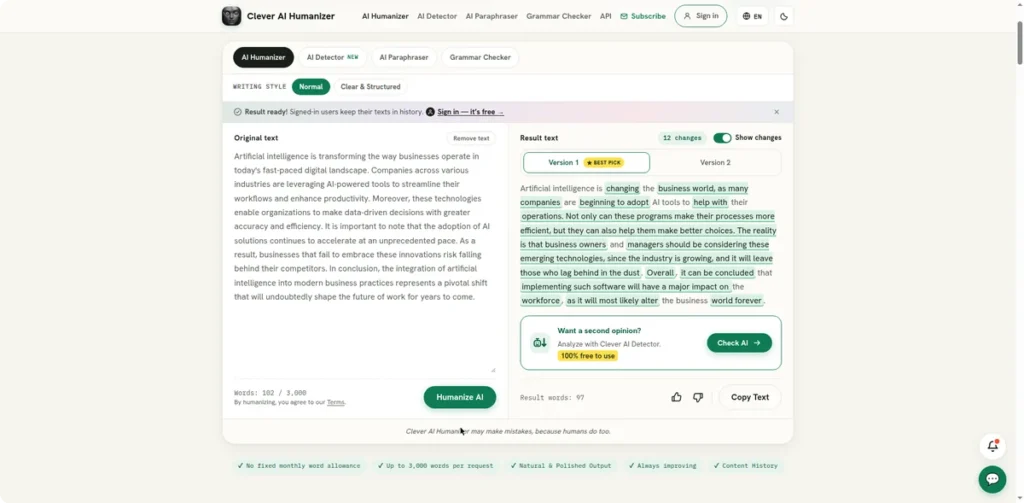
Free limit: 3,000 words per request, no monthly cap (confirmed on the site during our test: “$0, no ads, no paywall”). The most generous free tier we found anywhere.
Why it stands out: In HomeworkHelpGlobal’s October 2026 comparison, Clever offered the largest free allowance of any tool tested. In our own test it produced the most natural rewrite of the five tools — varied sentence rhythm rather than thesaurus-style word swapping.
Our test: our sample came back as a 97-word rewrite (shown below). The detector scored it 56% human (“looks human”) — borderline, not convincing.
The caveat: Scores vary significantly by detector. Don’t expect it to reliably defeat Turnitin’s strictest settings.
Best for: Students and creators working with longer texts who need a genuinely free option.
Free limit: free tier, no account needed for basic use. Note: editpad.org now redirects to ilovenote.net, same tool, new home.
Why it stands out: Scored 98% human in MukeshKDesigns’ detector test, with a dead-simple paste-and-click interface. No settings to learn, no modes to choose.
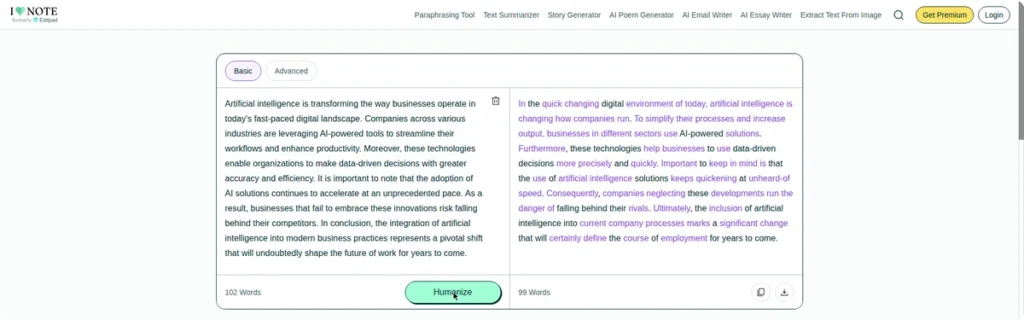
Our test: our sample came back as a ~100-word rewrite, and StealthWriter’s detector rated it “100% human — Looks Human” — one of only two tools to pass our check. The page itself is ad-heavy, but the tool works.
The caveat: Fewer controls than dedicated tools. What you see is what you get.
Best for: Beginners who want the shortest path from robotic text to natural text. It’s also the only no-signup tool that passed our detector check.
Free limit: free with a Grammarly account, 100 AI prompts per month on the free tier (quoted from the subscription page during our test).
Why it stands out: In HumanizerAI’s 15-tool test against five detectors, Grammarly posted a 43.2% bypass rate, the best free result in that particular test. And you probably already have it installed, which means zero new accounts and zero learning curve.
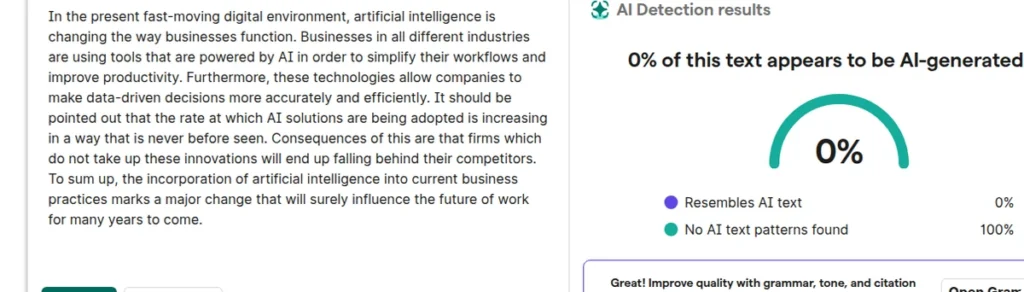
Our test: we signed up for a free account and ran the Humanizer agent (“The Naturalist” voice) on our sample. The rewrite was mostly synonym-level swaps — “Moreover” → “Furthermore”, “In conclusion” → “To sum up” — with the occasional awkward turn (“Consequences of this are that firms…”). Then the punchline: Grammarly’s own in-editor AI detector flagged the humanized output as 99% AI-generated during our October 11 test. But when we re-checked the identical text with Grammarly’s standalone web detector on October 12, it scored 0% AI, “no AI text patterns found” (shown below). Two detectors from the same company, two opposite verdicts.
The caveat: 43% is not 90%. Grammarly is a writing assistant with humanizing features, not a dedicated bypass tool. It makes text sound better; it doesn’t specialize in fooling detectors.
Best for: Everyday polishing where “less robotic” is enough and you’re not facing a strict detector.
Free limit: free with no sign-up; the site mentions 10,000–20,000 characters (wording varies by page).
Why it stands out: Zero friction: paste your text and go. In MukeshKDesigns’ test it scored a 100% human rating on their detector check, one of the strongest single-test results among free tools.
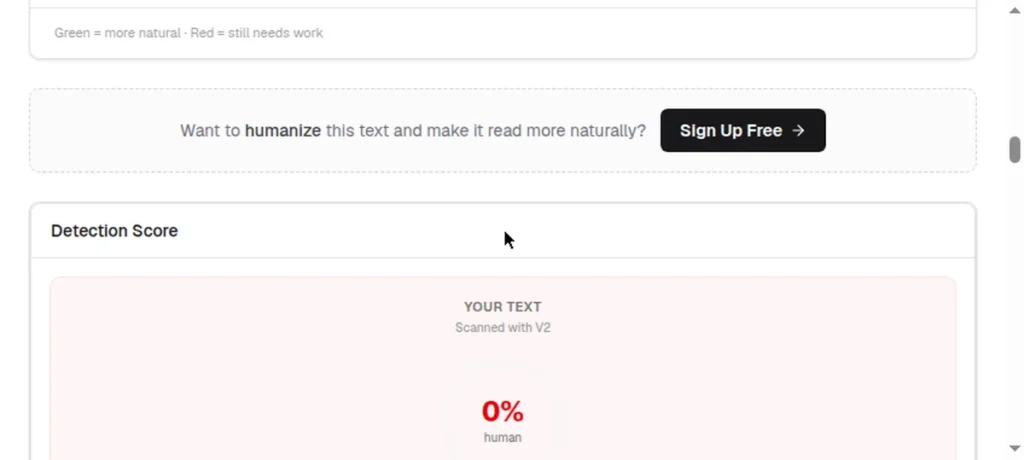
Our test: the rewrite read noticeably more natural than the input, but NoteGPT’s own detector gave it a 63% AI-generated probability, and StealthWriter’s detector scored it “0% human — AI Detected” (with a note that texts under 100 words score less reliably). Two detectors agreeing is hard to ignore.
The caveat: Fast and frictionless, but don’t trust it against strict detectors.
Best for: Quick one-off jobs where detection doesn’t matter and you don’t want another account.
Free limit: free with no sign-up, 200 words per request. It is not unlimited, despite what some roundups claim.
Why it stands out: Zero friction: paste and go, no account. A quick rewrite for short texts.
Our test: our most interesting result. TextToHuman stamped its own output “100% Human”, but StealthWriter’s detector scored that same output 100% AI-detected. Lesson: never trust a tool’s own badge; check with a separate detector.
The caveat: HumanizerAI’s testing also found lower output quality than paid alternatives. Expect to do manual cleanup.
Best for: Short, low-stakes rewrites where you’ll verify and edit the output anyway.
Free limit: free tier available.
Why it stands out: Posted a 100% human score in MukeshKDesigns’ test run, putting it among the top free performers measured that year.
The caveat: We couldn’t verify this hands-on: the site’s bot-verification check blocked our test, and we don’t bypass those. Limited corroboration beyond the one published test — worth watching, but unproven by us.
Best for: Trying a high-scoring free option alongside your main pick.
Free limit: 10 humanizations per day, 1,000 words per input (quoted from the site’s own pricing (some roundups say 1,000 characters; the site says 1,000 words). Account required, which is why we didn’t test the humanizer hands-on.
Why it stands out: It’s the only option here with the full rewrite → test → tweak loop in one place. Its free detector needs no account — we used it to score the other tools’ outputs above, and you can use it to check any text for free.
The caveat: The humanizer needs an account, and 10 free runs per day goes fast if you’re testing seriously. One disclosure: StealthWriter sells humanizing, so its detector is informed but not neutral — treat its scores as one data point among several.
Best for: Writers who want to check detection scores as they work.
Free AI Humanizer Tools Compared
Bypass scores below come from different published tests using different detectors. They indicate relative performance, not a head-to-head ranking.
Our hands-on test (Oct 11, 2026): same ~740-character sample through five free tiers: Clever: “looks human” (56%); Grammarly: its in-editor detector flagged its output 99% AI, while its web detector scored the same text 0%; NoteGPT: flagged as AI; TextToHuman: flagged as AI despite its own “100% human” badge; iLoveNote: “100% human — Looks Human.”
| Tool | Free Limit (reported Oct 2026) | Standout Strength | Main Caveat |
|---|---|---|---|
| Clever AI Humanizer | 3,000 words/request, no monthly cap (confirmed on site) | Most generous free tier; our test: “looks human” (56%) | Scores vary by detector |
| Editpad (now iLoveNote) | Free tier | 98% human on one detector; simplest UI (MukeshKDesigns test); our test: “100% human — Looks Human” | Few controls; ad-heavy page |
| Grammarly | Free with account (100 AI prompts/month, confirmed) | Best free all-rounder (43.2% bypass across 5 detectors, HumanizerAI test) | Our test: in-editor detector said 99% AI, web detector said 0% on the same text |
| NoteGPT | Free, no sign-up (10k–20k chars) | Zero friction (100% human on one detector, MukeshKDesigns test) | Our test: 0% human (AI Detected) |
| TextToHuman | 200 words/request (not unlimited) | No sign-up; fastest rewrite | Its “100% human” badge failed our detector check |
| AIHumanize.io | Free tier | 100% human on one detector (MukeshKDesigns test) | Not hands-on tested (bot check); limited corroboration |
| StealthWriter | 10/day, 1,000 words/input; account required | Rewrite → test → tweak loop; free detector needs no account | Short free allowance; detector is vendor-made |
The Honest Truth About Free Humanizers (Read This Before You Rely on One)
1. No free tool reliably beats Turnitin. Turnitin’s bypasser detection, added in August 2025, specifically targets humanized text. In HumanizerAI’s 2026 test, the best paid tools reached 73–80% bypass across five detectors (65–78% against Turnitin specifically); free tools score lower. If your grade, job application, or client contract depends on passing detection, don’t gamble on a free tier.
2. Detectors keep improving: this is an arms race. A tool that works today can fail after the next detector update. Creators who rely on humanizers seriously keep a second option as backup for exactly this reason.
3. “100% human” scores are detector-specific. A tool scoring 100% on one detector might score 60% on another. Always test with the specific detector that matters in your situation.
4. Meaning can drift. Aggressive humanizing sometimes garbles your actual point: changed emphasis, softened claims, lost nuance. Always re-read the output before publishing or submitting anything.
5. Free tiers shrink. A pattern we’ve seen repeatedly in this market: generous free tier at launch, quieter limits six months later. If a tool becomes central to your workflow, check its current limits regularly.
Privacy: What Happens to the Text You Paste?
Here’s a question almost no humanizer review asks: when you paste your text into a free tool — especially one that doesn’t even require an account — where does that text go?
The uncomfortable answer: you usually don’t know. Free tools have to sustain themselves somehow, and vague privacy policies are common in this category. That means:

- Don’t paste anything sensitive. Client work, unpublished manuscripts, personal data, proprietary business text — keep it out of free humanizers entirely.
- No account cuts both ways. No sign-up is convenient, but it also means you have no account to delete, no data controls, and no one to contact about retention.
- Read the privacy policy before making a tool your default. If you can’t find one, that’s your answer.
For low-stakes text — a blog draft, a marketing blurb — the risk is minimal. For anything confidential, either use a reputable paid tool with a clear data policy or humanize the old-fashioned way: rewrite it yourself.
A Quick Note on Academic Integrity
AI humanizers are legitimate tools for marketing copy, blog posts, and business writing — standard practice in content work. But using one to disguise AI-generated work in a context where AI use is prohibited, such as graded academic submissions at institutions that ban it, can violate academic integrity policies. Know your institution’s rules before you decide. Students: for essay workflows and Turnitin-focused picks, see our guide to the best free AI humanizer tools for students.
Frequently Asked Questions
It depends on your needs. For the largest free allowance, Clever AI Humanizer (3,000 words per request, no monthly cap — confirmed on the site). For no-signup convenience, iLoveNote (Editpad) — the only no-signup tool to pass our detector check. For everyday writing improvement, Grammarly’s free tier. There’s no single winner — match the tool to your text length and the detector you’re dealing with.
Not reliably. Turnitin’s AI-bypasser detection (added August 2025) is specifically designed to catch humanized text. In HumanizerAI’s 2026 test, paid tools achieved roughly 73–80% bypass across five detectors; free tools score lower. Don’t risk academic work on a free tool.
Yes — it’s legal software, and using it for marketing, content creation, and business writing is standard practice. However, using it to evade detection where AI use is prohibited (for example, some academic settings) may violate institutional policies even though the tool itself is legal.
They rewrite text to change the statistical patterns detectors flag — mainly perplexity (how predictable your word choices are) and burstiness (how much sentence length and structure vary). Good humanizers restructure sentences and paragraphs; weak ones just swap synonyms, which modern detectors catch.
Mostly, but not always. Aggressive rewriting can shift emphasis or lose nuance. Always re-read and edit the output before publishing or submitting — treat the humanizer as a starting point for editing, not a finished product.
The Verdict: Which Free AI Humanizer Should You Use?
What our hands-on test actually showed: of the five tools we ran ourselves, Clever and iLoveNote produced output that read as human to a detector; NoteGPT, TextToHuman, and Grammarly outputs were flagged as AI-written — though Grammarly’s own web detector later scored the same output 0% AI, so even detectors from one company disagree. The strongest detector readings were 100% human (iLoveNote) and 56% human (Clever) — but remember: one sample, one detector per output. A perfect score on a single run is promising, not proof, so keep expectations honest.
- Long texts, zero budget → Clever AI Humanizer
- Quick no-signup job → iLoveNote (Editpad) — passed our detector check
- Already use Grammarly → use its free humanizer and skip the new account (but don’t expect it to fool detectors)
- Short, low-stakes rewrites → TextToHuman (verify and edit the output)
- Want to try a high published-test scorer → AIHumanize.io (worth watching, but unproven by us)
- Want detector feedback while you work → StealthWriter
And the golden rule: free humanizers are for making your writing sound natural — not for fooling strict detectors. Match the tool to the stakes, keep a backup option, and always re-read what comes out.
Methodology & Sources (The Full Detail)
How we ranked: tools are ordered by free-tier usability and overall value first, with bypass scores as one input among several. After our hands-on test, real detector results carry heavy weight: tools whose output read as human rank above those flagged as AI-written. Published bypass scores come from different tests using different detectors, so they aren’t directly comparable; the comparison table notes which test each figure comes from.
Published tests consulted: HumanizerAI’s 2026 test of 15 tools · MukeshKDesigns’ 25+ free-tool test. We also consulted HomeworkHelpGlobal’s October 2026 student comparison and NetusAI’s free-tier guide. Disclosure: HumanizerAI and NetusAI sell tools in this space — informed but not neutral; we cross-checked their claims against each other and against our own test runs.
What didn’t make the list: paid-only humanizers with no ongoing free tier (Undetectable AI, StealthGPT); pure AI detectors that don’t humanize (GPTZero, Originality.ai); tools whose “free” access is a one-time trial rather than a usable free plan.
Also consulted: public video demos and creator-community threads comparing notes on what survives detector updates — weighted below direct evidence.
Free tiers change constantly. Treat every limit as current at test time (October 2026) and confirm on the tool’s site before relying on it.
Keep Reading
- Claude AI Pricing 2026: Free vs Pro $20 vs Max — What’s Worth It? — our honest breakdown of Claude’s plans and API costs.
- Best AI Chatbot for Small Business Website — how to choose the right AI chatbot for your site.