

The Honest Guide Nobody Else Will Give You — By Adrian Cole | Published: April 15, 2026 | Last updated: October 10, 2026 | aireviewcore.com
The Question Every Claude User Is Asking Right Now
Here is the situation most people find themselves in: Claude’s free plan has been genuinely impressive. You use it daily, it becomes part of your workflow, and then one day you hit the message limit mid-project. The timer starts. The frustration builds. And suddenly you are staring at three paid options $20, or $100, or $200 per month — wondering which one actually makes sense for your specific situation.
This is not a simple decision. While many guides exist, they often fail to explain Claude AI Pricing 2026 in a way that answers the question that actually matters: which plan is worth it based on how you actually work?
This guide answers that question directly. After testing all Claude AI pricing tiers across real professional workflows — content creation, software development, document analysis, and research — here is the honest breakdown of what each plan delivers, where each one falls short, and who should pay for what.
What Claude Actually Is in 2026 — Before We Talk Pricing
Understanding Claude AI pricing requires understanding what Claude has become in 2026, because it is a significantly different product than it was eighteen months ago.
Claude is Anthropic’s flagship AI assistant, built on Constitutional AI principles — designed to be helpful, harmless, and honest at a structural level, not just as a policy. The current model family includes Claude Opus 5.5, Claude Sonnet 5.5, Claude Haiku 5.5, plus Claude Fable 5.1 — with a 1 million token context window, agent team capabilities, and adaptive thinking improvements.
Claude Haiku 5.5, launched October 7, 2026, is built for high-volume work: classification, summarization, extraction, live support, voice agents, and subagent tasks. It also includes narrow cybersecurity safeguards. API pricing starts at $0.10 per million input tokens and $0.50 per million output tokens — $0.50 / $2.50 for longer prompts, about 75% cheaper than Haiku 4.5.
The context window matters more than most guides acknowledge. One million tokens means Claude can process entire codebases, book-length documents, or months of research notes in a single conversation. For professionals working with large, complex information — lawyers, researchers, developers, analysts — this is a functionally different capability from what competing models offer.
With that context established, here is exactly what each plan costs and what it delivers.
The Free Plan — More Capable Than You Think, More Limited Than You Need
What You Get
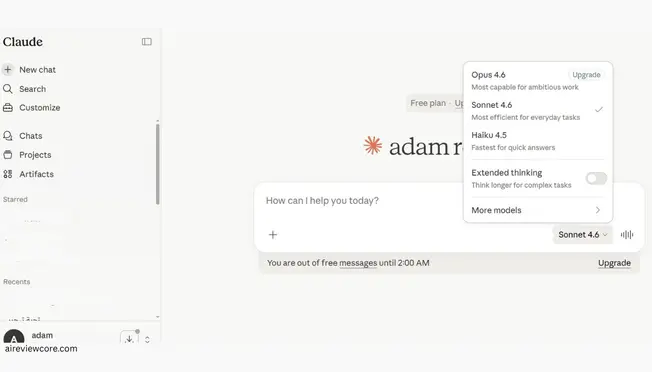
Claude’s free plan requires no credit card and provides access across web, iOS, Android, and desktop. It includes text generation, image analysis, code assistance, web search, and desktop extensions — all powered by the Claude 5.5 model family.
The free tier is not a crippled demo version. For users who interact with Claude intermittently — occasional research questions, one-off writing tasks, sporadic coding help — the free plan handles the workload without friction.
Where It Breaks Down
The limitation is not capability — it is continuity. Free plan usage limits reset every five to eight hours, and those limits are tight enough to interrupt any professional workflow that relies on Claude consistently throughout the day.
Heavy users report exhausting the free allocation in under an hour during focused work sessions. Once the limit is hit, the only options are waiting for the reset timer or upgrading. For anyone who has built Claude into their daily workflow, the reset timer becomes the defining friction point that drives the upgrade decision.
Who Should Stay on Free
The free plan is the right choice for users who engage with Claude a few times per week for non-urgent tasks, are evaluating whether Claude fits their workflow before committing to a subscription, or have access to alternative tools for the periods when limits are reached.
Verdict: Genuinely useful for light, irregular use. Insufficient for any professional workflow where Claude is a daily dependency.
Claude Pro — The Right Plan for Most Professionals
What You Get
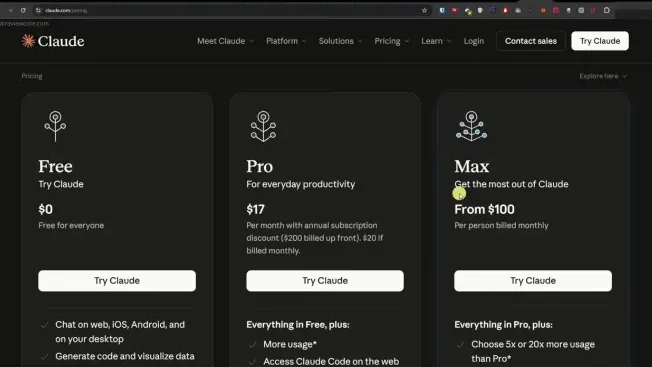
Cost: $20/month (billed monthly) or $17/month (billed annually — saves $36/year)
Claude Pro delivers 5x the usage capacity of the free tier, which in practical terms translates to approximately 50 to 100 messages per five-hour window depending on message length and complexity. For the vast majority of professionals using Claude as a primary work tool, this allocation covers a full workday without interruption.
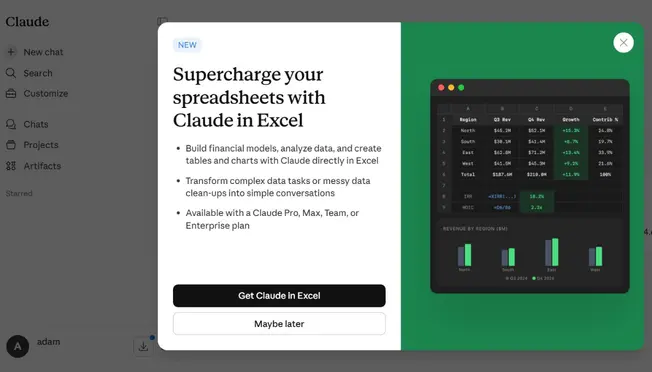
The 2026 Pro plan has expanded significantly beyond just increased limits. New additions include Google Workspace integration — Claude can directly read and edit your Docs, Gmail, and Drive files within the chat interface — alongside Claude Code terminal access, unlimited projects, file creation, and code execution capabilities.
Extended Thinking Mode, exclusive to paid tiers, allows Claude to pause and reason through multi-step logic before responding. For complex analytical tasks, debugging sessions, or nuanced writing assignments, this produces noticeably more structured and accurate outputs than standard generation.
Priority server access is also meaningful in practice. Free users experience slower response times during peak hours. Pro users get priority routing, which matters for time-sensitive professional workflows.
The Real-World Value Calculation
The most honest way to evaluate Claude Pro’s $20/month cost is to calculate what the time savings are worth at your hourly rate.
Professional users report that the elimination of reset-timer interruptions alone — no longer losing workflow momentum waiting for the free plan to refresh — saves between 30 minutes and two hours of daily productivity, depending on usage intensity. At any professional billing rate above $15/hour, that math closes immediately.
The Google Workspace integration — now available as a public beta announced October 6, 2026 — adds a layer of value that extends beyond chat interactions. It applies to paid plans and covers Docs, Sheets, and Slides: the ability to have Claude read your actual working documents — not just pasted text — without manual copy-paste overhead changes how the tool integrates into document-heavy workflows.
Honest Limitations
The five-hour rolling window on Pro is the plan’s most consistent frustration point among heavy users. Power users running long coding sessions or extended research projects regularly hit the Pro limit and face the same reset timer problem as free users — just less frequently. If your work involves extended, uninterrupted AI-assisted sessions lasting more than four to five hours, Pro will eventually interrupt your workflow.
Who Should Choose Pro
Claude Pro is the right plan for professionals who use Claude daily for two to four hours across writing, research, analysis, coding, or document work — and who need reliable, uninterrupted access without managing reset timers throughout their workday.
Verdict: The best value plan in Claude’s lineup for consistent professional use. The $20/month price point is competitive with equivalent AI subscriptions, and the 2026 additions — Google Workspace integration, Claude Code, Extended Thinking — make it meaningfully more capable than the plan was twelve months ago.
Claude Max — For Power Users Who Cannot Afford Interruptions
What You Get — Two Tiers
Max 5x: $100/month — 5x Pro capacity (25x Free), approximately 225+ messages per five-hour window
Max 20x: $200/month — 20x Pro capacity (100x Free), approximately 900+ messages per five-hour window, with a weekly reset rather than five-hour rolling windows
Both Max tiers include everything in Pro plus maximum priority server access, full Claude Code capabilities at enterprise scale, Extended Thinking Mode without restrictions, and Memory features for long-term project continuity.
The weekly reset on Max 20x is the structural difference that matters most for heavy users. Instead of managing a five-hour rolling window, Max 20x users operate within a weekly allocation — eliminating the mid-session interruptions that frustrate Pro users on intensive workdays.
The Developer Math — Where Max Pays for Itself
The clearest case for Max pricing comes from developers running Claude Code for serious software projects. Real-world testing has produced a striking data point: one developer tracked their Claude Code usage over eight months and estimated that their $200/month Max 20x subscription delivered the equivalent of approximately $15,000 in API token costs at pay-as-you-go rates.
That is not a cherry-picked outlier. Heavy Claude Code users — running code reviews, automated testing, multi-repository refactors, and continuous development workflows — regularly find that the Max subscription is 15 to 25 times cheaper than equivalent API usage. For developers who have crossed that usage threshold, Max 20x is not a premium — it is a significant cost reduction.
An Important Warning for Max Users
A March 2026 investigation found that Claude Code version 2.1.100 was silently adding approximately 20,000 invisible tokens to every request — burning through Max allocations 40% faster than users expected. If you are on a Max plan and hitting limits faster than the usage math suggests you should, check your Claude Code version and downgrade to v2.1.98 or upgrade to the latest patched version until Anthropic resolves this fully.
Who Should Choose Max
Max 5x ($100/month) is right for professionals who consistently hit Pro limits during extended work sessions — analysts running long research loops, writers working on book-length projects, developers with moderate but regular Claude Code usage.
Max 20x ($200/month) is right for developers running Claude Code as primary development infrastructure, researchers processing very large document sets daily, and professionals whose entire productive workflow runs through Claude for the majority of their workday.
Verdict: Max plans are genuinely worth the premium for the specific users they are designed for — but the jump from $20 to $100 is steep, and it only justifies itself if you are genuinely hitting Pro limits with enough regularity that the interruptions are costing you real productivity or if your Claude Code usage would cost significantly more at API rates.
Claude Team — When Your Business Needs More Than Individual Plans
What You Get
Team Standard: $25/seat/month (billed annually) — minimum 5 seats Team Premium: $100/seat/month (billed annually) — includes full Claude Code access
Team plans add the organizational infrastructure that individual subscriptions cannot provide: SSO authentication, SCIM provisioning, shared projects and knowledge bases, usage analytics across the organization, centralized billing, and Microsoft 365 and Slack integrations.
For engineering teams specifically, the math on Team Premium versus individual Max subscriptions is straightforward. Five developers on individual Max 5x plans cost $500/month total. Five developers on Team Premium cost $500/month total — the same per-seat price — but with SSO, shared projects, usage analytics, and centralized billing included at no additional cost. For any team of five or more developers already considering Max subscriptions, Team Premium is the clear choice.
Enterprise — When Compliance and Scale Matter
Enterprise costs $20 per seat per month plus API usage, billed annually. Self-serve signup is available, with a sales-assisted option for larger organizations. It adds SOC 2 Type II compliance, SCIM provisioning, audit logs, data residency controls, dedicated support, and context windows up to 400K tokens or more for qualifying deployments.
Enterprise is the right conversation to have if your organization has regulatory compliance requirements, needs contractual data governance guarantees, or is deploying Claude across hundreds of users with IT management requirements.
The Full Pricing Comparison Table
| Plan | Price | Usage | Best For | Free Trial |
| Free | $0/month | Limited, 5-8hr reset | Casual & occasional use | N/A |
| Pro | $20/mo ($17 annual) | 5x Free, 5hr window | Daily professional use | ❌ |
| Max 5x | $100/month | 25x Free, 5hr window | Heavy daily users | ❌ |
| Max 20x | $200/month | 100x Free, weekly reset | Developer & power users | ❌ |
| Team Standard | $25/seat/mo (annual) | Pro-level per seat | Business collaboration | ❌ |
| Team Premium | $100/seat/mo (annual) | Max 5x per seat + tools | Engineering teams | ❌ |
| Enterprise | $20/seat/mo + API (annual) | Custom | Large orgs & compliance | Contact sales |
API Pricing (Pay-as-you-go):
| Model | Input (per MTok) | Output (per MTok) |
| Haiku 5.5 | $0.10 | $0.50 |
| Sonnet 5.5 | $2.00 | $10.00 |
| Opus 5.5 | $4.00 | $20.00 |
| Fable 5.1 | $10.00 | $50.00 |
| Haiku 5.5 (longer prompts) | $0.50 | $2.50 |
Batch API discount: 50% off all models for non-urgent workloads
Frequently Asked Questions
Is Claude Pro worth it in 2026? For professionals using Claude daily for two or more hours, yes — without qualification. The elimination of reset-timer interruptions alone justifies the $20/month cost at any professional billing rate. The 2026 additions of Google Workspace integration and Claude Code access make it meaningfully more capable than it was a year ago.
What is the difference between Claude Pro and Max? Volume and reset structure. Both plans access the same models and features. Max provides 5x or 20x more usage than Pro, with Max 20x switching to a weekly rather than five-hour rolling reset window. Max does not unlock different models or new feature categories — it unlocks sustained, uninterrupted access to the same capabilities at much higher volume.
Is Claude better than ChatGPT for the same price? For specific use cases, yes. Claude’s 1 million token context window significantly outperforms ChatGPT Plus for long-document analysis, large codebase work, and extended research sessions. For general-purpose daily use, both perform at comparable quality levels. The right choice depends on your primary workflow.
Can I use Claude for free without any limits? The free plan has real usage limits that reset every five to eight hours. There is no unlimited free tier. The free plan is sufficient for light, irregular use but will interrupt any workflow that relies on Claude consistently throughout the day.
Is the Max plan worth it for non-developers? Only if you are hitting Pro limits regularly and those interruptions are materially affecting your productivity. For most non-developer professionals, Claude Pro at $20/month handles daily workflows without hitting limits frequently enough to justify the $80/month price jump to Max 5x.
What happens when I hit my usage limit? You receive a notification that your limit has been reached and are given a reset time. You can continue using Claude after the reset, upgrade to a higher plan, or wait. There is no option to purchase additional messages on top of your current plan without upgrading tiers.
What is Claude Haiku 5.5 and how much does it cost? Claude Haiku 5.5, launched October 7, 2026, is Anthropic’s fastest and most affordable model, built for high-volume classification, summarization, extraction, live support, voice agents, and subagent work, with narrow cybersecurity safeguards. API pricing starts at $0.10 per million input tokens and $0.50 per million output tokens — $0.50 / $2.50 for longer prompts, about 75% cheaper than Haiku 4.5.
Your Action Plan: Which Claude Plan Fits Your Workflow
Claude AI pricing in 2026 is structured clearly enough that the decision framework is straightforward once you know your usage pattern:
- Use Claude a few times per week for non-critical tasks? Stay on Free. The plan handles light, irregular use without any cost.
- Use Claude daily for professional work and hitting reset timers? Upgrade to Pro at $20/month. It solves the interruption problem for the vast majority of professional workflows at a price point that pays for itself quickly.
- Hitting Pro limits regularly during extended work sessions? Evaluate Max 5x at $100/month. The upgrade is worth it if the Pro interruptions are costing you more than $80/month in lost productivity — which, for professionals billing above $20/hour losing two or more hours monthly to reset timers, it often does.
- Running Claude Code as primary development infrastructure? Max 20x at $200/month is almost certainly cheaper than the equivalent API costs for your usage volume. Run the math on your token consumption before renewing a Pro plan.
- Managing a team of five or more developers? Team Premium at $100/seat/month (annual) is the same price as individual Max 5x subscriptions with organizational management tools included at no additional cost. The choice is obvious.
The professionals getting the most value from Claude in 2026 are not on the most expensive plan — they are on the right plan for their specific usage pattern. Start with Pro if you are unsure. The usage data from your first month will tell you everything you need to know about whether Max is justified.
Adrian Cole is a professional AI technology reviewer and creative technologist at aireviewcore.com, covering AI pricing, language models, and workflow technology with a focus on practical professional applications.
© 2026 aireviewcore.com — All rights reserved