
Make Your AI Writing Sound Human — Without Spending a Dollar | By Adrian Cole | aireviewcore.com
The best free AI humanizer tools for students in 2026 exist because AI detectors got a lot smarter — and so did the tools built to beat them.
If you have ever submitted an essay and held your breath waiting for the Turnitin score, you already understand the problem. AI-generated text has a fingerprint. Detectors in 2026 are no longer scanning for obvious patterns — they are analyzing perplexity, burstiness, sentence rhythm, and dozens of other linguistic signals that basic paraphrasing tools cannot touch.
The good news is that the tools designed to solve this problem have improved just as fast. The best free AI humanizer tools for students in 2026 go well beyond synonym swapping. They restructure syntax at a deeper level, inject the kind of controlled imperfection that characterizes real student writing, and preserve the meaning of your original text in ways that earlier tools routinely destroyed.
This guide covers four tools that actually deliver on the free-tier promise — tested against real student writing, evaluated for output quality, word limits, signup requirements, and how well each one fits into a student’s actual workflow.
What AI Detectors Are Actually Looking For in 2026
Before reviewing any tool, it helps to understand what you are working against.
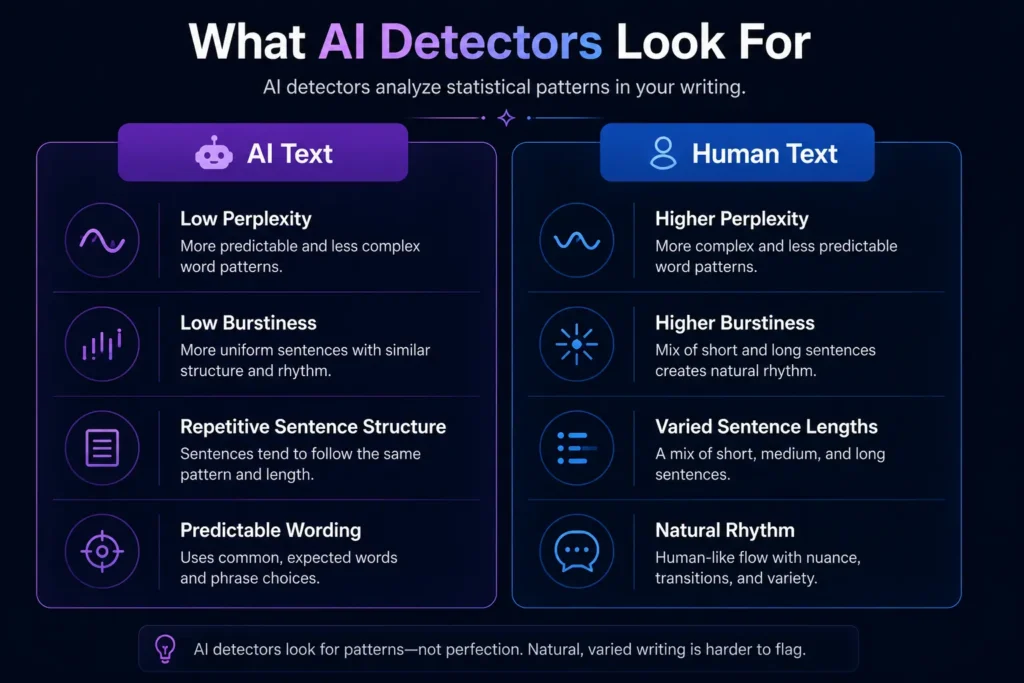
AI detectors in 2026 analyze two core signals above everything else. The first is perplexity — how unpredictable your word choices are. AI systems tend to select the statistically likely next word in a sequence. Human writers do not. We choose words that surprise, that feel specific, that carry personal emphasis. Low perplexity is the most reliable indicator of AI-generated text.
The second signal is burstiness — variation in sentence length and structure. AI text tends to be rhythmically even. Paragraphs follow similar structures. Sentences run at similar lengths. Human writing is messier. A short sentence lands after a long one. A fragment appears. The rhythm breaks in the ways that real thought produces.
A good humanizer does not just rephrase your text. It adjusts both signals simultaneously, producing output that reads naturally while moving the linguistic fingerprint away from AI-generated patterns. The four tools below do this reliably on their free tiers — which is not something most tools in this category can claim. For Google’s guidance on helpful, people-first content, see Google Search Central
A Note on Academic Integrity
Using an AI humanizer to improve the clarity and naturalness of AI-assisted writing is different from submitting work that is not your own. Many institutions have explicit policies about AI use in academic work — and if you need tools that generate original content from scratch without detection risks, see our guide on the best free AI content generators with no login required Read your institution’s guidelines before using any AI tool for submitted coursework. The tools in this guide work best as a refinement layer on writing that you have contributed meaningfully to — not as a replacement for original thinking.
The 4 Best Free AI Humanizer Tools for Students in 2026
Clever AI Humanizer has earned its position at the top of this list through consistent performance across the detectors that actually matter to students: GPTZero, Turnitin, and Originality.ai. In independent testing, detection rates drop close to zero percent on GPTZero while the text maintains a natural flow — which is a combination most free tools cannot deliver.
What separates Clever from the field is its approach to meaning preservation. Many free humanizers produce output that technically passes detection but reads awkwardly, introduces factual errors, or loses the specific argument you were making. Clever preserves the substance of your text while adjusting the delivery — which means you are not reading an alien version of your own essay after processing.
The free plan is genuinely functional without requiring a credit card or account setup, which matters for students who need quick results without creating another platform dependency.
Honestly, Clever AI Humanizer is the tool most students reach for first — and for good reason. The combination of GPTZero bypass performance, meaning preservation, and a clean interface with no mandatory signup makes it the most practical daily-use option in this guide.
A real scenario: You have a 1,500-word history essay where several paragraphs were drafted with AI assistance. You paste the flagged sections into Clever, run the humanizer, and check the result against GPTZero before submitting. The detection score drops to under 5 percent. The paragraphs still make your original argument. That is the workflow Clever is built for.
Expert Workflow:
- Process flagged sections individually rather than the full essay at once. Shorter input gives the humanizer more control over the output and produces more natural results than bulk processing.
- After humanizing, read the output aloud. If a sentence sounds wrong when spoken, rewrite it manually. AI humanizers are not perfect and occasionally produce phrasing that passes detection but reads unnaturally.
- Run your output through GPTZero before submitting rather than relying on the humanizer’s own detection estimate. Independent verification catches discrepancies the tool’s internal checker might miss.
| Best for | General student essays and academic writing |
| Free plan | Yes — no signup required |
| Word limit (free) | Generous daily limit |
| Detector bypass | GPTZero, Turnitin, Originality.ai |
| Meaning preservation | Excellent |
Expert Verdict: Clever AI Humanizer is the strongest all-round free option for students in 2026. Its detection bypass performance and meaning preservation make it the default starting point for any student working with AI-assisted writing.
QuillBot has been a student writing tool for years, and its AI Humanizer represents a natural extension of what the platform has always done well: improving writing quality while maintaining the writer’s voice.
The free tier allows up to 125 words per session with six uses per day — which is genuinely restrictive for long essays but workable for targeted paragraph-level improvements. The real value is in what QuillBot does with those 125 words. The output is grammatically accurate, naturally flowing, and color-coded to show exactly what changed — which means you can review every modification and choose whether to keep it. That level of transparency is rare in free tools.
The student discount makes QuillBot’s paid tier worth mentioning here too. Students with a valid academic email receive 25 percent off the Premium plan, bringing the annual cost down to $6.25 per month — the lowest legitimate student rate among premium humanizers. If the free tier covers your immediate needs but you find yourself hitting the word limit regularly, the student plan is the clearest upgrade path in this guide.
QuillBot is not the strongest performer against Turnitin specifically. Students who need maximum bypass performance for high-stakes submissions should use Clever AI Humanizer for the detection layer and QuillBot for the writing quality pass afterward. Combining both tools in that sequence produces output that is both undetectable and well-written.
Expert Workflow:
- Use QuillBot for essay sections where writing quality matters most — introductions, conclusions, and argument summary paragraphs. The 125-word limit is less restrictive when applied to targeted high-value sections.
- Take advantage of the synonym drop-down feature to override word choices that feel out of your voice. The best humanized output sounds like a better version of how you write — not like a different writer entirely.
- Stack QuillBot with Clever AI Humanizer for high-stakes submissions: run Clever first for detection bypass, then run the result through QuillBot for grammar and flow refinement.
| Best for | Grammar improvement and voice preservation |
| Free plan | Yes — 125 words, 6 uses per day, no signup |
| Word limit (free) | 125 words per session |
| Detector bypass | Moderate |
| Student discount | 25% off Premium ($6.25/month annual) |
Expert Verdict: QuillBot is the best free tool in this guide for writing quality output — its color-coded change display and synonym selection give students more control over the final text than any other free humanizer, and the student discount makes it the most affordable upgrade path when free limits become restrictive.
Phrasly stands out in the free tier landscape for one practical reason: it allows 300 words per humanization session without a signup requirement — more than double what QuillBot allows, and enough to process a complete essay introduction or a substantive body paragraph in a single pass.
The tool offers five different humanization drafts for each input, which is a feature that no other free tool in this guide provides. Rather than committing to a single output and hoping it sounds right, Phrasly generates five variations and lets you choose the one that best preserves your voice and argument. For students who have developed a specific writing style that they want to maintain through the humanization process, this selection approach produces more natural results than single-pass tools.
The detection bypass performance sits between QuillBot and Clever AI Humanizer on most major detectors. It is reliable enough for most coursework submissions but may require an additional pass through Clever for submissions where Turnitin is enforced at an institutional level.
One limitation worth acknowledging: the 300-word free limit, while generous by free-tier standards, still requires breaking a standard 1,500-word essay into multiple sessions. Students with large volumes of text to process will hit this ceiling regularly.
Expert Workflow:
- Generate all five draft variations before selecting. The differences between drafts are often subtle, but the variation in phrasing can make a meaningful difference in how natural the output sounds. Do not commit to the first result.
- Use Phrasly for introductions and conclusions where voice consistency matters most. These sections are read most carefully by instructors and benefit most from the multi-draft selection approach.
- When processing essays longer than 300 words, maintain a consistent processing approach across all sections. Humanizing some sections with Phrasly and others with a different tool occasionally produces noticeable stylistic inconsistencies within the same document.
| Best for | Balanced detection bypass and writing quality |
| Free plan | Yes — 300 words, requires signup |
| Word limit (free) | 300 words per session |
| Draft options | 5 variations per input |
| Detector bypass | Good |
| Paid plan | $12.99/month Premium — unlimited |
Expert Verdict: Phrasly earns its place in this guide through the combination of a generous free word limit and the five-draft selection system — for students who want more control over their humanized output than single-pass tools allow, it is the most practical middle-ground option in the free tier category.
Humanize AI Pro occupies a different position from the other three tools in this guide: it offers unlimited word processing with no signup requirement and no credit card on its free plan, which makes it the only genuinely unlimited free humanizer available to students in 2026.
The bypass performance claims are high — independent testing sites report rates above 99 percent against major detectors including GPTZero and Turnitin. The output quality is solid for standard academic writing, with reasonable meaning preservation and natural sentence flow on most input types.
The practical limitation is the interface itself. No signup means no saved history, no document management, and no iterative improvement across sessions. Each use starts fresh. For students processing a single document at a time, this is not a significant friction point. For those managing multiple essays across different subjects simultaneously, the lack of any session management becomes a meaningful inconvenience.
The tool also works best on AI-generated text that has already been lightly edited by the student. Heavily robotic raw AI output sometimes produces output that feels processed rather than genuinely humanized. Running your AI draft through at least one editing pass before humanizing produces consistently better results.
Expert Workflow:
- Edit your AI-assisted draft before humanizing. Remove obviously robotic phrasing, vary your sentence lengths manually, and add at least one specific personal observation or example before running the tool. The humanizer produces better output when working with text that already has some personality.
- Use the tool for bulk processing of longer essays where other free tools hit their word limits too quickly. The unlimited free processing makes Humanize AI Pro the practical choice when you have more than 500 words to process in a single session.
- Verify output against an independent detector. Do not rely solely on the tool’s own detection estimates. Run your output through GPTZero directly before submitting any high-stakes assignment.
| Best for | Large volumes of text with no word limit |
| Free plan | Yes — unlimited words, no signup required |
| Word limit (free) | Unlimited |
| Detector bypass | 99%+ claimed |
| Output quality | Good on pre-edited text |
| Paid plan | Not required for core features |
Expert Verdict: Humanize AI Pro is the right choice for students who need to process long essays without hitting word limits — its unlimited free tier is genuinely rare in this category, and the no-signup model means zero friction for immediate use, though the lack of session management makes it less practical for students juggling multiple documents simultaneously.
Quick Comparison — Which Tool Fits Your Situation?
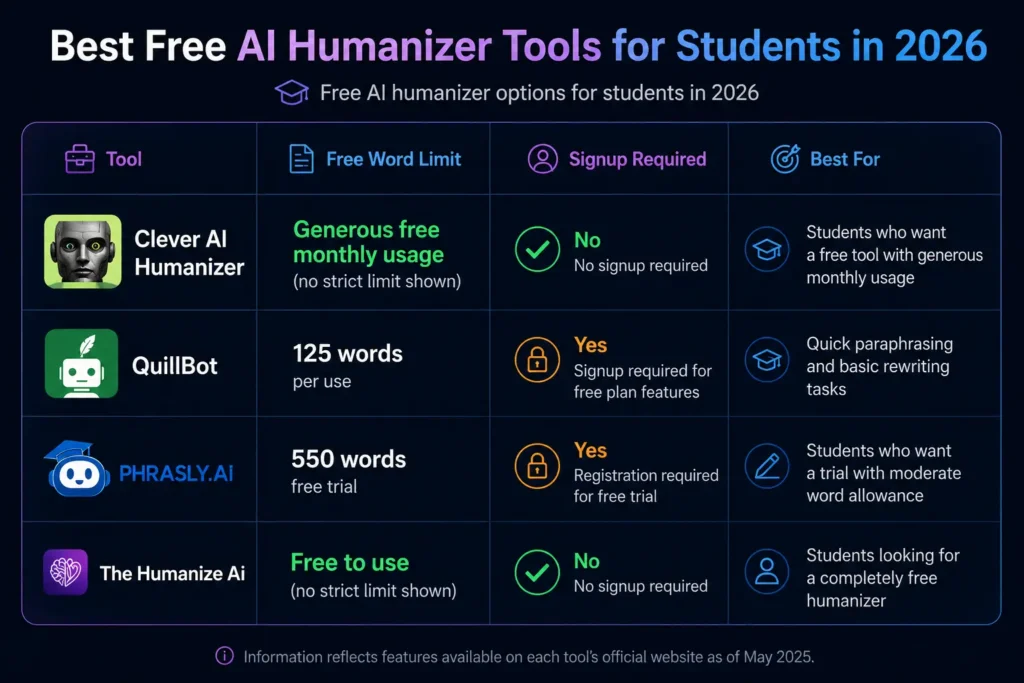
| Tool | Free Word Limit | Signup Required | Best For | Turnitin Bypass |
| Clever AI Humanizer | Generous daily limit | No | Best overall detection bypass | Excellent |
| QuillBot | 125 words, 6/day | No | Grammar and voice quality | Moderate |
| Phrasly | 300 words | Yes | Multi-draft selection | Good |
| Humanize AI Pro | Unlimited | No | Long essays, bulk processing | Excellent |
The recommended student workflow:
For standard coursework with moderate stakes: Start with Clever AI Humanizer for the flagged sections, then run through QuillBot for grammar polish.
For high-stakes submissions where Turnitin is enforced: Use Clever AI Humanizer as your primary tool, verify independently with GPTZero, and make manual adjustments on any sentences that still feel robotic.
For long essays where word limits are the main constraint: Use Humanize AI Pro for bulk processing, then apply QuillBot’s manual synonym controls to the most important paragraphs.
What to Look for in a Free AI Humanizer The Student’s Decision Framework
Word limit vs. session structure. A 125-word limit that takes 30 seconds per session is less disruptive than a 500-word limit that requires uploading documents and managing multiple steps. Match the tool’s workflow to how you actually process text under deadline pressure.
Signup requirement. Some students prefer tools with no account requirement for privacy reasons. Others value session history for managing multiple essays. Know which matters more to you before committing to a platform.
Meaning preservation. Detection bypass is only useful if the output still makes your original argument. Test any new tool on a paragraph where the specific wording of your argument matters — if the humanized version changes what you were actually saying, the tool is not the right fit.
Independent verification. Never submit humanized text based solely on the tool’s own bypass rate estimate. Run the output through GPTZero or a similar independent detector before any high-stakes submission. The few minutes this adds to your workflow are never wasted.
Frequently Asked Questions
Do free AI humanizer tools actually work against Turnitin in 2026? The best ones do — but results vary by tool and input quality. Clever AI Humanizer and Humanize AI Pro consistently produce results that pass major detectors including Turnitin. Tools that only rephrase or swap synonyms without adjusting sentence rhythm and structural patterns will not perform reliably against Turnitin’s current detection models.
Is it safe to use an AI humanizer for school assignments? That depends entirely on your institution’s AI policy. Using a humanizer to refine AI-assisted writing is different from submitting work that is entirely AI-generated. Read your institution’s guidelines carefully. Many schools permit AI assistance with disclosure check before submitting.
Which free tool has the highest word limit? Humanize AI Pro offers unlimited word processing with no signup required, making it the most practical choice for students processing full-length essays in a single session.
Can I use multiple tools together? Yes — and in many cases this produces better results than relying on any single tool. The most effective student workflow combines Clever AI Humanizer for detection bypass with QuillBot for grammar and flow refinement in a two-pass process.
Why does my humanized text sometimes sound worse than the original? Most humanizers produce better output on text that has already been lightly edited. Raw AI output with an even, robotic rhythm gives the tool less to work with. Edit your AI-assisted draft manually first — vary sentence lengths, add specific details, remove connector words like “moreover” and “in addition” — before running the humanizer. The output quality improvement is consistent and significant.
Are these tools FERPA compliant? Data handling practices vary by tool. Clever AI Humanizer and Humanize AI Pro’s no-signup models process text without creating an account trail. QuillBot and Phrasly maintain privacy policies standard for educational software. Always review current privacy documentation before processing sensitive academic content through any third-party tool.
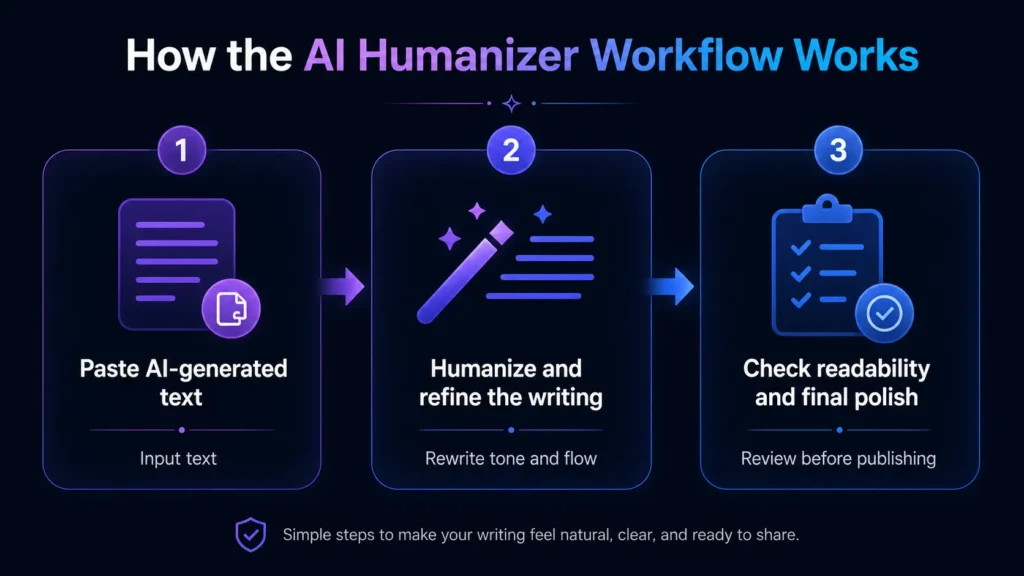
Your Action Plan: From AI Draft to Submitted Essay in Three Steps
The best free AI humanizer tools for students in 2026 have made the gap between AI-assisted drafting and submission-ready writing smaller than it has ever been. Here is the workflow that consistently produces the cleanest results.
Step 1 — Edit before you humanize. Open your AI-assisted draft and make at least ten manual changes before touching a humanizer tool. Vary sentence lengths. Add one specific example that reflects your own knowledge. Remove the most generic connectors. This step takes ten minutes and dramatically improves the quality of humanized output on every tool in this guide.
Step 2 — Humanize the flagged sections. Run your edited draft through GPTZero to identify which paragraphs are flagging. Process those sections through Clever AI Humanizer first. Read the output aloud. Accept changes that sound like a more articulate version of your voice. Manually rewrite anything that changed the meaning of your argument.
Step 3 — Verify independently before submitting. Run the final version through GPTZero or a comparable independent detector. If any sections still flag above the threshold you are comfortable with, apply QuillBot’s manual synonym controls to those specific sentences rather than re-processing the entire section.
Adrian Cole is a professional AI technology reviewer and creative technologist at aireviewcore.com, covering AI tools for students, content creators, and digital professionals.
© 2026 aireviewcore.com — All rights reserved.