
If you run a faceless YouTube channel in 2026, the voice is the channel. Viewers forgive a lot, but cheap robotic narration kills retention in the first three seconds. Creator communities consistently report the same thing: pick the wrong voice tool and people click away before your hook lands.
So the real question isn’t “which AI voiceover sounds best.” It’s three harder questions: which one can you afford, which one are you legally allowed to monetize, and which one won’t embarrass you in front of an audience.
That’s what this article answers. We verified every free limit and commercial-use term against official pages in October 2026, and ranked voice quality from independent listening tests and creator reports. No vendor talking points.
Short answer: ElevenLabs is still the quality benchmark, but its free tier can never be used commercially. The best free tier you can actually monetize is TTSMaker. The best free option inside an editor you already use is CapCut. The cheapest path to quality at scale is Google AI Studio. Details, catches included, below.
How We Evaluated the Tools
Three things, checked separately:
1. Free limits, verified directly. We read the pricing pages of all seven tools in October 2026 and recorded the actual free allowances: credits, characters, minutes, and what happens when you hit the wall. Where a vendor’s own pages contradicted each other (Fish Audio), we say so.
2. Commercial-use rights, checked in the terms. This is the question most roundups skip, and it’s the one that matters for YouTube. We checked whether each free tier legally allows monetized use, and flagged the traps (one tool’s free tier has a licensing catch most creators miss).
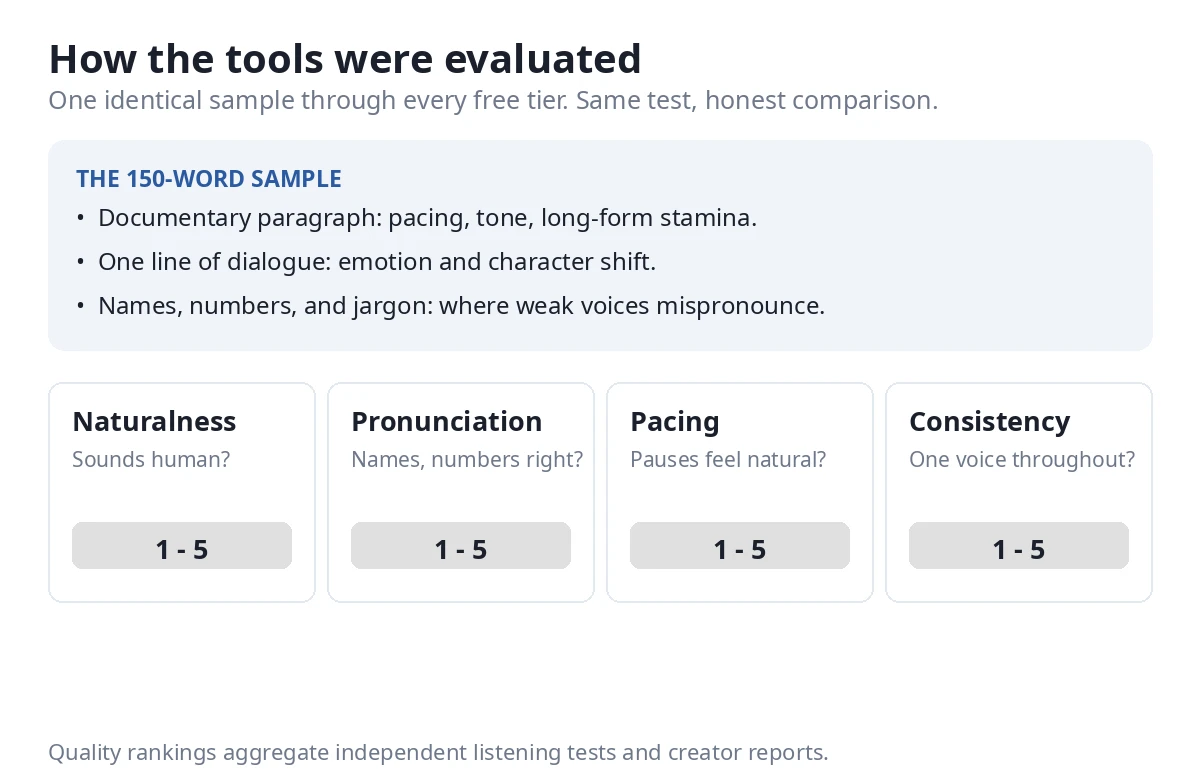
3. Voice quality, aggregated from independent tests. We did not run our own blind listening panel for this roundup. Instead we aggregated results from independent testers who did: multi-script comparison tests, long-form usage reports, and creator-community threads from 2026. The ranking reflects consensus across those sources, weighted toward tests that used identical samples. If you want the final word, run the 150-word protocol below through any two finalists yourself: one documentary-style paragraph, one line of dialogue, and a sentence packed with names and numbers (pronunciation is where weak voices fall apart).
How we ranked: to find the best AI voiceover for YouTube, we scored overall value for a YouTuber planning to monetize. Voice quality counts most, then whether the free tier allows commercial use, then cost. That’s why a flawless-sounding tool with a licensing minefield can still sit at number one, and why the cheapest good option outranks an expensive workflow tool.
One more honesty note: free tiers shrink. A pattern we’ve seen repeatedly in this market is a generous free tier at launch with quieter limits six months later. Treat every limit as current at check time (October 2026) and confirm on the tool’s site before you build a workflow on it.
The 7 Tools, Compared
Free limit: 10,000 credits per month, roughly 10 minutes of speech. Generations cap at 2,500 characters each on free (5,000 on paid).
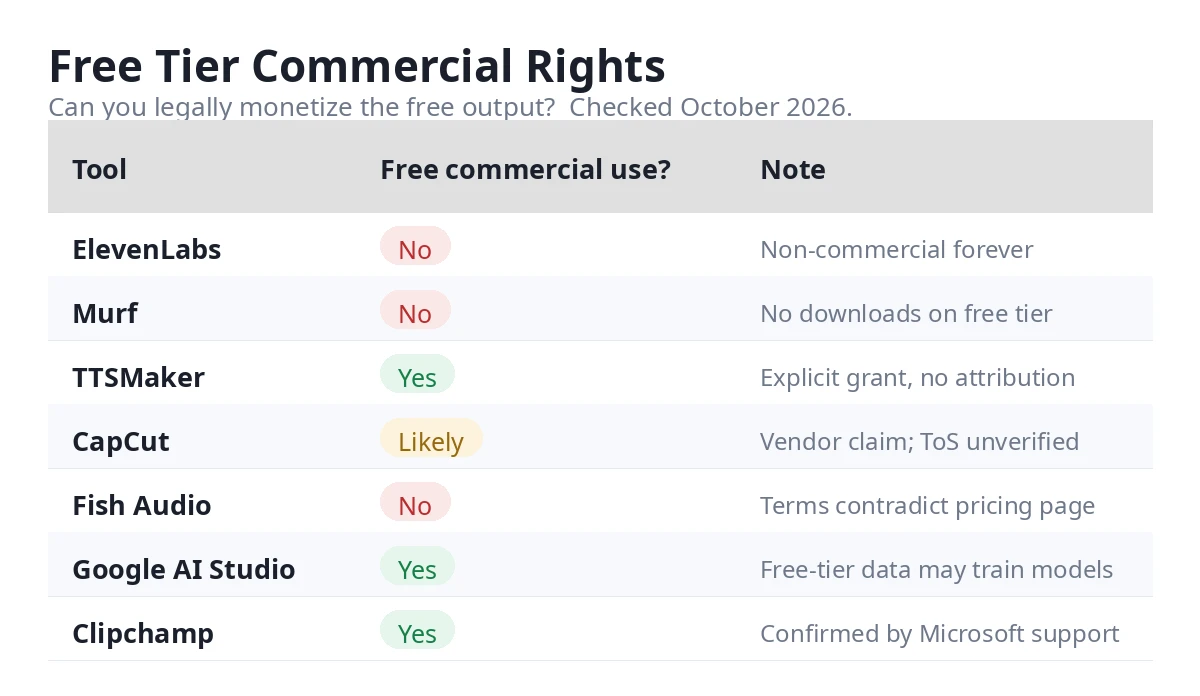
Commercial use on free: No. And this is the trap most creators miss: audio made on the free plan stays non-commercial forever. Upgrading later does not retroactively license old files. You have to re-render everything after paying. Free output also requires attribution, and it must go in the video title (“elevenlabs.io” or “11.ai”). The description doesn’t count.
Paid: Starter at $6/month ($5 on annual billing) brings 30,000 credits (about 30 minutes), a commercial license, and instant voice cloning. Creator at $22/month is the serious tier. Note: first-month promos change often; check the pricing page for any current offers.
Why it’s first: Every independent test we found names ElevenLabs the reference point. It wins blind naturalness comparisons, its phrase-level pacing is the most human-like, and its voice cloning (about a minute of sample audio) is the one competitors get measured against.
The catches, all five of them: (1) One shared credit pool: sound effects, voice isolation, and dubbing all drain the same credits as narration. (2) Billing counts characters submitted, so failed generations cost you anyway. (3) The free-tier licensing trap described above. (4) Title attribution on free. (5) Credits don’t roll over on the free plan (paid rolls over up to two months).
Best for: Creators who will pay for the best narration and want the voice their audience can’t distinguish from human.
Free limit: 20,000 characters per week, downloadable MP3, 100+ languages and 600+ voices, no signup, no credit card.
Commercial use on free: Yes, explicitly, with no attribution required (per its published terms). This is the single biggest honest differentiator in this roundup. Even a competitor’s review blog concedes the point.
Paid: Lite at $9.99/month for 300,000 characters per month.
Why it’s here: It’s the only serious free tier in this list that lets you monetize the output. For a zero-budget faceless channel, that one fact outweighs everything else.
The catch: A captcha on every free conversion, an ad-supported page, inconsistent quality across its deep voice catalog, and no advanced pronunciation controls. You trade polish for rights.
Best for: Zero-budget creators who need commercial rights from day one.
Free limit: Yes, through the Gemini API free tier and AI Studio. Google doesn’t publish fixed per-model quotas; your actual limits appear per-project in the AI Studio console. No card needed for a first test.
Commercial use on free: Allowed under Google’s developer terms, as reported by multiple independent sources, with one caveat you should know: Google may use free-tier inputs and outputs to improve its products. Don’t run confidential scripts through it.
Paid: About $0.81 per hour of audio through December 2026. Then the price doubles on January 1, 2027. Even after the increase, it’s roughly an order of magnitude cheaper than premium voice APIs.
Why it’s here: Voice design from text prompts (“dry, sardonic, unimpressed…”), 130 languages, top benchmark scores, and SynthID watermarking on every clip. For creators producing at volume, the math is hard to ignore.
The catch: It’s an API-shaped workflow. The AI Studio UI exists, but this isn’t one-click generation, and early testers report occasional voice drift and artifacts. Enterprise API features are still rolling out.
Best for: Technical creators and high-volume channels where cost per hour is the deciding factor.
Free limit: Text-to-speech is built into the editor, and CapCut publishes no monthly character limit on standard voices. CapCut’s own resource page describes it as a “100% free text-to-speech tool with no watermarks or character limits,” and independent reviewers report the same. We could not verify this in the formal Terms of Service, so treat it as the vendor’s stated position rather than a contractual guarantee.
Commercial use on free: CapCut’s page positions the tool for commercial content creation, but again, we did not find an explicit clause in the ToS. Cautious creators should check the current terms before monetizing at scale.
Paid: Pro at $9.99/month ($7.99 on annual) unlocks premium voices and features.
Why it’s here: The narration drops straight onto the timeline of the editor most faceless creators already use. Zero extra cost, zero new workflow, zero new account. Reviewers call it the backbone of thousands of automated channels, and they’re not wrong about the convenience.
The catch: Voice quality sits a tier below ElevenLabs, the voice library is limited, and the TTS is locked inside the editor. There’s no standalone audio pipeline here. If you want more free tools that skip the signup step entirely, see our no-login AI video tools roundup.
Best for: Faceless creators already editing in CapCut who want narration with no new subscription.
Free limit: Text-to-speech included free, no monthly quota. Clips cap at 10 minutes (about 1,500 words) each, with unlimited clips, and free MP3 audio-only export.
Commercial use on free: Yes. Microsoft’s own support Q&A confirms Clipchamp’s AI text-to-speech can be used for both commercial and non-commercial purposes. The one restriction: you can’t redistribute the raw stock media files on their own, outside your video. (One practical note from Microsoft: YouTube’s Content ID may occasionally flag a properly licensed Clipchamp video anyway. Disputing the claim resolves it.)
Paid: Premium at $11.99/month, also bundled with Microsoft 365 Personal and Family.
Why it’s here: It runs in any browser at clipchamp.com and ships with Windows 11, it’s genuinely free, and commercial use is confirmed in writing by Microsoft. That combination is rare in this list.
The catch: Browser-based (needs internet), the 10-minute per-clip cap means long narration needs stitching, and voice quality is mid-tier next to ElevenLabs.
Best for: Creators who want free, legal, monetizable narration with zero new accounts (works in the browser or on Windows).
Free limit: 10 minutes of voice generation per month, watermarked, with no downloads. Treat the free tier as a demo, not a pipeline.
Commercial use on free: No.
Paid: Creator plan around $19/month on annual billing, with 120+ voices.
Why it’s here: Murf isn’t trying to out-sound ElevenLabs. Its pitch is the built-in voice studio: per-sentence emphasis and pause editing without regenerating the whole track, plus team review workflows. For creators who iterate on scripts with an editor, that workflow matters more than raw voice quality.
The catch: Attentive listeners can tell it’s AI. Independent testers consistently place Murf a tier below ElevenLabs on naturalness. It’s fine for educational content; in storytelling narration the gap shows.
Best for: Teams and educators who value the editing workflow over the last 5% of realism.
Free limit: 8,000 credits per month (about 7 minutes), 500 characters per generation, 3 public voice slots, no credit card required.
Commercial use on free: Treat as no. Fish Audio’s own pages contradict each other here: the pricing page lists “Commercial use” under the free tier, while the Terms of Use restrict free output to personal and non-commercial purposes. Until the company resolves that in writing, assume the restrictive reading. Plus ($15/month) is the safe commercial entry point.
Paid: Plus at $15/month ($66 for the first year on annual billing); Pro at $100/month.
Why it’s here: The fastest-rising alternative in creator communities: 2 million+ community voices, inline emotion tags, voice cloning from about 15 seconds of sample audio, and a real API. Independent comparisons rate its naturalness close to the top tier.
The catch: The contradictory rights documentation is a red flag for anyone monetizing. Credits don’t roll over, and at roughly 600 credits per minute, “8,000 credits” sounds bigger than 7 minutes.
Best for: Experimenters who want the biggest voice library and emotion control, on a paid plan.
The 7 Tools Compared
| Tool | Free Limit | Free Commercial Use? | Paid From | Best For |
|---|---|---|---|---|
| ElevenLabs | 10,000 credits/mo (~10 min) | No (permanent) | $6/mo | Best narration quality |
| TTSMaker | 20,000 chars/week, MP3 download, no signup | Yes, explicit | $9.99/mo | Free tier you can monetize |
| Google AI Studio | Free tier, per-project quotas | Yes (free-tier data may train models) | ~$0.81/hour audio | Cheapest quality at scale |
| CapCut | No published monthly limit (standard voices) | Vendor claims yes (ToS unverified) | $9.99/mo | Narration inside your editor |
| Clipchamp | No monthly quota; 10-min clips | Yes (confirmed by Microsoft) | $11.99/mo | Free + legal, web or Windows |
| Murf | 10 min/mo, watermarked, no downloads | No | ~$19/mo | Studio editing workflow |
| Fish Audio | 8,000 credits/mo (~7 min) | No (pages contradict; assume no) | $15/mo | Voice library + emotion control |
Can You Monetize AI Voiceover on YouTube in 2026?
Yes. The voice is not the gate. Originality is.
YouTube’s July 2025 update renamed “repetitious content” to “inauthentic content,” and the distinction matters. The policy targets mass-produced, templated videos with low original input: the same script shape, the same thumbnail layout, thirty uploads that are essentially one video repeated. That gets demonetized whether the narrator is AI or human.
An original script, real editing, and a consistent quality voice is monetizable. The classic demonetization flag that creators actually get hit with is robotic text-to-speech reading Reddit threads over gameplay footage with nothing added. The problem there isn’t the synthetic voice. It’s that nothing original was contributed.
Faceless channels are not a policy category. YouTube’s own examples never mention whether a face appears on camera. What reviewers look at is sameness across uploads. A faceless history channel where each episode has its own research and story fits squarely inside what the policy allows. For the broader creator toolkit beyond voice, see our AI tools for YouTube creators.
The Disclosure Checkbox, Explained
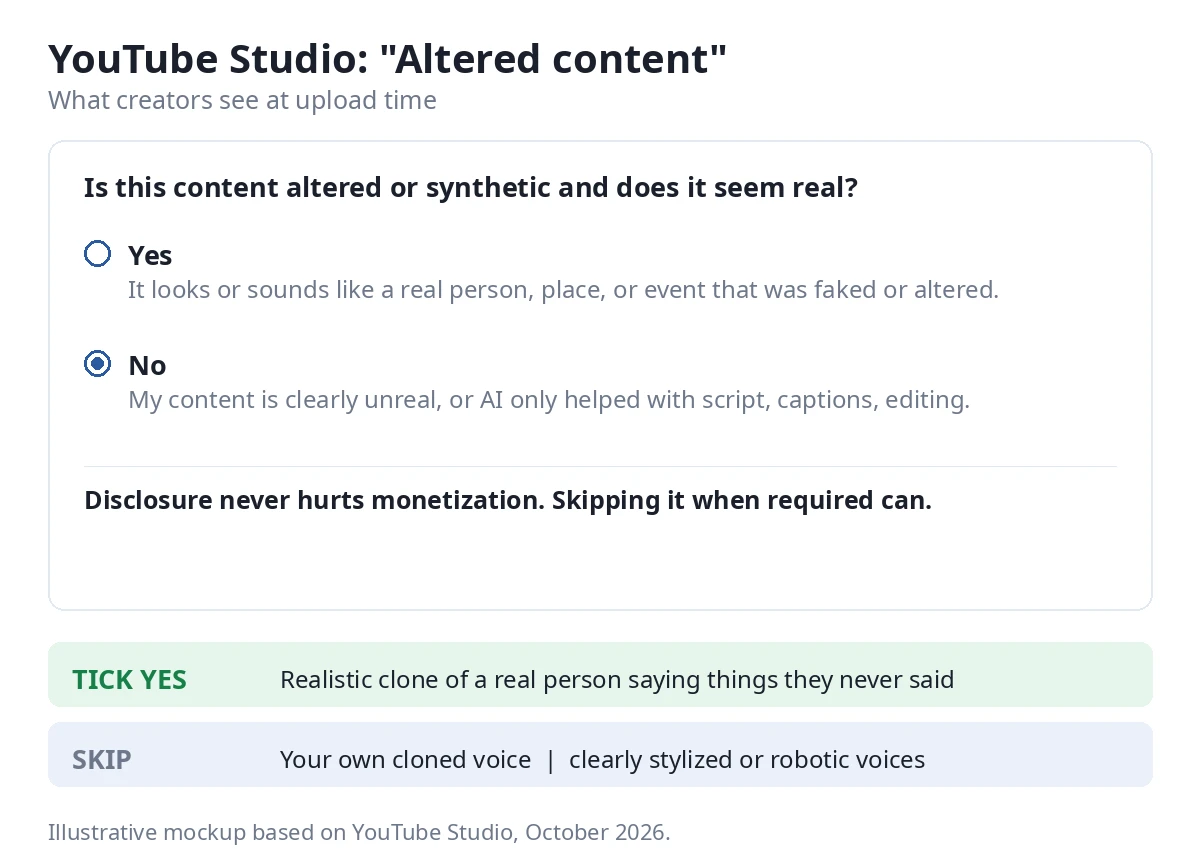
When you upload a video, YouTube Studio asks about altered or synthetic content. Here’s the rule, straight from YouTube’s help pages as summarized by policy watchers in October 2026: disclosure depends on realism, not on AI use.
Tick “yes” when a viewer could mistake your content for real: a realistic voice cloning a real person saying things they never said, synthetic footage of events that didn’t happen. Skip it for the obviously unreal (cartoons, fantasy), for production assistance (AI-written scripts, thumbnails, captions), and, importantly, for cloning your own voice for narration. That last case is widely reported as not requiring disclosure, but confirm the current wording on YouTube’s help page before you publish.
Two things creators get wrong: first, disclosing does not hurt you. YouTube states directly that the label doesn’t limit audience or monetization eligibility. The penalty comes from failing to disclose when required, which can mean removal or Partner Program suspension. Second, the checkbox is a form field, not a barrier. Read it, answer honestly, move on. A current walkthrough of the policy is here: how AI disclosure affects YouTube monetization.
The Free-Tier Commercial-Rights Trap
This is the section that saves you from a nasty surprise six months from now.
Most “best free voiceover” lists never ask whether the free tier allows commercial use. The answer, for most tools, is no, and the details are worse than you’d guess:
ElevenLabs: free output is non-commercial forever. Upgrading later doesn’t clean old files. Attribution goes in the video title, not the description.
Murf: the free tier doesn’t even allow downloads, so the question is moot.
Fish Audio: the pricing page says one thing, the Terms say another. Assume the restrictive reading.
The safe three: TTSMaker (explicit commercial grant, no attribution), Clipchamp (confirmed by Microsoft’s own support), and CapCut (claimed on CapCut’s page, though we couldn’t verify it in the formal terms).
The practical rule: if monetization is the plan, start on a tier whose commercial rights you’ve confirmed in writing. Re-rendering a hundred videos because your free tool’s license didn’t cover them is a special kind of pain.
This section summarizes published terms as we read them in October 2026; it is not legal advice. Confirm the current terms on each vendor’s site before you build on them.
Tools We Didn’t Test (and Why)
Honesty includes saying what we left out.
PlayHT and Lovo: dead. PlayHT wound down its consumer product on December 31, 2025 after the Meta acquisition (source), and Lovo filed for Chapter 7 bankruptcy in May 2026, with its site offline since (source). Any 2026 roundup still recommending them is provably stale. We name them here so you know we checked.
Suno Speech: wrong category (for now). Launched October 2026 as voice-plus-music in one track, aimed at narrated creator content. Interesting, but it’s a beta, not a narration engine, and free-plan clips can never gain commercial rights. Worth watching; not testable as a voiceover tool yet.
NaturalReader: can’t export. The free tier is listen-only, no MP3 download, and the license excludes commercial and public use. Useless for YouTube by design.
Fliki: the free tier (about 8.5 minutes a month, watermarked, no commercial rights) is too small to evaluate honestly, and regenerating costs credits again.
Descript, WellSaid, Speechify: capable products, wrong use case. Descript is an editing suite, WellSaid is enterprise narration, Speechify is accessibility-first.
Microsoft Edge Read Aloud: genuinely free and unlimited, but there’s no download button. Recording system audio is a hack, not a workflow.
Which Tool for Which YouTuber
Long documentaries where the voice carries the video: ElevenLabs, paid. This is the one case where the subscription pays for itself in retention.
Zero budget but monetized from day one: TTSMaker. The only free tier here with commercial rights in writing.
High volume, technical comfort: Google AI Studio. At roughly $0.81 an hour of audio, nothing else is close on price.
Daily shorts, zero budget: CapCut. The voice is already in your editor, and volume matters more than perfection at this cadence.
No new accounts: Clipchamp. Free, legal, confirmed by Microsoft.
Precise explainers and courses: Murf. The timeline editing is unmatched; pay for it, since the free tier is a demo.
Experimenting with voices and emotion: Fish Audio, on Plus. Don’t build a monetized channel on the free tier’s contradictory terms.
Frequently Asked Questions
Can I monetize AI voiceover on YouTube in 2026?
Yes. YouTube’s “inauthentic content” policy targets mass-produced, low-originality videos, not synthetic voices. An original script with real editing and a quality voice is monetizable. What gets flagged is templated content with nothing added, regardless of the narrator.
Do I have to disclose AI voiceovers to YouTube?
It depends on realism, not on AI use. A realistic voice that could mislead viewers (like cloning a real person) needs the “altered content” label at upload. Stylized voices, and cloning your own voice for narration, don’t. Disclosing doesn’t hurt monetization; failing to disclose when required can.
Which free AI voiceover tool can I legally use for monetized videos?
TTSMaker (explicit commercial grant on the free tier, no attribution needed) and Clipchamp (commercial use confirmed by Microsoft’s support). CapCut’s page also positions its TTS for commercial content, though we couldn’t verify that in the formal terms. ElevenLabs, Murf, and Fish Audio free tiers do not allow commercial use.
Why does ElevenLabs require attribution in the video title?
It’s their free-tier license condition: publishing free-plan audio requires crediting elevenlabs.io or 11.ai where viewers will actually see it, which means the title. The description doesn’t satisfy the requirement.
Is CapCut’s text-to-speech really free with no limits?
CapCut publishes no monthly character limit for standard TTS voices, and its own resource page describes the tool as free with no watermarks or character limits. Independent reviewers report the same. We could not verify this in the formal Terms of Service, so treat it as the company’s stated position.
What happened to PlayHT and Lovo?
PlayHT shut down its consumer product on December 31, 2025 following the Meta acquisition, and Lovo filed for Chapter 7 bankruptcy in May 2026, after which its site went offline. They still appear in some 2026 “best of” lists, which is a good reminder to check dates on any roundup you read.
The Verdict
The voiceover market in 2026 has a clear shape: one quality king with a licensing minefield, a handful of genuinely free options with real trade-offs, and a graveyard of dead tools that stale roundups keep recommending.
If you remember nothing else: the best AI voiceover for YouTube is the one that matches your business model, not just the best-sounding voice. Monetizing? Start on TTSMaker or Clipchamp, where the commercial rights are confirmed. Chasing maximum quality? ElevenLabs on a paid plan, and re-render anything you made while free. Producing at volume? Do the math on Google AI Studio.
And whatever you pick, read the commercial-use terms before your hundredth video, not after. For the rest of the creator stack, our content creator AI tools guide covers what pairs well with a good voice.
Sources
The official pages we checked in October 2026. All links open in a new tab.
- CapCut text-to-speech: capcut.com/tools/text-to-speech
- Fish Audio plans: fish.audio/plan
- Clipchamp commercial use, Microsoft support Q&A: Microsoft Learn
- PlayHT shutdown (December 31, 2025): theplanettools.ai/tools/playht
- Lovo Chapter 7 bankruptcy (May 2026): cartesia.ai
We also read the pricing and terms pages for ElevenLabs, Murf, TTSMaker, and Google AI Studio in October 2026. Confirm the current pages on each vendor’s site before you buy, since free tiers and terms change.