
From Script to Published Video — The Complete Workflow Guide | By Adrian Cole | aireviewcore.com
Table of Contents
You Don’t Need a Camera. You Don’t Need a Studio. You Need the Right Stack.
The best AI tools for faceless YouTube channels in 2026 have made one thing clear: the barrier between having an idea and publishing a professional video is now measured in hours, not weeks.
Faceless YouTube channels have seen explosive, measurable growth since 2024 — driven almost entirely by AI automation reaching a quality threshold that makes the format viable at scale. The channels that are winning are not the ones with the biggest budgets or the best equipment — they are the ones that figured out the right tool stack early and built a repeatable production system around it.
This guide covers seven tools that together handle every stage of that system: topic research, scripting, voiceover, video production, thumbnail creation, captions, and SEO optimization. We tested each one across a complete content workflow — from blank page to published video — and evaluated them on output quality, ease of use, pricing, and how well they actually fit a solo creator’s reality.
Why Faceless Channels Are Growing So Fast in 2026
Three shifts happened simultaneously that made faceless YouTube genuinely viable at scale.
AI voice generation reached human quality. The robotic narration that defined early faceless channels — flat delivery, unnatural pacing, obvious synthetic artifacts — is gone. Tools like ElevenLabs now produce voices that viewers cannot reliably distinguish from human recordings. This single improvement changed retention rates dramatically.
Stock footage integrated directly into AI editors. Creators no longer hunt for B-roll across multiple platforms. The best AI video tools pull relevant footage automatically based on script content. What used to take an afternoon of asset searching happens in minutes.
YouTube stopped penalizing consistency and started rewarding it. The algorithm rewards channels that publish on a reliable schedule. Faceless channels — because they do not depend on a person being available, rested, and camera-ready — can maintain that schedule far more easily than camera-dependent creators. A human gets sick. A workflow does not.
The most profitable faceless formats right now are AI explainer videos, finance breakdowns, top-10 listicles, documentary-style content, and motivational channels. All of these can be fully automated with the stack below.
What to Look for Before Choosing Your Tools
Four questions separate tools worth using from tools worth skipping:
Output quality — Does the final video retain viewers, or does it look like every other AI-generated channel from 2023? Quality has become the differentiator now that everyone has access to the same basic tools.
Workflow fit — Does the tool actually save time, or does it create new bottlenecks that require manual work to fix? Some tools sound powerful in a demo and slow you down in practice.
Free plan reality — Every tool in this category has a free plan. What varies wildly is whether that free plan is functional or deliberately broken to force an upgrade. We tell you which is which.
Affiliate potential — Several tools in this guide have affiliate programs that let you earn by recommending them to your audience. For a faceless channel in the AI or creator tools niche, this is a meaningful secondary revenue stream.
The 7 Best AI Tools for Faceless YouTube Channels in 2026
InVideo AI is the closest thing to a complete faceless video factory in a single tool. Type a topic — “10 habits of highly productive people” — and InVideo generates a complete script, pulls relevant stock footage from its 16M+ asset library, adds AI voiceover, syncs captions, and exports a publish-ready video.
For a creator who wants to go from zero to published as fast as possible, nothing in this guide matches that end-to-end coverage.
What it does particularly well is the footage selection. The AI reads your script and pulls contextually relevant clips — not random B-roll — which dramatically reduces the number of manual corrections needed before export. The voiceover quality on InVideo’s built-in narration is solid for most niches, though creators who prioritize voice quality will want to pair it with ElevenLabs.
The honest limitation: AI footage selection occasionally mismatches the narration on abstract or metaphorical concepts. Any video about emotional or psychological topics — mindset content, relationship advice, personal development — needs a manual review pass before publishing. Build that review step into your workflow from the start.
Expert Workflow:
- Use InVideo AI for your first 10 videos to learn which topic types produce the cleanest automated output
- For topics where footage selection is consistently weak, write your script with more concrete, visual language — “a person sitting at a desk reviewing documents” generates better footage matches than “someone working on their goals”
- Export at 1080p minimum — the quality difference between 720p and 1080p is visible in YouTube’s compression algorithm
| Best for | Complete beginners who want a single tool |
| Free plan | ✅ Yes — with watermark |
| Paid plan | $25/month |
| Affiliate program | ✅ Yes |
Expert Verdict: Start here. InVideo AI covers the full workflow in one tool and lets you publish your first video without spending anything. Once your channel is consistent, upgrade individual steps where quality matters most to your niche.
Honestly, ElevenLabs is the tool that made faceless channels viable as a serious content format. Before human-quality AI voice, the narration was always the giveaway — the thing that made viewers clock a channel as automated and disengage. ElevenLabs solved that problem.
The difference between ElevenLabs and the built-in voiceover tools is not subtle. It is immediately noticeable. Viewers engage longer, comments mention the “presenter,” and average watch time increases measurably when the voice sounds natural. For any channel where retention is the primary growth metric — which is every channel — voice quality is not a cosmetic choice. It directly affects algorithmic performance.
Voice cloning is the feature that creates long-term brand value. Record two minutes of yourself speaking naturally — or source a voice actor — and ElevenLabs creates a cloned voice that becomes your channel’s signature sound. Every video uses the same voice. Audience recognition builds. The channel develops an identity that feels consistent even without a face.
The free plan reality: 10 minutes per month is enough to test the tool and validate one video’s voiceover. For a channel publishing two to three videos per week, the $5/month Creator plan is the first upgrade worth making — it is the highest-value dollar in the stack.
Expert Workflow:
- Generate your voiceover before building the video — not after. The narration timing determines how footage and captions are synced, and working from a locked audio file produces cleaner output than trying to fit audio to pre-assembled footage
- Use the “Stability” and “Clarity” sliders to match voice energy to content — higher stability for calm educational content, lower stability for more dynamic delivery
- Save your most successful voice configurations as presets to ensure consistency across all videos
| Best for | Creators who want a signature voice identity |
| Free plan | ✅ 10 minutes/month |
| Paid plan | From $5/month |
| Languages | 29+ languages |
Expert Verdict: Non-negotiable for any channel where voice quality is part of the viewing experience. Pair with InVideo AI for a near-complete script-to-video workflow that covers everything a beginner needs.
Publishing a video without keyword research is the fastest way to build a channel nobody finds. vidIQ solves the research problem before you spend any time producing content.
The core value is topic validation. Before writing a single word of script, vidIQ shows you the search volume, competition level, and trend trajectory of any topic you are considering. It identifies the topics that are growing before they peak — so your video is ready when search volume climbs, not after it has plateaued.
The Daily Ideas feature is where vidIQ earns its place in the stack for creators who struggle with what to make next. It delivers a feed of trending topics personalized to your niche every morning, each scored for opportunity and ranked by potential reach. For a creator managing a faceless channel solo, this eliminates the research session that otherwise eats an hour before any production begins.
Competitor tracking is the strategic feature. Add three to five channels in your niche and vidIQ shows you which of their videos are gaining momentum, which keywords they are ranking for, and where the gaps are in their coverage. The gaps are your opportunity.
Expert Workflow:
- Validate every topic before scripting — not after. If the keyword research does not support the topic, the production time is wasted regardless of video quality
- Use the title scoring tool before every upload — a title change from 65 to 85 on vidIQ’s score consistently produces measurable CTR improvements
- Set up competitor alerts for your top three rival channels so you know within 24 hours when they publish something that is gaining traction
| Best for | Finding video ideas that rank and get views |
| Free plan | ✅ Basic features |
| Paid plan | From $7.50/month |
| Chrome extension | ✅ Works directly in YouTube Studio |
Expert Verdict: Use this before producing any video to validate the topic first. The free plan covers enough functionality to start — upgrade when the daily ideas and competitor tracking features become part of your regular workflow.
Pictory occupies a specific and valuable position in the faceless channel stack: it is the fastest tool for converting existing written content — blog posts, articles, newsletters, scripts — into fully edited videos with stock footage, captions, and background music.
If you already have a blog, a newsletter, or a content library in written form, Pictory turns that existing asset into a second content format without starting from scratch. Paste a URL or drop in your text, and Pictory generates a complete video with relevant footage selected automatically, captions synchronized to the narration, and background music added.
The repurposing workflow is where Pictory is genuinely faster than any other tool in this guide. For a creator who writes long-form content first and then wants to distribute it on YouTube, the time from written piece to published video drops from hours to under thirty minutes.
The limitation is creative control. Pictory’s automated footage selection works well for educational and informational content but produces weaker results for narrative or emotionally driven content that requires more specific visual choices. For those topics, InVideo AI’s manual override options give more control.
Expert Workflow:
- Paste your blog post URL directly rather than copying and pasting text — Pictory pulls formatting context from the original that improves scene segmentation
- Use Pictory for mid-tier videos — the content you need to publish consistently between your flagship pieces — and InVideo AI or a manual workflow for the videos you want to perform best
- Pair with ElevenLabs by exporting Pictory’s video without voiceover, then adding ElevenLabs narration in CapCut for higher voice quality
| Best for | Repurposing written content into video |
| Free plan | ⚠️ Trial only |
| Paid plan | $19/month |
| Affiliate program | ✅ Yes |
Expert Verdict: Ideal if you have an existing content library in written form and want to expand onto YouTube without rebuilding every piece from scratch. Less useful if video is your primary format from the start.
Copyright claims are one of the most consistent problems for faceless YouTube creators — and Suno AI solves it at the root by generating completely original background music from a text prompt.
No copyright claims. No licensing fees. No Content ID issues. Every track is unique, generated on demand. Commercial rights are included on the Pro plan at $8/month — verify ownership terms before monetizing.
The practical impact on workflow is significant. Finding appropriate background music used to mean browsing royalty-free libraries, testing tracks against video content, and still risking a Content ID dispute if a library track was claimed after you used it. Suno eliminates that entire process. Describe the mood, genre, and energy level you need, and you have a track in under thirty seconds.
The free plan is the most generous in this guide — 50 song generations per day for personal use. For a creator just starting out, this covers every video’s background music needs at zero cost. The $8/month Pro plan is necessary only when commercial licensing becomes a requirement — which it does the moment you monetize.
Expert Workflow:
- Generate three to five background track options for every video rather than using the first result — music mood affects viewer emotion and watch time more than most creators account for
- Describe the energy curve you need, not just the genre: “upbeat lo-fi that builds gradually over 3 minutes then fades” produces more useful output than “lo-fi music”
- Create a folder of your best-performing Suno tracks organized by mood — this builds a personal library that speeds up future production sessions
| Best for | Copyright-free background music |
| Free plan | ✅ 50 songs/day (personal use) |
| Paid plan | From $8/month (commercial use) |
Expert Verdict: Replace every royalty-free music library with this one tool. The copyright risk elimination alone justifies the $8/month upgrade the moment your channel is monetized.
Thumbnails drive click-through rate more than any other single variable in YouTube performance. A professional thumbnail on a mediocre video will outperform a mediocre thumbnail on a professional video — every time. Leonardo AI generates high-quality, cinematic thumbnail images from text prompts, at a level of visual distinctiveness that stock photos cannot match.
The 150 free credits per day is the most generous free tier of any image generation tool in this guide — enough to generate four thumbnail options for every video you publish, daily, without spending anything. The free plan is not a trial. It is a complete, sustainable workflow.
What separates Leonardo from generic image generators for thumbnail creation is its cinematic output style. Thumbnails need to communicate emotion and curiosity in a half-second glance at mobile size. Leonardo’s image quality — the lighting, the detail, the visual weight — produces thumbnails that hold up at small sizes in ways that flatter but lower-quality generators often do not.
Expert Workflow:
- Generate four thumbnail options for every video — never go with the first result
- Test two thumbnail variations using YouTube Studio’s A/B thumbnail feature when available — data from your own audience beats any aesthetic judgment
- Build a thumbnail prompt template for your channel’s visual style and reuse it with topic-specific variations — this creates visual consistency that makes your channel recognizable in the feed
| Best for | Eye-catching custom thumbnails |
| Free plan | ✅ 150 credits/day |
| Paid plan | From $10/month |
Expert Verdict: A professional thumbnail separates a growing channel from a stagnant one. The free plan covers everything a solo creator needs — upgrade only when you need faster generation speeds or commercial usage guarantees.
CapCut’s auto-caption feature is the last step before every video publish — and skipping it is one of the most consistent mistakes new faceless channel creators make. Captions increase average view duration by up to 40%. That single metric affects how YouTube’s algorithm distributes your content across the platform.
The auto-caption accuracy is high, the styling options produce the kinetic text format that performs well on YouTube in 2026, and the entire tool is free with no watermark on standard exports. There is no paid tool in this category that justifies paying for what CapCut gives away.
Beyond captions, CapCut handles the final editing tasks that AI video generators leave unfinished — trimming dead air, adding an intro and outro, color grading, adjusting audio levels, and adding transitions between sections. For a faceless channel that uses InVideo AI or Pictory for primary production, CapCut is the finishing layer that brings the video to publish-ready quality.
Expert Workflow:
- Run every video through CapCut’s auto-caption tool before exporting, regardless of what tool produced the video
- Use the “remove silence” feature to automatically cut dead air from any talking-head or voiceover content — this alone reduces average video length by 10 to 15% while improving pacing
- Create a channel-specific caption style preset and apply it to every video — visual consistency in captions contributes to brand recognition
| Best for | Auto-captions and final video polish |
| Free plan | ✅ Fully featured |
| Paid plan | Optional |
Expert Verdict: Free, fast, and essential for every video before publishing. The caption step alone justifies the two minutes it adds to the production workflow — the retention impact is measurable and consistent.
Free vs Paid — The Honest Stack Comparison
| Tool | Free Plan | Paid Plan | Priority |
| InVideo AI | ✅ With watermark | $25/month | 🔥 Start here |
| ElevenLabs | ✅ 10 min/month | $5/month | 🔥 First upgrade |
| vidIQ | ✅ Basic | $7.50/month | 🔥 Essential |
| Suno AI | ✅ 50/day | $8/month | ✅ Free until monetized |
| Leonardo AI | ✅ 150/day | $10/month | ✅ Free is enough |
| CapCut | ✅ Full features | Optional | ✅ Stay free |
| Pictory | ⚠️ Trial only | $19/month | Optional |
Minimum budget to start: $0 — six of the seven tools have functional free plans.
Recommended first paid upgrade: ElevenLabs at $5/month — the voice quality improvement has the highest impact on retention of any single upgrade in the stack.
Optimal paid stack for serious creators: $37.50/month — InVideo AI + ElevenLabs + vidIQ. Everything else runs on free tiers.
The Complete Workflow — Idea to Published in Under 2 Hours
This is the production sequence that experienced faceless creators use. Each step flows directly into the next.
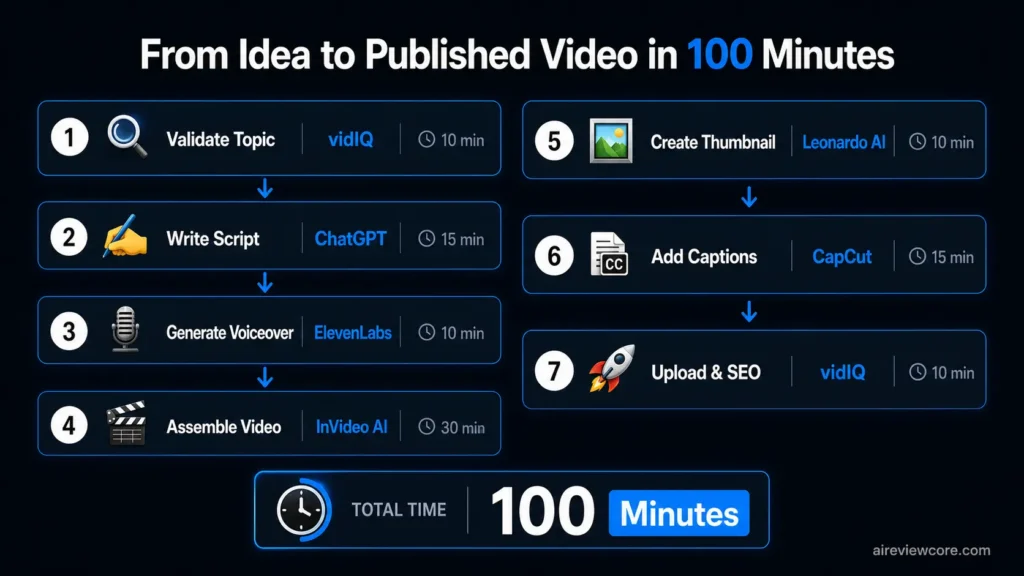
Step 1 — Validate the topic (10 minutes) Open vidIQ and search your topic idea. Check search volume, competition score, and trend direction. If the opportunity score is below 50, find a different angle or a different topic. Do not produce a video the keyword data does not support.
Step 2 — Write the script (15 minutes) Use ChatGPT or Claude to write a 700 to 900 word script optimized for retention — strong hook in the first 30 seconds, clear structure, specific examples rather than abstract claims. Concrete, visual language produces better footage matches in InVideo AI.
Step 3 — Generate voiceover (10 minutes) Paste the script into ElevenLabs. Generate the narration in your cloned or selected voice. Download the audio file. This becomes the timing anchor for everything that follows.
Step 4 — Assemble the video (30 minutes) Upload your ElevenLabs audio to InVideo AI or Pictory. Let the tool select footage and build the initial cut. Review the footage selection and correct mismatches — typically five to ten clips in a standard video. Add your Suno-generated background music at 20 to 30% volume beneath the narration.
Step 5 — Create the thumbnail (10 minutes) Open Leonardo AI and generate four thumbnail options based on your video’s emotional hook — curiosity, surprise, transformation, or fear of missing out. Select the strongest option and add text overlay in Canva if needed.
Step 6 — Add captions and final edit (15 minutes) Import the video into CapCut. Run auto-captions, apply your channel’s caption style preset, use silence removal to tighten pacing, and make any final cuts. Export at 1080p.
Step 7 — Upload and optimize (10 minutes) Open YouTube Studio. Use vidIQ’s title scoring to finalize your title. Write a description that includes your primary keyword in the first two sentences. Add tags based on vidIQ’s keyword suggestions. Set your thumbnail. Schedule or publish.
Total time: 100 minutes from validated topic to live video.
Best Niches for Faceless Channels in 2026
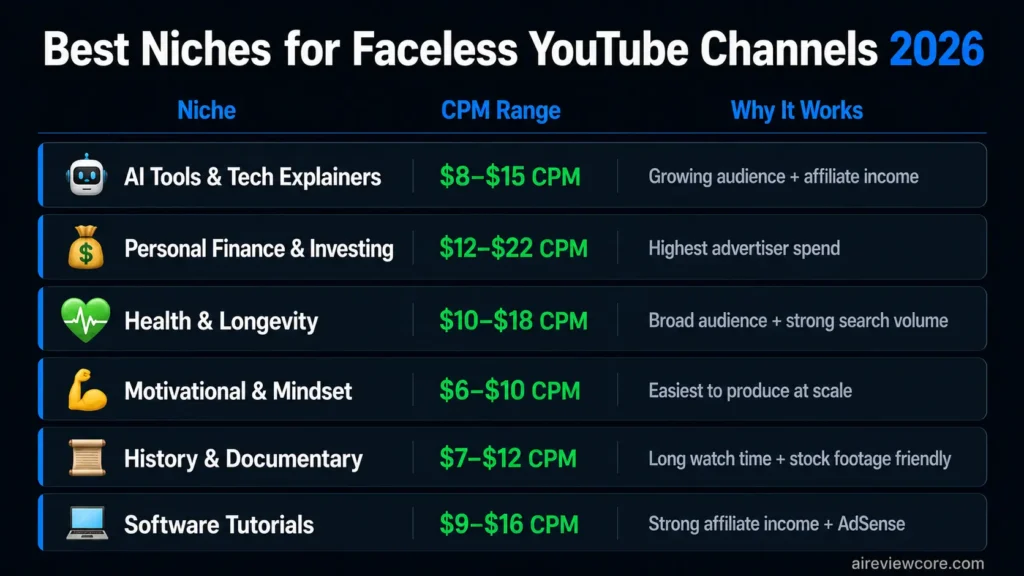
The most profitable faceless niches combine high advertiser CPM with content formats that do not require original footage or on-camera expertise.
| Niche | CPM Range | Why It Works |
| AI Tools & Tech Explainers | $8–15 | Growing audience, affiliate income potential |
| Personal Finance & Investing | $12–22 | Highest advertiser spend, evergreen content |
| Health & Longevity | $10–18 | Broad audience, strong search volume |
| Motivational & Mindset | $6–10 | Easiest to produce, high publishing volume possible |
| History & Documentary | $7–12 | Stock footage-friendly, long average watch time |
| Software Tutorials | $9–16 | Strong affiliate income alongside AdSense |
The AI Tools niche is particularly well-suited for faceless channels because the content — reviewing and demonstrating software — requires no physical presence and can be fully illustrated with screen recordings and generated visuals. It also aligns naturally with the affiliate programs of every tool in this guide.
Frequently Asked Questions
Can a faceless YouTube channel get monetized in 2026? Yes. YouTube’s monetization requirements apply equally to faceless and camera-based channels. The standard AdSense threshold is 1,000 subscribers and 4,000 watch hours. Faceless channels that publish consistently — two to three videos per week with keyword-validated topics — typically reach this threshold within three to five months.
Do I need to disclose AI-generated content on YouTube? As of 2026, YouTube requires disclosure when content is realistic and AI-generated, particularly for news, politics, health, and financial topics. For standard educational and entertainment content, disclosure is recommended but not currently enforced with demonetization penalties. Always disclose in your video description as a best practice.
Which single tool should I start with? InVideo AI on the free plan. It covers the complete production workflow — script, footage, voiceover, captions — in one tool and lets you publish your first video without spending anything. Once you are publishing consistently, ElevenLabs at $5/month is the first upgrade that produces a measurable quality improvement.
Is faceless YouTube oversaturated in 2026? The format is competitive but not saturated. Most faceless channels that fail do so because of inconsistency, not competition. Channels that publish on a fixed schedule with keyword-validated topics consistently outperform higher-production channels that publish irregularly. The algorithm rewards consistency above almost everything else.
Can I run multiple faceless channels simultaneously? Yes — and this is one of the structural advantages of the AI workflow. Once the production process is standardized and runs in under two hours per video, managing two to three channels requires only a modest increase in time investment. The limiting factor is topic research and script quality, not production capacity.
The Bottom Line
The best AI tools for faceless YouTube channels in 2026 have made the production question answerable: you can build a professional, consistent, monetizable faceless channel for under $40 per month using the stack in this guide.
The harder question is not which tools to use. It is whether you will build the production discipline to use them consistently.
The channels winning in this space are not the ones with the most sophisticated tools or the biggest initial investment. They are the ones that validated a topic before producing, published on a fixed schedule, and improved one element of their stack at a time based on actual performance data.
Start with InVideo AI and vidIQ. Publish ten videos. Look at your retention data and your click-through rates. Then decide which part of the stack to upgrade next.
Adrian Cole is a professional AI technology reviewer and creative technologist at aireviewcore.com, covering AI tools for content creators, marketers, and digital entrepreneurs.
© 2026 aireviewcore.com — All rights reserved.