
By Adrian Cole | aireviewcore.com
Table of Contents
YouTube is no longer just a place to upload finished videos. In 2026, YouTube AI tools for creators are turning the platform into an AI-assisted workspace for researching ideas, improving drafts, testing thumbnails, editing Shorts, managing comments, and protecting digital likeness.
The important change is not that YouTube has added one more AI button. It is that the platform is connecting AI assistance to the entire creator workflow: from finding an idea, to reviewing a draft, to testing a thumbnail, to improving an older video after publication.
This guide explains the most important YouTube AI tools announced at Made on YouTube 2026, what they are designed to do, when they are expected to roll out, and how creators can use them without giving up creative control.
Top YouTube AI Tools for Creators in 2026
YouTube announced a set of creator-focused tools that span research, editing, video feedback, thumbnail testing, moderation, likeness protection, live streaming, and monetization.
The most relevant AI updates for everyday creators are:
- New Insights and Research areas in YouTube Studio.
- More capable Ask Studio assistance for ideas, analytics, drafts, and channel workflows.
- AI feedback on unpublished video drafts.
- Channel-matched thumbnail suggestions.
- Dynamic thumbnail testing with up to three thumbnail options.
- Video A/B testing for different video cuts and opening hooks.
- Conversational AI editing in Shorts and the YouTube Create app.
- Optional AI-powered comment moderation.
- Expanded likeness detection, including planned voice detection support.
Some features are available now, while others are rolling out gradually or are planned for late 2026 and early 2027. Do not assume every tool will be visible in every channel immediately.
Ask Studio: Your Channel-Aware AI Assistant
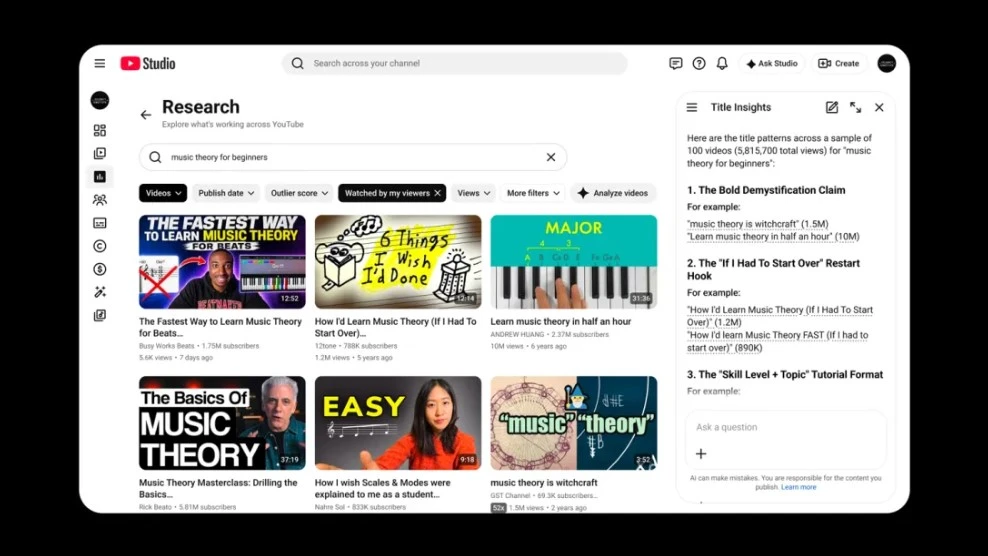
Image Credits:YouTube
Ask Studio is YouTube’s AI creative partner built directly into YouTube Studio. It is designed to help creators brainstorm, understand their performance, analyze comments, develop ideas, and get feedback without leaving their channel dashboard.
Unlike a general chatbot, Ask Studio is intended to work with information connected to your own YouTube channel and audience. You can ask questions about performance, recent uploads, comments, themes in your content, and potential ideas for future videos.
YouTube says Ask Studio can help creators:
- Brainstorm video topics.
- Explore audience and channel trends.
- Analyze video performance.
- Summarize comment patterns.
- Review ideas before production.
- Save useful suggestions as Idea cards.
- Get feedback on video scripts.
- Review eligible draft, private, or unlisted videos before publication.
For example, instead of asking a vague question like “How is my channel doing?”, a creator could ask:
text
Which topics in my last 10 videos had the strongest audience retention, and what patterns do they share?
Or:
text
What common questions are viewers asking in the comments on my recent AI tools videos?
The more specific the question, the more useful the answer is likely to be.
What Ask Studio cannot replace
Ask Studio can suggest ideas and interpret patterns, but it cannot fully understand your brand, your audience relationship, or your business goals. Treat its responses as a starting point for decisions, not a final creative verdict.
YouTube also notes that Ask Studio responses may vary in quality and accuracy. Creators should use judgment, especially when interpreting analytics, making strategic decisions, or discussing sensitive topics.
New Insights and Research Tools
YouTube Studio is adding dedicated Insights and Research areas to help creators better understand what has performed well and identify “outlier” videos that may inspire their next upload.
An outlier video is a piece of content that performed unusually well compared with the typical performance of similar videos or a channel’s usual baseline. Studying these videos can help creators identify useful patterns:
- A topic that attracted new viewers.
- A stronger-than-usual opening hook.
- A title or thumbnail that improved click-through rate.
- A format that generated more watch time.
- A question or trend that the audience responded to.
The goal is not to copy a successful video exactly. The better approach is to identify why it worked, then apply that insight to your own topic, audience, and style.
Draft Feedback Before You Publish
One of the most valuable additions is AI feedback for video drafts. YouTube says creators can get personalized suggestions on pacing, structure, storytelling, and other elements before publishing.
This feature can be especially useful when you have already recorded or edited a video but are unsure whether:
- The opening is strong enough.
- The explanation takes too long to reach the point.
- The middle section loses momentum.
- The call to action feels forced.
- The story structure is difficult to follow.
- The video matches what viewers expect from your channel.
The best way to use draft feedback is to review it in stages.
A practical draft-review workflow
- Upload your draft as private or unlisted.
- Ask for feedback on one goal at a time.
- Review the suggestions against your own creative intent.
- Make only the changes that improve clarity, pacing, or viewer value.
- Watch the revised version manually before publication.
Do not ask AI to make every decision. A fast-paced tutorial, a calm documentary, and a personality-led review can all be successful with very different pacing and structure.
Dynamic Thumbnails: More Than AI Image Generation
YouTube is expanding thumbnail tools in a way that goes beyond simply generating an image.
Creators will be able to use channel-matched thumbnail suggestions and upload up to three different thumbnail options. YouTube can then recommend or show the most suitable option to different audience segments.
This is important because a thumbnail is not just an image. It is the packaging of your idea.
A strong thumbnail should help the right viewer understand:
- What the video is about.
- Why it is worth watching.
- What result, insight, or story they can expect.
- How the video fits your channel’s visual identity.
YouTube says creators have run more than 40 million title and thumbnail experiments since its A/B testing feature officially launched in 2024. The new system expands that testing mindset by allowing three thumbnail options for a video.
How to prepare useful thumbnail variations
Do not create three almost identical thumbnails. Test one meaningful variable at a time.
For example:
| Version | What Changes | What You Learn |
| Thumbnail A | Product close-up with short benefit | Does a clear outcome attract interest? |
| Thumbnail B | Creator reaction with product | Does a human element improve clicks? |
| Thumbnail C | Before-and-after visual | Does transformation perform better? |
Keep the topic, visual style, and promise consistent. Otherwise, you will not know why one option performs better.
What to review manually
Even if YouTube recommends a thumbnail, review it before relying on it.
Check for:
- Misleading visual promises.
- Text that is too small on mobile.
- Brand colors that do not match your channel.
- Facial expressions that feel exaggerated or unnatural.
- Images that overpromise what the video delivers.
- Inaccurate product screenshots or claims.
A higher click-through rate is not helpful if viewers leave immediately because the video does not match the thumbnail.
Video A/B Testing: Test the Hook, Not Just the Thumbnail
YouTube is introducing video A/B testing that will let selected creators test up to three different cuts of a Short or long-form video and choose the version that performs best with their audience.
This is a major shift. Until now, creators could test titles and thumbnails, but the actual opening of the video often remained fixed.
The first seconds of a video are critical because viewers decide quickly whether to keep watching. Different openings can change how the audience understands the value of the content.
For example, a creator reviewing an AI tool could test three openings:
text
Version A: Start with the final result.
Version B: Start with the biggest problem the tool solves.
Version C: Start with a surprising limitation or comparison.
The purpose is not to trick viewers. It is to find the clearest, most compelling way to introduce a video that already has value.
YouTube describes video A/B testing as a feature that is coming soon, so availability may vary by channel and region as the rollout progresses.
Conversational Editing for Shorts and YouTube Create
YouTube is integrating Gemini into a conversational editing assistant for Shorts and the YouTube Create app.
Instead of editing only through a traditional timeline, creators will be able to use prompts and follow-up requests to shape a first draft. The tool can suggest edits such as:
- Trimming quiet pauses.
- Reordering clips for stronger pacing.
- Adding on-screen text.
- Synchronizing music with the beat.
- Building an initial draft from selected photos and video clips.
The key point is that conversational editing does not remove manual editing. YouTube says creators can move back and forth between AI assistance and the timeline, adjusting the result until it matches their intent.
That makes this feature more useful than a simple “generate a video” button. It is designed to reduce repetitive editing work while keeping the creator in control.
For more options beyond YouTube’s native workflow, see our guide to the best AI video generators for product ads in 2026.
YouTube says conversational editing is planned to begin rolling out on Android and iPhone in early 2027, with availability expanding over time.
AI-Powered Comment Moderation
YouTube is testing an optional AI-powered comment moderation feature that learns from a creator’s manual moderation history.
The feature is designed to identify similar incoming comments and hold them for review in the Held tab. Importantly, YouTube says comments are not automatically deleted without the creator’s consent.
This makes the tool more useful as a filtering assistant than an autonomous moderator.
Best use cases
- Channels with repeated spam comments.
- Communities with recurring harassment patterns.
- Channels that need moderation but cannot monitor comments all day.
- Creators who want a consistent moderation standard across uploads.
Why human review still matters
Comment moderation is highly contextual. A joke, criticism, disagreement, or inside-community reference can look negative to an automated system but still be valuable discussion.
Use AI to reduce repetitive moderation work, but keep final control over what stays visible in your community.
Likeness and Voice Protection
YouTube is expanding its likeness detection tools to help creators find and manage unauthorized synthetic uses of their face and voice.
The platform already offers visual likeness detection for eligible creators. Later in 2026, YouTube plans to combine speaking-voice detection with facial detection to improve match accuracy and strengthen protection against synthetic impersonation.
Creators will also be able to access likeness detection through the YouTube mobile app, making it easier to set up, review matches, and take action away from a desktop computer.
This matters because AI-generated impersonation is no longer only about face swaps. A convincing voice clone can create the same trust and reputation risks.
What creators should do now
- Review your current YouTube security settings.
- Monitor suspicious clips that use your name, face, or voice.
- Keep original recordings of your voice and video content.
- Avoid sharing sensitive raw footage publicly without a reason.
- Establish a clear public channel identity so viewers can recognize official uploads.
- Review new likeness-detection options when they become available.
A Practical YouTube AI Workflow
The most useful way to think about YouTube’s new tools is as a workflow, not a collection of isolated features.
Step 1: Research what is working
Use Insights, Research, and Ask Studio to identify patterns in your previous videos, comments, and audience behavior.
Step 2: Develop a focused concept
Turn the research into one clear video promise. Avoid combining too many topics in one upload.
Step 3: Create the first draft
Film your video or collect your Shorts clips. Use conversational editing when it becomes available to create a first cut, remove pauses, and improve sequencing.
Step 4: Review the draft
Use Ask Studio for feedback on pacing, structure, and storytelling. Keep only suggestions that fit your brand and video purpose.
Step 5: Build thumbnail options
Create two or three different packaging concepts that communicate the same honest promise in different ways.
Step 6: Test meaningful variations
Use thumbnail testing and, when available, video A/B testing to learn which version connects best with your audience.
Step 7: Publish with human review
Before publishing, manually check your title, thumbnail, captions, claims, links, copyright status, and audience expectations.
Step 8: Learn from the result
Use performance data to improve the next video rather than treating every upload as a one-time experiment.
What YouTube AI Tools Cannot Do
These tools can save time, but they cannot guarantee channel growth or replace creative judgment.
They cannot:
- Guarantee that a video will go viral.
- Replace a strong idea or a clear audience need.
- Fact-check your claims automatically.
- Understand every detail of your brand voice.
- Know whether a thumbnail creates the wrong expectation.
- Replace legal, financial, medical, or professional advice.
- Remove the need to understand your own audience.
The best creators will use AI to remove repetitive work, not to outsource the relationship with their audience.
Final Verdict
YouTube’s 2026 AI updates are most useful when treated as a creator support system rather than an automatic content machine.
Ask Studio can help you explore ideas, understand performance, review drafts, and identify opportunities in your existing library. Dynamic thumbnails and video A/B testing can improve how you package a strong video. Conversational editing can reduce repetitive work in Shorts, while AI moderation and likeness detection address the less visible but equally important work of managing and protecting a channel.
The biggest opportunity is not “letting AI run your channel.” It is using AI to spend less time on repetitive decisions and more time making better videos for the people who already choose to watch you.