
Turn One Product Photo Into a Scroll-Stopping Ad in Minutes
By Adrian Cole | aireviewcore.com
Table of Contents
Filming a professional product ad used to mean booking a studio, hiring a crew, and waiting days for the final cut. In 2026, a handful of AI video generators can turn a single product photo, a store link, or a short text brief into a polished ad in minutes.
The catch is that not every tool keeps your product looking accurate, and not every “AI video generator” is actually built for product ads. Plenty of the tools crowding this category are cinematic generators repurposed for commerce, or general marketing platforms with a video feature bolted on. Neither is optimized for the one thing that actually matters here: does the logo on the label still read correctly by the fifth frame?
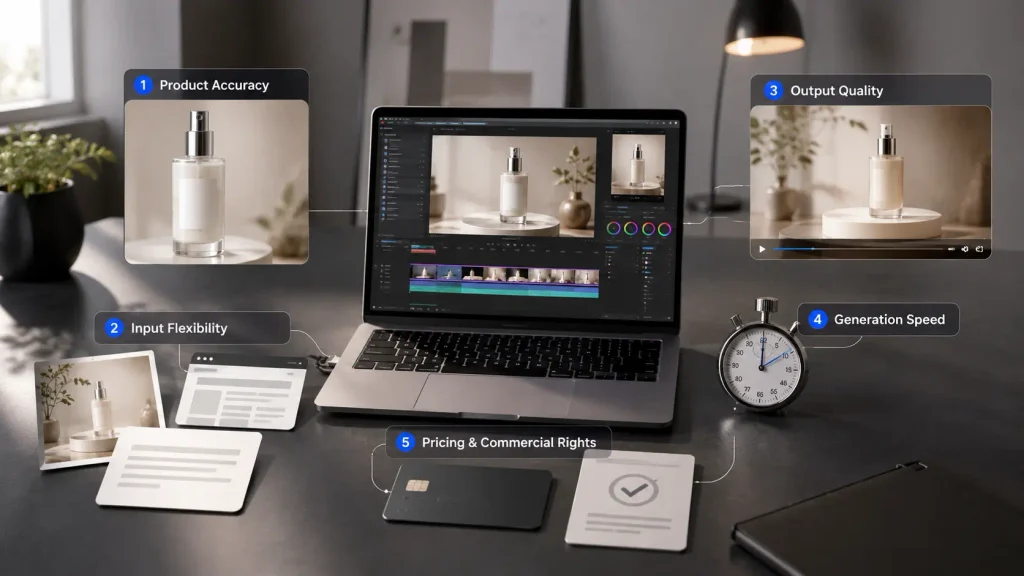
We researched and compared the leading AI product video generators on five criteria that matter most for advertisers: product accuracy, output quality, speed, pricing transparency, and commercial usage rights. Here is what actually works in 2026, and which tool fits which type of brand or creator.
How We Evaluated These AI Product Video Generators
Before ranking anything, we evaluated each tool through the lens of someone who actually needs to publish an ad — not just generate a fun clip for a portfolio.
- Product accuracy. Does the AI preserve the real shape, texture, and label of the product, or does it distort details like text and logos across the clip’s duration?
- Input flexibility. Can you start from a photo, a product URL, or a text prompt, or are you locked into a single rigid workflow?
- Output quality. Resolution, motion realism, and whether footage looks broadcast-ready or obviously synthetic under close inspection.
- Speed. How long it actually takes from upload to a usable clip, not just the marketing claim on the landing page.
- Pricing and commercial rights. Whether the free or entry plan genuinely allows commercial use, and what a realistic monthly cost looks like per usable video rather than per generation attempt.
Pricing in this category changes often, and providers frequently run temporary discounts or restructure credit systems. Treat every number below as a directional guide and confirm current pricing on each provider’s site before subscribing.
The 5 Best AI Video Generators for Product Ads in 2026
1. Topview AI — Best Overall for Product Ads
Topview AI is built specifically around turning a product image or a product URL into a finished ad, rather than being a general-purpose video generator adapted for commerce after the fact. Paste a product link and the tool pulls images and copy directly from the listing, or upload a photo and let an AI avatar hold and demonstrate the product on screen instead of just talking about it. It also supports cloning the structure of a proven viral ad from platforms like TikTok and reapplying that exact structure to your own product.
The Video Agent V2 feature is the standout capability for teams running multiple product lines: it accepts complex, multi-reference instructions in a single request, which means you can specify the product photo, a reference video for pacing, and a brand style guide all at once rather than iterating through separate steps.
Best for: Ecommerce sellers and UGC-style ad campaigns who want a presenter actually holding the product on screen, not just a static animation orbiting it.
Expert Workflow: Start every project by pasting your product URL rather than uploading a bare photo. The listing-pull feature captures your existing copy, pricing, and multiple product images automatically, which gives Topview more reference material to work from than a single uploaded shot — and produces noticeably more consistent product accuracy across the clip.
Pricing snapshot: A free tier exists but is limited to short, watermarked clips using public avatars only. Paid plans start at roughly $16 per month on annual billing for around 80 monthly credits, full agent features, and watermark-free exports, scaling up to a Business tier near $40 per month for more credits and custom avatars.
2. Higgsfield AI — Best for Cinematic Motion and Camera Control
Higgsfield stands out for camera work in a category where most tools default to a slow, generic rotation. It offers 70-plus cinematic camera presets from crash zooms to Dutch angles plus start-and-end frame control so you can dictate exactly how a product shot begins and ends. It bundles access to multiple underlying video models in one subscription, including Kling 3.0, Veo 3.1, and Sora 2, so you are not locked into a single generation engine for every clip.
Best for: Brands that want a more cinematic, ad-agency look rather than a templated UGC style, and teams who want to test the same product concept across multiple underlying video models without separate subscriptions.
Expert Workflow: Match your model choice to your credit budget deliberately rather than defaulting to whichever model is highlighted first. Kling 3.0 generations cost roughly six credits per clip, while Sora 2 and Veo 3.1 generations run 40 to 70 credits for the same length meaning a Starter plan’s 200 monthly credits stretches to over 30 Kling clips but fewer than five clips on the premium models. Reserve the expensive models for your final hero shot, not your early concept testing.
Pricing snapshot: Higgsfield uses a credit-based system, and plan prices, included credits, and model access can vary by billing period, region, and promotion. Entry plans are typically priced from about $15 per month, while higher tiers provide larger credit pools and broader model access. Check Higgsfield’s live pricing page before subscribing, especially if you plan to use premium models such as Veo or Sora.
3. InVideo AI — Best for Scripted Product Explainers
InVideo AI leans into a fuller production pipeline rather than only animating a single image: it writes the script, designs scenes, generates AI avatars and voiceovers, and adds subtitles and sound effects around your product photos. This makes it a meaningfully stronger fit for explainer-style product ads that need narration and structure, not just a short social clip built around movement alone.
Best for: Teams that want a scripted, presenter-led explainer video rather than a short social clip think SaaS product walkthroughs or physical products with a feature set complex enough to need spoken explanation.
Expert Workflow: Write your own script outline before letting InVideo generate one automatically. The AI-generated scripts are a reasonable starting point but tend toward generic phrasing; feeding it three or four specific bullet points about what makes your product different produces a noticeably sharper final script than accepting the first automated draft.
Pricing snapshot: A free plan offers a limited weekly allowance with watermarked, non-commercial output only. Paid plans commonly start around $17 to $25 per month on annual billing for roughly 50 to 75 monthly credits with watermark-free, commercial-use exports, moving up to $60 to $85 per month for higher credit tiers and 4K export.
4. AdCreative.ai (Product Videoshoots) — Best for Fast, Ready-to-Publish Clips
AdCreative.ai’s Product Videoshoots feature is built around raw speed: upload a product photo, pick a style or add a short prompt, and it generates a ready-to-use product video without filming or manual editing. It is positioned more as a performance-marketing ad-generation tool than a creative studio the goal is volume and iteration speed, not a single polished hero asset.
Best for: Performance marketers who need many quick ad variations to test simultaneously rather than one highly polished cinematic spot.
Expert Workflow: Generate in batches of five or more variations per product rather than evaluating one clip at a time. AdCreative.ai’s value proposition is speed at volume the platform is genuinely most useful when you treat every generation as one entry in an A/B test rather than a final deliverable you review individually.
Pricing snapshot: Plans start at roughly $39 per month, with quarterly and annual billing discounts advertised directly on the provider’s site.
5. Canva AI Video Generator — Best for Canva Users
Canva’s Create a Video Clip tool generates an AI-powered video from a text prompt, complete with synchronized audio, and it plugs directly into Canva’s existing design and template ecosystem. It is not a specialized product-ad tool, and it will not compete with the other four on product accuracy or camera control but it is the easiest entry point if you are already designing product graphics in Canva and want to add basic motion without learning an entirely new platform.
Best for: Canva Pro users and small teams that already create product graphics in Canva and want to add AI-generated video clips without learning a separate editing workflow.
Expert Workflow: Use Canva to test concepts and messaging before moving your winning idea to a specialized tool like Topview or Higgsfield for the final production version. Canva’s familiar workflow makes it a practical place to validate a hook or angle before investing in a specialized product-video tool, although it may not be the right place to publish your final ad.
Comparison Table
| Tool | Starting Price (Paid) | Free Plan | Image-to-Video | Product URL-to-Video | Commercial Use on Entry Tier |
| Topview AI | ~$16/mo | Yes, watermarked | Yes | Yes | Yes |
| Higgsfield AI | ~$15/mo | Limited trial credits | Yes | No | Varies by plan |
| InVideo AI | ~$17–25/mo | Yes, watermarked | Yes | No | Yes |
| AdCreative.ai | ~$39/mo | Limited trial | Yes | No | Yes |
| Canva | Free tier available | Yes | Limited | No | Yes on paid plans |
Prices reflect commonly reported 2026 rates at the time of writing and may not include current promotions. Confirm on the provider’s pricing page before purchasing.
How to Create a Product Ad Video With AI, Step by Step
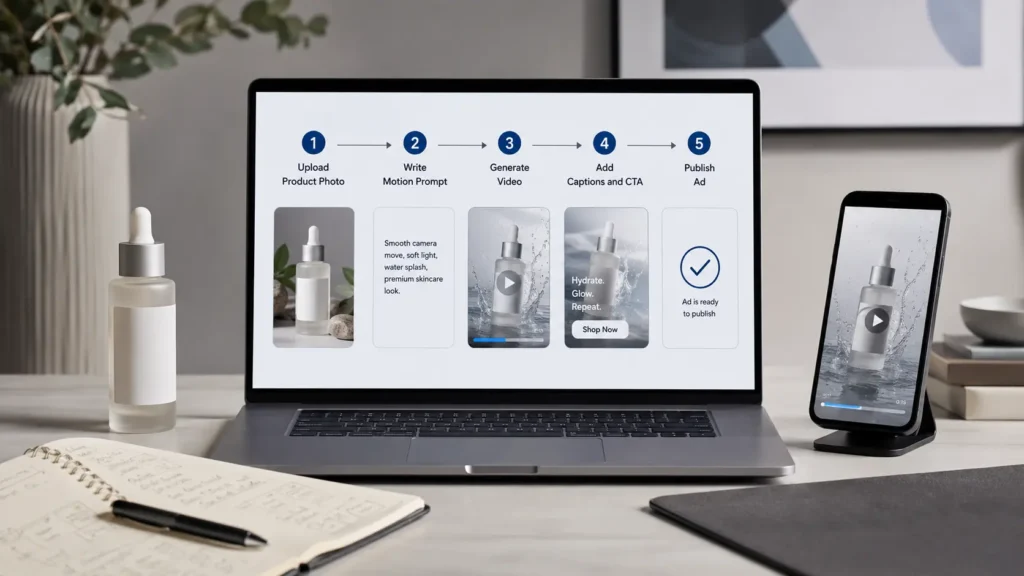
- Start with a clean product photo. Even the best AI model struggles to fix a blurry, poorly lit, or cluttered source image, so a sharp photo on a plain background consistently gives the most accurate result.
- Choose your input method. Decide whether you are uploading a photo, pasting a product URL, or writing a text brief. Tools like Topview AI support all three; others are photo-only.
- Pick the aspect ratio for your platform. Vertical 9:16 for TikTok, Reels, and Shorts. Square 1:1 for feed ads. Horizontal 16:9 for YouTube pre-roll.
- Write a specific motion prompt. Instead of “make it move,” describe the actual shot: a slow rotation, a hand picking up the product, or a zoom into a key feature.
- Generate multiple variations. Most tools let you regenerate cheaply. Producing three or four versions and picking the best one is consistently more reliable than expecting a perfect first result.
- Add voiceover, captions, and a call to action. A short on-screen CTA and one clear spoken benefit outperform silent, caption-free clips across most ad placements.
- Check product accuracy before publishing. Zoom in on labels, logos, and any text on the packaging. AI models can still distort fine details even when the overall shot looks convincing at a glance.
AI Product Video Generators vs. Traditional Product Photography
AI tools do not fully replace a real photoshoot, but they solve a specific problem: turning existing static images into short, scroll-stopping video ads without booking a studio or a crew. A traditional shoot still wins on full creative control and guaranteed accuracy, especially for high-end or detail-critical products. An AI generator wins decisively on speed and cost when you need many ad variations quickly testing five different hooks for the same product in a single afternoon is not realistic with a traditional shoot budget or timeline.
The most practical approach for most online stores in 2026 is a hybrid one: keep a small library of high-quality real photos, then use an AI product video generator to multiply that library into dozens of ad variations for testing.
Common Mistakes When Using AI for Product Ads
- Using a low-quality source photo. Distorted labels and warped edges are usually a symptom of a weak input image, not a weak model.
- Publishing without a full review. Always watch the entire clip before publishing distortions often appear only in later frames, not the opening shot most people check first.
- Ignoring commercial usage terms. Free and entry tiers on several platforms restrict or forbid commercial use entirely; check this before running paid ads with the output.
- Using one aspect ratio everywhere. A clip built for TikTok rarely performs as well when stretched or cropped for YouTube or a website banner.
- Overloading a single video with claims. One clear benefit per ad, backed by a simple visual, generally outperforms a video trying to explain five features at once.
Frequently Asked Questions
Is there a genuinely free AI product video generator?
Yes most of the tools above offer a free tier, but expect real limits: short clip lengths, visible watermarks, and no commercial usage rights. Free tiers are useful for testing a workflow, not for publishing final ads.
What is the cheapest AI video generator for product ads?
Entry-level paid plans from Higgsfield AI ($15/month) and Topview AI ($16/month) currently sit at the lower end of the market, though credit limits at that tier are modest and clip length is often capped around 10 to 15 seconds on Higgsfield’s standard plan specifically.
Can AI video generators work for marketing teams, not just solo creators?
Yes. Most platforms in this comparison offer team or business tiers with higher concurrent generation limits, shared credit pools, and priority rendering, aimed at agencies and in-house marketing teams running multiple product lines simultaneously.
Which tool keeps product logos and text the most accurate?
Topview AI and Higgsfield AI are generally reported to hold up well on standard product labeling, based on user reviews and published comparisons we referenced for this guide. That said, any AI video generator can distort fine text under complex lighting or extreme close-ups, so always zoom in on the final export before publishing, regardless of which tool you use.
Do I need different tools for different ad platforms?
Not necessarily different tools, but different settings. Generate at the correct aspect ratio for your target platform from the start rather than cropping a finished clip afterward cropping after generation frequently cuts off product details that were correctly framed in the original.
Final Verdict
If you need one all-around pick for product ads, Topview AI is the strongest choice in 2026 because it is purpose-built for turning product photos and URLs into finished ads, including AI presenters that interact with the product on screen rather than simply animating around it.
If cinematic camera control matters more than presenter-led ads, Higgsfield AI is the better fit just budget your credits carefully around which underlying model you actually need for each shot. For scripted explainer-style videos, InVideo AI’s script-and-voiceover pipeline is hard to beat. For performance marketers who need volume over polish, AdCreative.ai’s speed-first workflow is built for exactly that. And Canva is the easiest option for existing Canva users who want to test the format inside a familiar design workflow.
For the broader landscape of AI tools that pair well with product video in a full content pipeline, see our guides on the best AI image to video tools in 2026 and the best AI tools for social media content creation.
Adrian Cole is a technology reviewer at aireviewcore.com covering AI video tools, creative production technology, and practical guides for marketers and content creators.
© 2026 aireviewcore.com — All rights reserved.