
Turn Any Static Photo Into Cinematic Motion — Tested & Ranked | By Adrian Cole | aireviewcore.com
Last updated in June 2026 to reflect the latest rankings, pricing, and platform changes
Table of Contents
The best AI image to video tools in 2026 have crossed a threshold that changes what a single photograph can become.
A product photo becomes a commercial. A portrait becomes a film still. A landscape becomes an establishing shot. What took a production crew two days now takes under two minutes — and the output quality has crossed the point where the question is no longer whether AI-generated video looks professional, but which tool produces the right kind of professional for your specific use case.
By April 2026, the AI video generation market has several major models producing high-quality video up to 4K with synchronized audio and cinematic camera work that rivals professional production at a fraction of the cost. Four of them stand above the rest for image-to-video specifically — and the differences between them are more significant than most guides acknowledge. The best AI image to video tool for a product photographer is not the same as the best one for a filmmaker, a marketer, or a social media creator.
Kling AI 3.0, Runway Gen-4.5, Veo 3.1 (launched October 2025, now widely available), and Seedance 2.0 are the four tools that consistently deliver the strongest image-to-video results in 2026.
What Image-to-Video AI Actually Does in 2026 — And Why It Is Different Now
Earlier generations of image-to-video tools did something that looked impressive in demos and fell apart in production: they interpolated between pixels, creating the visual impression of motion without understanding the physical rules that govern how objects, people, and environments actually move.
The best AI image to video tools in 2026 operate differently. They simulate. When a character sits down in a Runway Gen-4.5 generation, the cushion compresses based on the character’s perceived mass. When water moves in a Kling 3.0 clip, it follows the laws of fluid dynamics rather than blurring between two states. When light shifts in a Veo 3.1 generation, it responds to the actual light sources in the scene rather than smoothly transitioning between brightness levels.
This physics-aware generation is the structural leap that separates 2026’s tools from their predecessors and it is why the output from the four tools in this guide can be used in professional production contexts that would have rejected AI-generated video two years ago.
Three criteria determine which image-to-video tool is right for your workflow. Subject consistency — whether the person, product, or object in your reference image maintains its identity across the duration of the clip. Motion quality — whether the movement looks physically plausible or artificially smooth. And control surface — how precisely you can specify what happens in the clip rather than accepting what the AI decides.
The 4 Best AI Image to Video Tools in 2026
Kling AI 3.0 launched on February 5, 2026 and immediately took the number one position on the Artificial Analysis leaderboard with 1,249 Elo — the highest score ever recorded on the industry’s most-watched AI video benchmark. For image-to-video specifically, its multi-angle subject consistency is the feature that separates it from every competing tool: the same subject appears from multiple camera angles within a single generation, maintaining identity across the full clip without drift or degradation.
This consistency capability is what makes Kling 3.0 the default choice for character-driven image-to-video work. Feed it a reference portrait and the generated clip maintains facial geometry, skin texture, and clothing detail across every frame — across multiple camera angles simultaneously. For creators working with AI influencers, brand characters, or any content where a specific person or persona needs to appear consistently throughout a video, this is the technical capability that makes the workflow viable at a professional level.
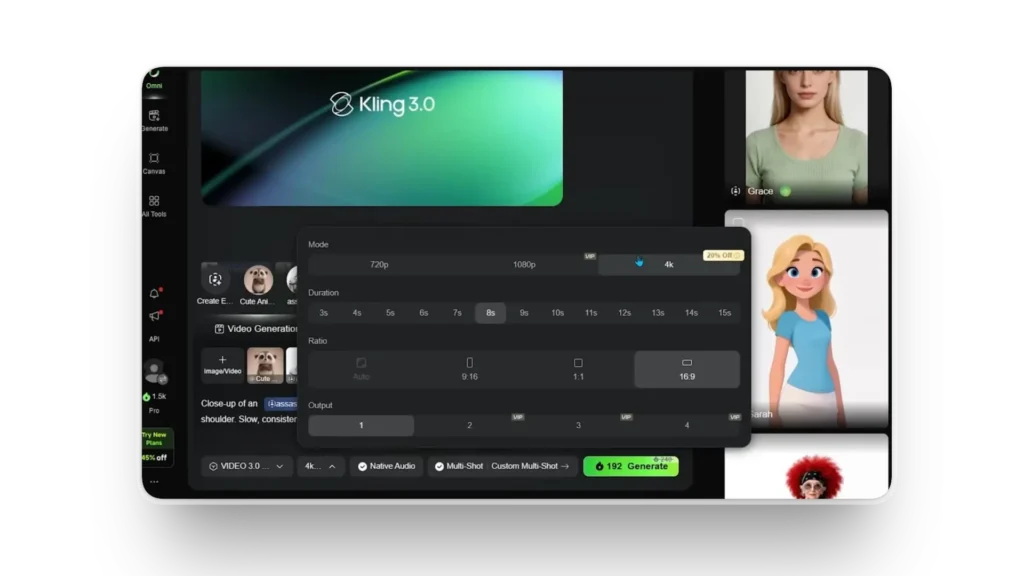
The Director Physics system is Kling 3.0’s other distinguishing feature. It handles complex physical interactions that earlier AI video models struggled with consistently: fabric movement, liquid behavior, hair physics, and the kind of cause-and-effect realism that makes a clip read as filmed rather than generated. The 6-cut storyboarding capability — generating multi-shot sequences that maintain subject and environment consistency across cuts — makes Kling 3.0 the most complete image-to-video tool for anyone producing multi-shot content from static image references.
At approximately $0.10 per second of output, Kling 3.0 offers the strongest quality-to-cost ratio in this guide. A 10-second clip costs roughly $1.00 at API pricing. The subscription model through Kling’s platform offers daily free credits that make it the most accessible premium tool in this guide. For creators who want to test at low volume, visit the official Kling AI platform to access daily free credits before committing to a subscription.
Expert Workflow: Upload the highest resolution version of your reference image available. Kling 3.0’s subject consistency engine performs significantly better with high-detail inputs — the more facial and texture information available in the reference, the more reliably it maintains identity across frames. For fashion and product content, include multiple reference angles in your prompt context rather than a single hero shot.
Use the Director Physics prompting vocabulary explicitly. Describing physical conditions in your prompt “hair moving in a light breeze,” “fabric settling after the subject sits,” “liquid surface reflecting ambient light” — activates the physics simulation rather than producing the default smooth interpolation. Generic motion prompts produce generic motion. Specific physical descriptions produce the cinematic quality Kling 3.0 is capable of.
Start with 5-second clips before committing to longer generations. The quality of subject tracking is most visible in the middle frames of longer clips where drift is most likely to occur. Testing on shorter clips first tells you whether the reference image has the detail quality that Kling’s consistency engine needs before investing in longer generations.
| Best for | Character-driven content, multi-angle coverage, AI influencers |
| Free plan | Daily credits via Kling platform |
| API pricing | ~$0.10/second (~$1.00 per 10-second clip) |
| Native audio | Yes — Kling 3.0 Omni with lip-sync in 5 languages |
| Maximum resolution | 1080p |
| Leaderboard position | #1 Artificial Analysis (1,249 Elo) |
Expert Verdict: Kling AI 3.0 is the strongest image-to-video tool for any workflow where subject consistency across frames is the primary requirement. Its leaderboard-leading quality, cost-competitive API pricing, and Director Physics system make it the default choice for professional creators working with character-driven content in 2026.
Runway Gen-4.5 does not lead any benchmark. It leads in something more practically important for professional creators: the depth of control you have over what the generated clip actually does.
Motion brushes let you paint which parts of a reference image should move and how — specifying that the background stays static while a subject’s hair moves, or that water in the foreground flows while the landscape behind it remains fixed. This kind of granular control over the motion layer is not available in any other image-to-video tool in this guide at the same level of precision. For creators who have a specific visual outcome in mind and need the AI to execute it rather than interpret it, Runway Gen-4.5’s control surface is the reason it remains in production workflows despite being out-benchmarked by newer models.
The camera control system is equally precise. You can specify camera movement, trajectory, speed, and focal behavior using cinematography vocabulary — not just “zoom in” but the specific type of camera motion that a director would call out on a professional set. For content that needs to read as intentionally filmed rather than AI-generated, this control over the camera’s relationship to the subject is often the difference between output that works commercially and output that does not.
Runway’s 2026 pricing restructure introduced something significant: one subscription now gives access to Runway’s own Gen-4.5 alongside Google Veo 3.1, Kling 3.0 Pro, and Seedance 2.0 For creators who want multi-model access from a single interface, Runway’s platform has become the most practical hub for image-to-video production at professional volume. The Standard plan at $15/month covers casual creative use. The Pro plan at $28/month with 2,250 monthly credits is the starting point for consistent professional output. Unlimited at approximately $76/month is the right choice for high-volume production.
Expert Workflow: Use motion brushes for every image-to-video generation rather than relying on text prompts alone for motion specification. The visual painting interface takes thirty seconds to configure and consistently produces more precise results than equivalent text descriptions. Start by masking the areas you want to remain static, then paint the motion direction and intensity on the elements you want to move.
Take advantage of Runway’s multi-model access before assuming Gen-4.5 is the right model for a specific clip. For clips where subject consistency matters more than camera control, route the generation through Kling 3.0 Pro via Runway’s interface. For clips where audio sync is essential, use Veo 3.1 Fast. Using Runway as a multi-model hub rather than a single-model tool is the workflow that most experienced creators have settled on.
For brand and commercial work, build a reference library within Runway’s asset storage before starting any campaign. Storing approved reference images, approved motion styles, and approved brand color palettes in the platform’s project system produces more consistent output across a campaign than starting fresh with each individual generation.
| Best for | Creative control, professional editing, multi-model access |
| Free plan | 125 one-time credits (not monthly) |
| Paid plans | Standard $15/mo · Pro $28/mo · Unlimited ~$76/mo |
| API pricing | ~$0.20/second (~$2.00 per 10-second clip) |
| Native audio | No — separate audio generation required |
| Control features | Motion brushes, camera control, video editor |
Expert Verdict: Runway Gen-4.5 is the right tool for professional creators who need precise control over what their generated clips do — not just quality output but specific output. Its motion brush system, camera control vocabulary, and multi-model platform access make it the strongest production infrastructure for image-to-video work at professional volume in 2026.
Veo 3.1 is the only image-to-video tool in this guide that generates native audio in the video output. Every other tool produces video and requires a separate audio generation step — adding cost, latency, and the synchronization challenge of aligning generated audio to generated motion. Veo 3.1 eliminates that step entirely, generating audio that is native to the scene rather than post-processed onto it.
For image-to-video workflows that need sound — product demos where the product makes noise when used, human subjects speaking or reacting, environments with ambient sound — this native audio capability changes the production math significantly. The audio quality is not an approximation layered over the video. It emerges from the same generation process, producing the kind of audio-visual synchronization that is extremely difficult to achieve with post-production audio placement.
Scene consistency is Veo 3.1’s other primary strength. Where some image-to-video tools maintain subject consistency but allow the environment to drift across the clip duration, Veo 3.1 locks both the subject and the environment with strong temporal coherence. For clips where the setting matters as much as the subject — architecture, landscape, interior design — this dual-layer consistency produces more commercially usable output than tools that prioritize subject tracking alone.
Access considerations matter for Veo 3.1. It is available through Google AI Studio for development and testing, through Vertex AI for enterprise deployment, and through Runway’s platform as a third-party model. Some regional restrictions apply to direct API access. Creators without Google Vertex AI access will find Runway the most practical interface for using Veo 3.1 at production volume. At $0.15 per second in fast mode and $0.40 per second in standard mode, the cost per clip is higher than Kling 3.0 but the elimination of a separate audio generation step partially offsets this for audio-dependent workflows.
Expert Workflow: Use Veo 3.1 Fast mode for iteration and Veo 3.1 Standard mode for final output. The quality difference between fast and standard is visible at the detail level — skin texture, fabric rendering, fine motion — but not always significant enough to justify the price difference at the iteration stage. Develop your prompt approach in fast mode, then generate the final clip in standard mode when you have confirmed the motion and composition are correct.
Leverage the native audio by being specific about sound in your prompts. Veo 3.1’s audio generation responds to explicit sound descriptions — “the sound of fabric moving,” “ambient outdoor environment with light wind,” “footsteps on a wooden floor” — in the same way the visual generation responds to visual descriptions. Generic prompts produce generic ambient audio. Specific sound descriptions produce audio that matches the visual content in ways that make the clip feel genuinely filmed.
For architecture and interior design content, Veo 3.1 is the strongest choice in this guide. Its environment consistency handles the precise geometry and lighting of architectural spaces more reliably than any competing model, producing clips that architectural visualization studios use in client presentations.
| Best for | Audio-dependent content, scene consistency, architecture |
| Free plan | Limited via Google AI Studio |
| API pricing | $0.15/sec (Fast) · $0.40/sec (Standard) |
| Native audio | Yes — unique in this guide |
| Access | Google AI Studio · Vertex AI · Runway platform |
| Scene consistency | Best in class |
Expert Verdict: Veo 3.1 is the right tool for any image-to-video workflow where audio is part of the output requirement — not added in post-production, but native to the generation. Its audio-visual synchronization quality and scene consistency make it the strongest choice for commercial content, product demonstrations, and any clip where the environment matters as much as the subject.
Seedance 2.0 launched on February 8, 2026 — three days after Kling 3.0 — and triggered a copyright discussion in the creative industry that is still ongoing. What caused it was the model’s ability to maintain specific visual details — logos, text, product design elements, brand marks — with a precision that no previous AI video model had achieved. For e-commerce and product content specifically, this capability changes what AI image-to-video can produce professionally.
Most AI image-to-video tools drift on fine details across the duration of a clip. A logo on a product label becomes unreadable by the midpoint of a 10-second generation.
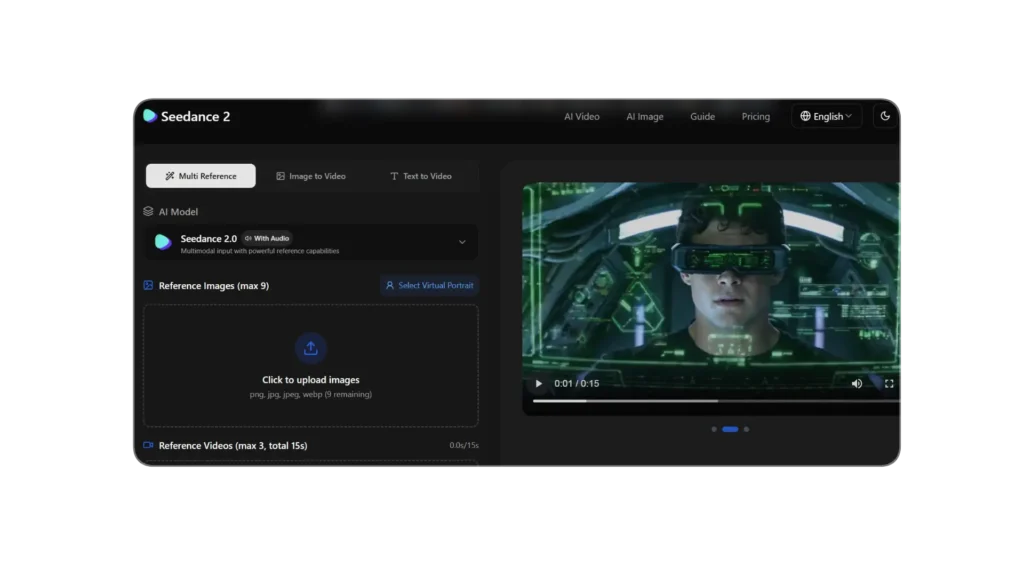
Text on a product package loses its sharpness after a few frames. These degradations make most AI-generated product video unsuitable for commercial use where brand accuracy is a requirement. Seedance 2.0’s phoneme-level approach to detail preservation solves this problem specifically — the logo on frame 1 is the logo on frame 10, with no drift, blur, or distortion across the clip duration.
The multi-modal reference input is Seedance 2.0’s other production advantage. It accepts up to 12 reference files — product shots from multiple angles, packaging detail close-ups, lifestyle context images, and even audio files — and synthesizes them into a generation that incorporates all of that reference material. For a product content workflow where brand accuracy across multiple visual elements is non-negotiable, this multi-reference capability produces more reliable output than any single-image input approach.
The copyright considerations are worth acknowledging directly. Seedance 2.0’s detail preservation capability applies to all reference material, including copyrighted visual elements. Users deploying this tool for commercial content should verify that all reference images and brand elements they input are cleared for use in AI-generated content under their licensing agreements.
Expert Workflow: Build your reference package before generating any clips. The multi-modal input capability is only as good as the reference material you provide. For product content, collect the hero shot, three to four detail close-ups of key features, and at least one lifestyle context image before starting your first generation. The quality of Seedance 2.0’s output scales directly with the comprehensiveness of the reference package.
Use text prompts to specify the motion layer while the reference images handle the visual consistency layer. Seedance 2.0 works best when you are explicit about what should move and how — “product rotating slowly on a white surface,” “packaging label remains sharp throughout,” “background bokeh with subtle depth-of-field shift” — while the reference images anchor the visual accuracy of the brand elements.
For e-commerce product pages, generate clips in 5-second increments rather than single longer clips. Shorter generations maintain detail precision more reliably at higher frame quality, and five-second product loops are the format that most e-commerce platforms optimize for anyway.
| Best for | E-commerce, product content, logo and text preservation |
| Free plan | Limited via Seedance platform |
| API pricing | ~$0.09–0.14/second |
| Native audio | Partial — strong lip-sync capability |
| Reference inputs | Up to 12 files (multi-modal) |
| Detail preservation | Best in class for logos and text |
Expert Verdict: Seedance 2.0 is the strongest image-to-video tool for e-commerce brands and product content creators who need brand-accurate video where logos, packaging text, and product design elements must remain sharp and consistent across every frame — a requirement that eliminates most competing tools from commercial product content workflows.
Pricing at a Glance — What You Actually Pay Per Clip
| Tool | Free Plan | Per-Second Cost | 10-Second Clip | Best Plan for Regular Use |
| Kling AI 3.0 | Daily credits | ~$0.10/sec | ~$1.00 | Kling subscription |
| Runway Gen-4.5 | 125 one-time credits | ~$0.20/sec | ~$2.00 | Pro $28/month |
| Veo 3.1 Fast | Limited (AI Studio) | $0.15/sec | ~$1.50 | Via Runway Pro |
| Seedance 2.0 | Limited | ~$0.09–0.14/sec | ~$0.90–1.40 | Platform subscription |
One important note on free plans: Runway’s 125-credit free allocation is one-time only — not a monthly reset. Once spent, they are gone. Kling’s daily credit system is the most genuinely functional free tier in this guide for ongoing testing.
Which Tool Should You Use — The Honest Decision Framework
The right image-to-video tool depends entirely on what your specific clip needs to do.
If your clip features a person, character, or AI persona who needs to look consistent across multiple camera angles, Kling AI 3.0 is the starting point. Its leaderboard-leading subject consistency and Director Physics system handle character-driven content more reliably than any competing tool.
If you need precise control over how your clip moves — specifying which parts of the image move, in what direction, and with what camera behavior — Runway Gen-4.5 is the professional production choice. Its motion brush system and camera control vocabulary give you a level of directorial control that no other tool in this guide matches.
If your clip requires audio as part of the output rather than added in post-production, Veo 3.1 is the only tool in this guide that generates native audio-video output. For product demos, dialogue scenes, and any content where sound is integral rather than supplementary, this eliminates a pipeline step that adds cost and synchronization challenges to every other tool.
If your clip features specific brand elements — logos, product text, packaging design — that must remain accurate and sharp across the full duration, Seedance 2.0 is the only tool purpose-built for this requirement. Its detail preservation capability is the reason e-commerce brands that have tried multiple image-to-video tools consistently return to Seedance for commercial product content.
Frequently Asked Questions
Which AI image to video tool is the best overall in 2026? There is no single best tool for all use cases. Kling AI 3.0 leads the Artificial Analysis benchmark with 1,249 Elo and offers the strongest subject consistency for character-driven content. Veo 3.1 leads on native audio quality. Runway Gen-4.5 leads on creative control. Seedance 2.0 leads on product detail preservation. The right tool depends on what your specific clip needs to accomplish.
Are there free AI image to video tools in 2026? All four tools in this guide offer some form of free access. Kling AI provides daily credits through its platform — the most functionally generous free tier for ongoing testing. Runway provides 125 one-time credits that do not refresh. Veo 3.1 is accessible in limited form through Google AI Studio. Seedance 2.0 offers limited free access through its platform. For sustained free testing, Kling’s daily credit system is the most practical option.
What happened to Sora in 2026? OpenAI discontinued the Sora web and app experience on April 26, 2026, with the Sora API scheduled for discontinuation on September 24, 2026. Any production workflow dependent on Sora should migrate to Veo 3.1, Kling 3.0, or Runway Gen-4.5 before the API shutdown.
How much does AI image to video cost in 2026? Per-second costs range from approximately $0.09 (Seedance 2.0 and Wan 2.6) to $0.40 (Veo 3.1 Standard). A 10-second clip costs between $0.90 and $4.00 depending on the tool and quality tier. Subscription plans offer better economics for regular users — Runway Pro at $28/month provides 2,250 monthly credits covering approximately 90 seconds of Gen-4.5 output.
Can AI image to video tools maintain logo and text quality? Most tools struggle with logo and text preservation across the duration of a clip. Seedance 2.0 is the exception — its detail preservation capability was specifically designed for brand-accurate content and maintains logos, packaging text, and product design elements across the full clip duration. For commercial product content where brand accuracy is non-negotiable, Seedance 2.0 is currently the only tool that reliably meets this requirement.
What reference image quality produces the best results? Higher resolution inputs consistently produce better outputs across all four tools. For character-driven content, face-forward reference images with even lighting and minimal motion blur produce the most consistent subject tracking. For product content, multiple reference angles produce more accurate 3D interpretation than single hero shots. The minimum effective resolution is 1080p for most tools, with 4K references producing noticeably better detail preservation in the output.
Your Action Plan: From Reference Image to Published Video
The best AI image to video tools in 2026 have made one thing clear — a static image is no longer the end of the visual production process. It is the beginning of a motion picture.
Here is the workflow that produces the most consistent professional results across the tools in this guide.
Start by identifying what your clip needs to accomplish before choosing a tool. Character consistency requirement points to Kling. Audio requirement points to Veo. Precise motion control requirement points to Runway. Brand detail preservation requirement points to Seedance. Choosing the tool before identifying the requirement produces workflow friction that the right tool selection eliminates.
Prepare your reference material at the highest available quality before generating. Resolution, lighting quality, and compositional clarity in the reference image directly determine the ceiling of what the generated clip can achieve. Fifteen minutes spent sourcing or retouching a reference image is worth more than fifteen minutes spent adjusting prompts on a low-quality reference.
Test on 5-second clips before committing to longer generations. The quality of subject tracking, motion physics, and detail preservation is fully visible in a 5-second test clip. Running 5-second tests across two or three tools before selecting one for a final generation costs less than a single poorly-executed 30-second clip.
If you want to continue building your AI creative production stack beyond video generation, see our guides on thebest AI image generators in 2026 and thebest AI tools for social media content creation.
Adrian Cole is a professional AI technology reviewer and creative technologist at aireviewcore.com, covering AI video tools, image generation, and creative production technology.
© 2026 aireviewcore.com — All rights reserved.