
A No-Fluff Guide for Creators, Marketers, and Small Teams — By Adrian Cole | aireviewcore.com
Table of Contents
The Content Treadmill Is Real — And AI Is the Only Way Off It
Best AI tools for social media content creation in 2026 are not about replacing your creativity. They are about removing the part of content creation that was never creative to begin with — the repetitive drafting, the manual resizing, the hours of video editing, the endless caption rewrites.
Here is what the numbers say: a 2026 Salesforce survey found that generative AI saved marketers an average of five hours per week on content tasks alone. A 2026 Sprout Social benchmark reported engagement lifts of 15 to 30 percent for teams that switched to AI-optimized posting schedules. And according to HubSpot’s 2026 State of Marketing Report, 80 percent of marketers now use AI for content creation.
This is not a trend. It is the new baseline.
But here is what most guides get wrong: they give you a list of twenty tools and leave you to figure out how they fit together. That is not a workflow. That is a shopping list.
This guide is different. The best AI tools for social media content creation do not work in isolation — they work as a stack, each tool handling a specific job in the content production cycle. This guide covers four tools that together handle every stage of that cycle: writing and ideation, visual design, short-form video, and scheduling and analytics. Together, they cover 90 percent of what most creators and marketing teams need — for under $50 per month.
How to Think About Your Content Stack Before Choosing Tools
Before evaluating any individual tool, it helps to understand what jobs a complete content stack needs to perform. Content creation for social media breaks into four distinct functions:
Writing and ideation — generating ideas, writing captions, drafting scripts, repurposing long-form content into short posts.
Visual design — creating graphics, carousels, branded templates, and static image assets.
Video editing — producing Reels, TikToks, Shorts, and any short-form video content.
Scheduling and analytics — publishing at the right time, managing multiple platforms, and understanding what is working.
Most creators try to solve all four with one tool and end up with a 7 out of 10 solution across the board. The smarter approach is picking the best tool for each function and connecting them into a simple, repeatable workflow.
The four tools in this guide are the best-in-class choice for each of these functions in 2026.
Tool 1: Claude — The Writing Partner That Matches Your Voice
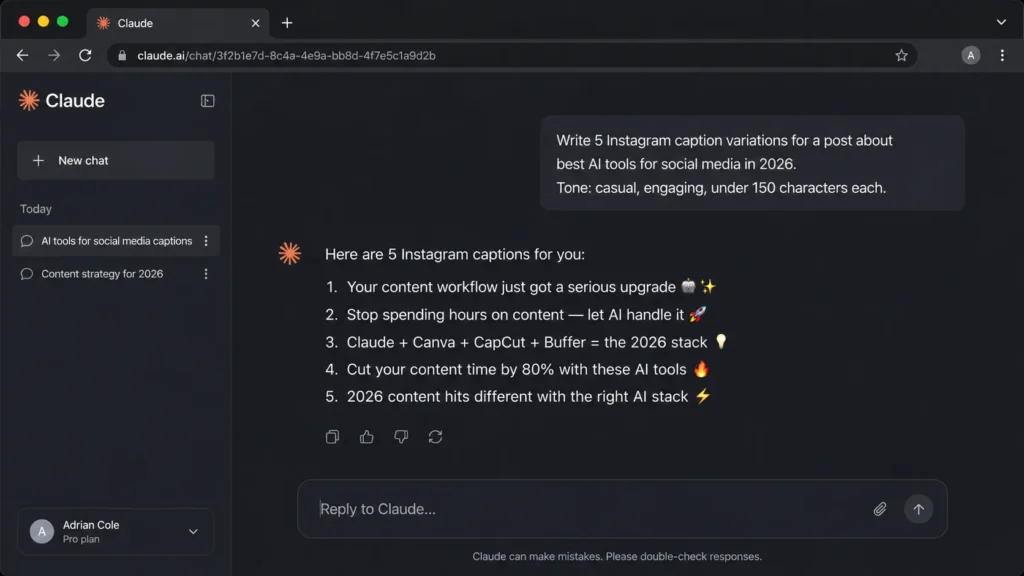
Claude, developed by Anthropic, has become one of the two dominant AI writing tools for content creators in 2026 — alongside ChatGPT. Its particular strength is what practitioners describe as voice matching: the ability to analyze your existing content and produce new material that sounds like you wrote it, rather than producing the generic AI-flavored output that heavy social media users can now spot immediately.
For social media content creation, Claude handles the full writing cycle — caption drafts, content calendars, thread structures, video scripts, carousel copy, and content repurposing from long-form articles or videos into platform-specific short posts. It handles long-form thinking with a level of coherence that makes it particularly effective for LinkedIn content and newsletter-to-social repurposing workflows.
The practical problem with AI-generated social content is not that it is wrong — it is that it is generic. It sounds like every other brand using the same prompts. Claude’s advantage is the combination of its long context window and its instruction-following precision. You can feed it a large sample of your existing content, describe your tone and audience in detail, and receive output that is genuinely calibrated to your voice rather than a statistical average of the internet.
Experienced creators report a consistent workflow: use Claude to generate five to ten caption variations for a single piece of content, then select and lightly edit the one that fits best. The editing step is not optional — AI-generated content that goes out unedited is detectable and performs worse — but the drafting step compresses from twenty minutes to two.
Claude does not generate images, manage scheduling, or edit video. It is a writing and thinking tool. Treat it as your creative collaborator for the ideation and drafting phases of content creation, not as an all-in-one platform.
- Feed it your voice before asking for content. Paste your five best-performing posts into the conversation and ask Claude to identify the patterns in your tone, structure, and language. Use that analysis as the foundation for every subsequent request.
- Use it for repurposing, not just creation. Paste a long-form blog post or video transcript and ask Claude to generate one LinkedIn post, three Instagram captions, five tweet variants, and a carousel outline. One piece of content becomes a week of social posts in minutes.
- Ask for variations, not single outputs. Always request three to five versions of any caption or hook. The best version is rarely the first one.
| Plan | Price | Key Features |
|---|---|---|
| Free | $0/month | Limited daily usage, access to Claude Sonnet |
| Pro | $20/month | 5x usage, Extended Thinking, Google Workspace integration |
| Max | $100-$200/month | High-volume use, priority access, full Claude Code |
Expert Verdict: Claude is the strongest AI writing tool for content creators who prioritize voice consistency and content depth — its ability to match your existing tone and handle long-form repurposing tasks makes it the most practical daily writing partner for the best AI tools for social media content creation stack in 2026.
Tool 2: Canva — The Design Layer That Requires No Design Background
Canva remains the default visual design tool for social media content creators in 2026 — and its free tier continues to handle 90 percent of what most creators need without requiring a paid upgrade. Its AI features, consolidated under the Magic Studio banner, have matured significantly: Magic Write generates caption and post copy directly inside designs, Magic Design produces complete branded templates from a text description, and the Background Remover works cleanly on product and portrait photography without manual masking.
For social media specifically, Canva’s value is in the template-to-publish speed. A creator who knows their brand colors and fonts can produce a polished carousel, story graphic, or LinkedIn post banner in under ten minutes — without opening a brief, contacting a designer, or waiting for a revision cycle.
Purpose-built AI image generators produce more visually impressive individual images than Canva’s Magic Media feature. But for social media content creation, individual image quality is rarely the constraint. The constraint is producing ten branded, formatted, platform-optimized graphics per week consistently. Canva solves that problem better than any standalone image generator because it combines generation with templating, resizing, brand kit management, and direct publishing — all in one interface.
The brand kit feature is particularly valuable for teams: fonts, colors, logos, and approved image assets are centralized and automatically applied to every new design. This eliminates the consistency errors that accumulate when multiple people produce content independently.
Canva’s video editing capabilities are functional for simple cuts and text overlays but inadequate for the kind of dynamic short-form video that performs best on TikTok and Reels. For serious video content, you need a dedicated tool — which is where CapCut enters the stack.
- Build your brand kit before creating a single post. Uploading your logo, locking in your color palette, and setting your approved fonts takes thirty minutes and pays dividends on every design you produce afterward.
- Use Magic Resize to repurpose every design across platforms. Create one piece of content in the correct dimensions for Instagram, then use Magic Resize to instantly generate the Facebook, LinkedIn, Pinterest, and Twitter versions. One design becomes five in seconds.
- Use templates as starting points, not final outputs. Canva’s template library is so widely used that heavy social media users recognize the patterns. Use templates for structure and timing, but change colors, fonts, and imagery to distinguish your content from the default Canva aesthetic.
Expert Verdict: Canva remains the most practical visual design tool in the best AI tools for social media content creation stack because it combines AI-assisted design with the templating, brand management, and multi-platform formatting features that standalone image generators cannot provide — and its free tier is genuinely sufficient for individual creators.
Tool 3: CapCut — The Short-Form Video Editor That Runs on Your Phone
CapCut has become the default short-form video editor for social media creators in 2026 — installed on the majority of creator mobile devices and producing professional-quality output from its free tier. Its AI features handle the most time-intensive parts of video editing automatically: auto-captions with speaker detection, background noise removal, one-tap background removal, auto-highlight extraction from longer recordings, and a script-to-video feature that generates a complete short-form video from a text prompt.
For TikTok, Instagram Reels, and YouTube Shorts — the content formats that dominate social media engagement in 2026 — CapCut is three to four times faster than professional editing software like Premiere Pro or Final Cut for short-form output. The mobile-first interface means content can move from recording to edited to published without touching a desktop.
Auto-captions are not a convenience feature — they are a performance feature. Research consistently shows that captions increase video completion rates, extend average watch time, and improve accessibility for viewers scrolling in environments where audio is off. CapCut’s auto-caption accuracy is among the highest of any mobile editing tool, and the word-by-word animation options produce the kinetic text style that performs particularly well on TikTok and Reels.
CapCut is optimized for short-form content. For videos longer than ten minutes, for multi-track audio work, or for any production requiring professional color grading, the tool reaches its limits quickly. Creators producing long-form YouTube content or branded video campaigns with complex requirements need a professional editor alongside CapCut, not instead of it.
- Record first, script second. CapCut’s auto-transcript feature converts your spoken content into an editable script after recording. Editing the transcript edits the video. For talking-head content, this removes the need to memorize scripts and dramatically reduces the number of takes required.
- Use templates for hooks, not for full videos. CapCut’s trending template library is updated in real time with formats that are performing on TikTok. Use these as inspiration for your opening three seconds — the hook that determines whether viewers continue watching — then build your original content on top.
- Batch edit, not one-at-a-time. Record multiple pieces of content in a single session, then edit them in sequence using CapCut’s project organization. The efficiency gains from batching editing sessions are significant compared to producing each video start-to-finish separately.
| Plan | Price | Key Features |
|---|---|---|
| Free | $0/month | Full editing suite, auto-captions, basic AI features, watermark on some exports |
| Pro | ~$10/month | Watermark removal, premium templates, advanced AI features, cloud storage |
Expert Verdict: CapCut is the non-negotiable video tool in any best AI tools for social media content creation in 2026 stack for creators producing short-form content — its combination of AI-assisted editing features, mobile-first workflow, and free-tier capability makes it the fastest path from recorded footage to published Reel or TikTok available in 2026.
Tool 4: Buffer — The Scheduling Layer That Makes Consistency Possible
Buffer is the scheduling and analytics tool that closes the loop on the content stack. Its AI Assistant generates caption drafts and post ideas directly within the scheduling interface — eliminating the tool-switching that most creators do between a writing tool and a scheduling platform. Its Start Page feature creates a simple link-in-bio landing page at no additional cost. And its analytics dashboard consolidates performance data across Instagram, TikTok, LinkedIn, Facebook, X, and Pinterest in one view.
The core value proposition is straightforward: consistency is the most reliable predictor of social media growth, and consistency requires a system. Buffer provides the system — a single place to plan, schedule, and review performance across all platforms — at a price point that makes it the best AI-to-cost ratio tool in the social media management category.
The algorithm reality of every major social platform in 2026 is that posting frequency and consistency are weighted heavily in content distribution. A creator who posts high-quality content erratically performs significantly worse than a creator who posts good content on a consistent, predictable schedule. Buffer removes the daily decision-making and manual posting that makes consistency hard to sustain — you schedule a week’s content in one session, and Buffer handles the publishing automatically at the optimal time for each platform.
Buffer’s AI-recommended posting times are drawn from your account’s actual audience engagement data rather than from generic industry benchmarks. For accounts with meaningful history, this produces posting schedules that are materially more effective than the “post at 9am on Tuesdays” advice that fills most social media guides.
Buffer’s AI writing features are useful for quick caption generation but are not a replacement for a dedicated writing tool like Claude for complex content repurposing or long-form ideation. Use Buffer’s AI Assistant for quick caption variations and scheduling copy; use Claude for deeper writing tasks.
- Batch schedule one week of content in a single session. Set aside two hours each week — or one hour if your content is already drafted — to schedule the following week’s posts across all platforms. This eliminates the daily decision of what to post and when, which is where most creators’ consistency breaks down.
- Use the analytics dashboard to identify your top performers monthly. Buffer’s performance data shows you which content formats, topics, and posting times are driving real engagement on your specific accounts. Review this data monthly and adjust your content calendar to produce more of what is working.
- Connect all platforms during setup, not one at a time. The full value of Buffer’s consolidated dashboard only materializes when all your active social accounts are connected. Set up every platform during onboarding so the analytics view is immediately comprehensive.
| Plan | Price | Key Features |
|---|---|---|
| Free | $0/month | 3 channels, 10 scheduled posts, basic analytics |
| Essentials | $6/channel/month (annual) | Unlimited posts, AI Assistant, engagement tools, analytics |
| Team | $12/channel/month (annual) | Collaboration tools, approval workflows, team access |
Expert Verdict: Buffer is the most cost-effective scheduling and analytics tool in the best AI tools for social media content creation in 2026 stack for individual creators and small teams — its combination of AI-assisted caption generation, multi-platform scheduling, and consolidated analytics delivers more value per dollar than any competing platform at its price point.
The Complete Stack — What It Costs and What It Delivers
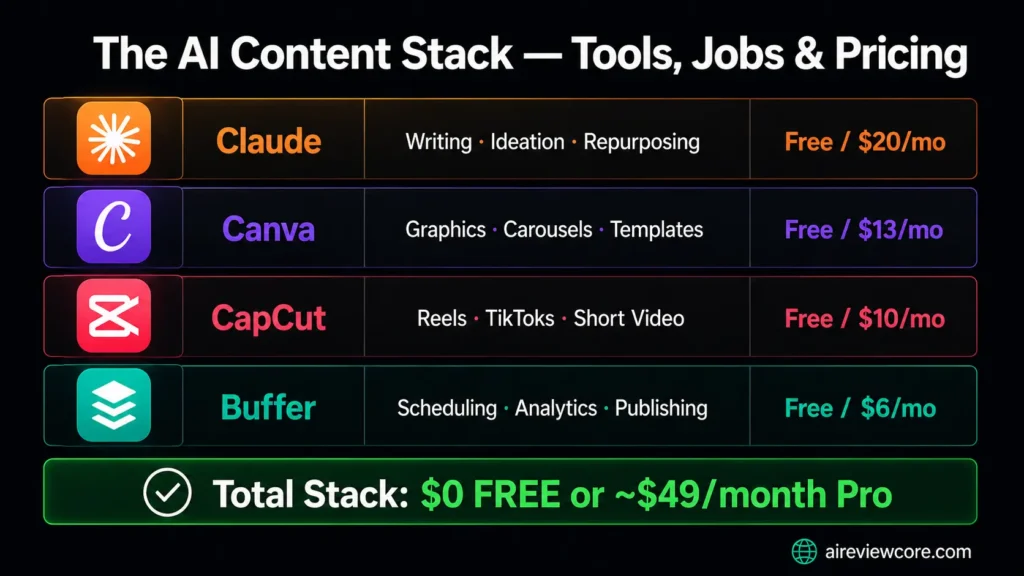
| Tool | Job in the Stack | Free Plan | Paid Plan |
|---|---|---|---|
| Claude | Writing, ideation, repurposing | ✅ Limited | $20/month (Pro) |
| Canva | Visual design, graphics, carousels | ✅ Generous | $13/month (Pro, annual) |
| CapCut | Short-form video editing | ✅ Full features | ~$10/month (Pro) |
| Buffer | Scheduling, analytics, publishing | ✅ 3 channels | $6/channel/month (annual) |
Total stack cost at free tier: $0 Total stack cost at paid tier: approximately $49/month for a solo creator
This four-tool stack covers writing, design, video, and scheduling — the complete content production cycle — for under $50 per month. That is less than the cost of a single hour of freelance content creation work.
Frequently Asked Questions
Do I need all four tools, or can I start with fewer? Start with two: Claude for writing and Canva for design. These two tools cover the highest-volume tasks for most creators. Add CapCut when video becomes a meaningful part of your content strategy, and add Buffer when you are managing more than two platforms or struggling with posting consistency.
Are the free tiers of these tools genuinely useful, or are they just trials? All four tools offer genuinely functional free plans. Canva’s free tier covers 90 percent of creator needs. CapCut’s free tier produces professional-quality output with only minor limitations. Buffer’s free tier is sufficient for creators managing one to three channels with moderate posting frequency. Claude’s free tier has usage limits that most casual creators will not hit daily.
Which tool has the steepest learning curve? None of these tools requires significant learning time. CapCut has the most features to explore but produces usable results from day one. Claude, Canva, and Buffer are intuitive from the first session. You should expect to reach a comfortable working speed with all four within two weeks of regular use.
Can I replace Claude with ChatGPT? Yes — both are effective writing tools for social media content. Claude has a slight advantage in voice matching and long-form repurposing tasks. ChatGPT has broader tool integrations through its plugin ecosystem. Either works effectively in this stack.
Is this stack suitable for a business, or just individual creators? Both. Individual creators can run this stack on free tiers at zero cost. Small business teams can scale to the paid tiers of all four tools for under $100 per month per person — significantly less than the cost of a part-time social media coordinator. For larger teams, Canva Teams and Buffer’s Team plan add the collaboration and approval features that multi-person workflows require.
Your Action Plan: Building Your Stack in the Right Order
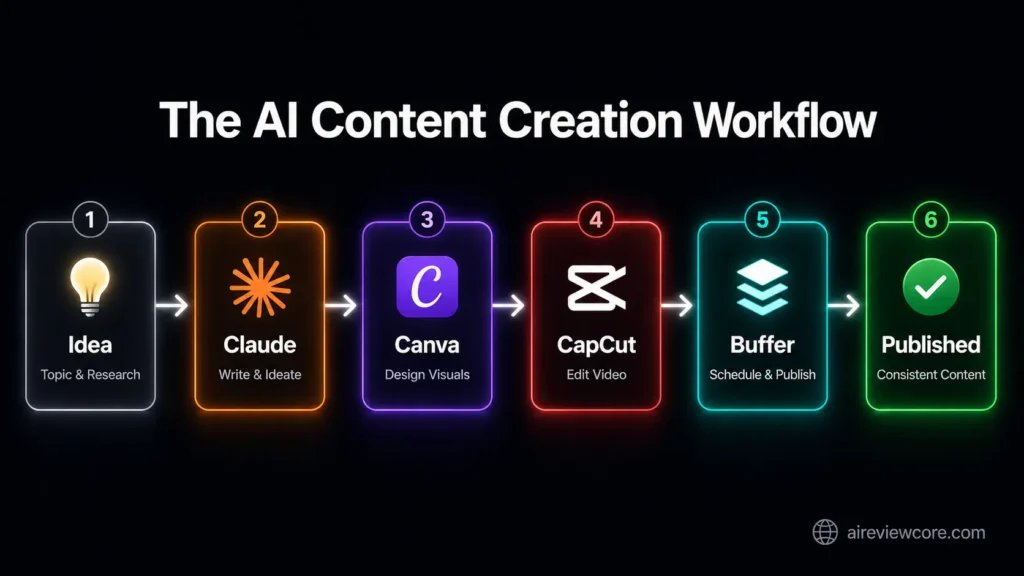
The best AI tools for social media content creation in 2026 work best when you adopt them in sequence rather than all at once. Here is the recommended onboarding order:
- Start with Claude. Before producing any visual content, establish your content voice and batch your first two weeks of written content. This gives you a bank of captions, scripts, and post ideas to work from — eliminating the blank-page problem that derails most creators’ consistency.
- Set up Canva. Build your brand kit first. Upload your logo, lock in your colors and fonts, and create two to three master templates for your most common content formats. Every design you produce after this will be faster and more consistent.
- Add CapCut when you are ready to produce video. Start with the auto-caption feature on existing footage. Once the basic workflow feels natural, explore the script-to-video and template features to increase your video output speed.
- Connect Buffer last. Once you have a content creation workflow that produces material consistently, Buffer transforms that material into a publishing system. Connect all your active social accounts, set up your first scheduled week, and establish the weekly batching habit that makes consistent posting sustainable.
The creators and marketing teams outperforming on social media in 2026 are not producing better content than their competitors — they are producing more consistent content, more efficiently, with systems that remove the friction points that cause most people to fall off their posting schedules.
This stack is that system.
Adrian Cole is a professional AI technology reviewer and creative technologist at aireviewcore.com, covering AI tools for content creators, marketers, and small business teams.
© 2026 aireviewcore.com — All rights reserved.