
Tested on Real Footage, Not Studio Shots | By Adrian Cole | aireviewcore.com
Last tested: April 2026 | Updated: June 2026
Table of Contents
Disclosure: This review is fully independent. No tool featured here sponsored, commissioned, or was notified about this article. No affiliate links are present. All tools were tested personally using the same footage set described below.
Most “Free” Face Swap Tools Are Not Free. Here Is What Actually Is.
The standard pattern in the AI face swap category is predictable: two to five swaps before a paywall, 480p resolution caps, or a visible watermark stamped across every output. That is a trial with extra friction — not a free tier.
The best free AI face swap tools in 2026 break from that pattern. A genuine free tier means you can complete a real creative task, download a clean result without a watermark, and return tomorrow and do it again. Four tools currently meet that bar in 2026. Each has real strengths and documented limitations — both are covered below without exaggeration in either direction.
One non-negotiable note before the tools: face swap technology requires the consent of the person whose likeness you are working with. Creating non-consensual imagery, deepfakes intended to deceive, or content that misrepresents real people is harmful regardless of which tool you use. Every tool in this guide is built for creative, entertainment, and professional content production. Use them accordingly.
How This Review Was Conducted
Most face swap reviews test on clean studio headshots and present the results as representative. That is not how face swap tools perform in real production. Here is exactly what was tested.
Test media used:
- 3 studio-lit, front-facing headshots (controlled conditions)
- 3 phone-recorded video clips, 30 to 45 seconds each, natural indoor lighting
- 1 group photo with 4 faces
- 2 video clips with head movement from 30° to 65° off-center
Evaluation criteria:
- Output quality on real footage — not just clean studio shots
- Free tier honesty — does the free plan deliver genuinely usable output without bait-and-switch mechanics
- Watermark policy — is the output clean and downloadable without payment
- Privacy handling — where is your data processed and stored
- Failure modes — every tool has them, and this review documents them explicitly
Tools requiring a paid subscription to generate any output, tools that watermark all free results regardless of quality, or tools unavailable in major markets were excluded from testing.
The 4 Best Free AI Face Swap Tools in 2026
Magic Hour is the strongest free face swap tool tested in April 2026, and it earns that position specifically on real footage — not curated test images.
On controlled studio photos, every tool in this guide performs adequately. The differentiator is what happens on a 30-second phone-recorded clip with natural lighting variation and head movement between 30° and 60° off-center. Magic Hour produced the most consistent frame-to-frame tracking of any web-based tool tested — minimal flickering, accurate jaw and hairline blending across movement. The two closest competitors produced visible artifacts at the jawline under identical conditions.
The platform extends beyond face swap. Lip sync, talking photo generation, and image-to-video tools are available from the same dashboard, which reduces workflow fragmentation for creators who need multiple AI production steps. Credits never expire, no concurrency cap means jobs process immediately regardless of volume, and the no-signup entry point means you test before creating any account.
Magic Hour is trusted at production scale by teams at Meta, the NBA, L’Oréal, Puma, Cisco, and Shopify. The API matches every feature available in the interface, which matters for teams building automated pipelines.
Where it falls short: Quality degrades noticeably on full-profile shots beyond approximately 70° off-center. It is not designed for stylized, animated, or non-human subjects. Creators working primarily with extreme angles will find the ceiling faster than others.
Privacy: Cloud-based processing. Uploading footage means it leaves your device. Review the privacy policy before uploading footage of other people in sensitive contexts.
Expert Workflow: Test without creating an account first. The no-signup entry gives you a genuine quality sample before any commitment. When evaluating for video, upload your actual production footage — not a clean test image. The quality difference between Magic Hour on real footage and optimized test content is smaller than most tools, but seeing it on your own content before scaling is still the right approach. For group content, use the multi-face dashboard to map all faces before starting the swap rather than processing faces sequentially.
| Watermark | No |
| Signup to try | No |
| Video support | Yes |
| Multi-face | Yes |
| Free credits | 400 — no expiry |
| Paid plans | $10 / $30 / $66 per month |
Expert Verdict: The strongest free video face swap tool available in 2026 on real footage. The no-signup entry and no-watermark policy make it the right starting point for most creators. Understand the cloud processing tradeoff before uploading sensitive material.
FaceSwapper.ai solves a narrow problem well: delivering a clean face swap on a photo with no account, no payment information, no watermark, and no friction. You arrive at the site, upload your images, get a result, download it, and leave. Nothing else is required.
Output quality on well-lit, front-facing photos is good. Blending is accurate on standard creative use cases — portrait swaps, group photos, concept testing for social media. For the specific scenario where you need a clean result immediately without creating another platform account, no other tool in this guide delivers faster.
Where it falls short: FaceSwapper.ai processes static images only. No video support, no batch processing, no additional creative tools. Multi-face capability is limited compared to the other tools in this guide. For any use case beyond a single photo swap, it reaches its ceiling quickly.
The absence of an account also means there is no usage history and no way to retrieve a result after closing the tab. Download immediately after generation.
Privacy: No account required reduces the data footprint significantly. Uploaded images are still processed on external servers — review their privacy policy for retention details.
Expert Workflow: Use FaceSwapper.ai for quick one-off photo swaps where speed matters more than workflow integration. For best results, use source photos where the face is clearly lit and within approximately 45° of center. Like all tools in this category, output quality on front-facing, well-lit reference material is noticeably stronger than on angled or low-light inputs.
| Watermark | No |
| Signup required | No |
| Video support | No |
| Multi-face | Limited |
| Free credits | Direct use — no credit system |
| Paid plans | Not required for core photo swap |
Expert Verdict: The right tool when you need a clean face swap on a photo in under a minute with no platform relationship and no watermark. The wrong tool for video, volume, or multi-face output.
Remaker AI’s free tier works differently from the other tools in this guide. Rather than a fixed credit allocation that runs out, it offers 30 credits on signup plus daily check-in bonuses that accumulate over time. For a creator who uses face swap regularly but not at production volume, this daily accumulation produces a genuinely sustainable free workflow that does not hit a wall after the first week.
The platform extends into image upscaling, background removal, and AI portrait generation — which makes it more useful than dedicated face swap tools for creators who need multiple image editing capabilities from a single free platform. This toolset breadth is particularly valuable for independent creators who want to explore AI image production without committing to multiple subscriptions.
Where it falls short: Free outputs carry a watermark. This is the most important limitation to understand clearly before investing time in the platform. Free results are suitable for evaluation, personal projects, and concept testing — not for professional or commercial deliverables. Video swaps consume credits faster than photo swaps, which shortens the free runway for video-heavy workflows.
Privacy: Account creation required, which ties uploaded content to a profile. Review the data retention policy before uploading footage of other people.
Expert Workflow: Use the daily check-in to accumulate credits during periods when you are not actively producing content, so you have a meaningful balance available when a project requires multiple swaps. Prioritize photo swaps over video swaps on the free tier to maximize output from your credit balance. The watermark on free results is acceptable for internal reviews and client concept presentations — plan for the paid tier before delivering final commercial output.
| Watermark | Yes on free plan |
| Signup required | Yes |
| Video support | Yes — higher credit cost |
| Multi-face | Yes |
| Free credits | 30 on signup + daily bonuses |
| Paid plans | Competitive rates for watermark-free output |
Expert Verdict: The right choice for creators who want a sustained free workflow over time and access to multiple AI image tools alongside face swap. The watermark on free outputs is the honest tradeoff — plan for the paid tier when professional output is the goal.
WaveSpeed takes a different position on the watermark question: rather than limiting resolution or stamping output, it delivers full-resolution PNG without a visible watermark on its free tier — and does so without requiring an account.
For users who are unwilling to accept watermarked photos or resolution downgrading as the price of a free plan, and for whom privacy is a higher priority than workflow breadth, WaveSpeed is the strongest alternative to Magic Hour for photo use cases.
The no-login model means no account data is created, no browsing history is tied to a profile, and no platform relationship is established. For projects involving other people’s likenesses — clients, subjects, collaborators — this reduced data footprint is a meaningful production consideration. Output quality is competitive for well-lit, front-facing photo swaps with accurate skin tone matching and realistic blending.
Where it falls short: Video support on the free tier is limited. The tool is optimized for single-face photo swaps rather than multi-face or group content. Workflow breadth is narrower than Magic Hour or Remaker AI.
Regulatory note: WaveSpeed’s documentation references EU AI Act Article 50 disclosure requirements effective August 2026, which require labeling AI-generated content depicting real people in realistic scenarios. This applies to any creator publishing face swap content publicly — not to using the tool privately.
Expert Workflow: Use WaveSpeed for face swap projects where privacy matters more than workflow breadth. For EU-based creators or anyone producing content for European audiences, review the AI Act Article 50 disclosure requirements before August 2026. The disclosure rules apply to the content you publish — building a disclosure label into your publishing workflow now is the responsible approach for any creator working with face swap technology at scale.
| Watermark | No |
| Login required | No |
| Video support | Limited on free tier |
| Multi-face | Limited |
| Privacy | No account — reduced data footprint |
| Paid plans | Available for higher volume |
Expert Verdict: The right choice when privacy matters more than workflow breadth. Full-resolution, watermark-free photo output with no account required makes it the strongest privacy-first free option in this guide.
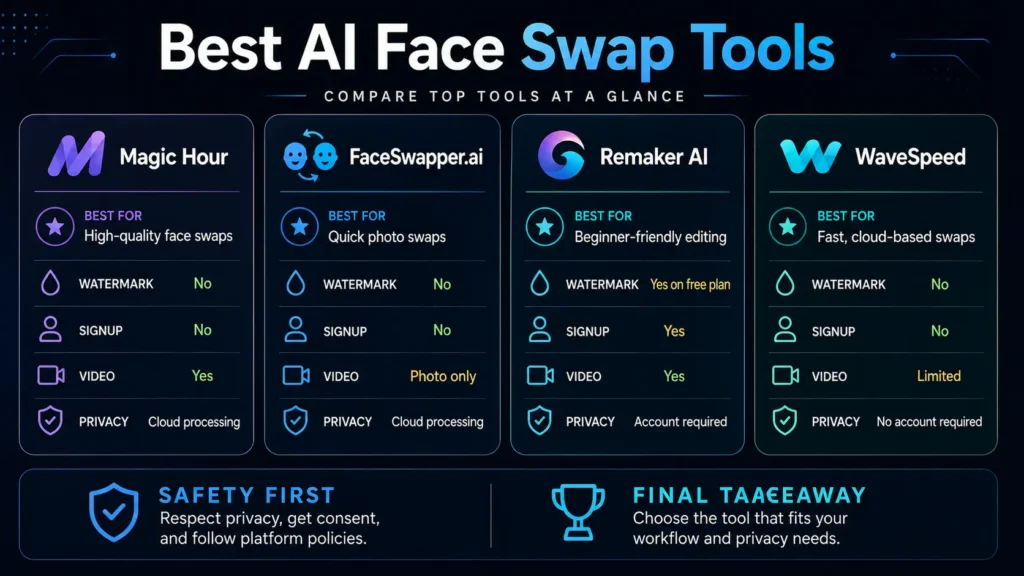
Side-by-Side Comparison
| Tool | Watermark | Signup | Video | Multi-Face | Best Use Case |
| Magic Hour | No | No (to try) | Yes | Yes | Best overall — real footage video |
| FaceSwapper.ai | No | No | No | Limited | Instant single photo swap |
| Remaker AI | Yes (free) | Yes | Yes | Yes | Sustained free workflow, multi-tool |
| WaveSpeed | No | No | Limited | Limited | Privacy-first, full-res photos |
What the EU AI Act Means for Face Swap Creators in 2026
Starting August 2026, EU AI Act Article 50 introduces mandatory disclosure requirements (EU Parliament) for AI-generated content that realistically depicts real people in recognizable form. This applies to content you publish — not to using a face swap tool privately.
The practical implication for content creators is straightforward: labeling face swap content as AI-generated is becoming a legal requirement in the EU rather than a voluntary ethical choice. For creators publishing to global audiences, the EU standard is likely to become the de facto production baseline regardless of where you are located.
Every tool in this guide produces AI-generated content that may trigger these disclosure requirements when published publicly. Building a disclosure label into your publishing workflow now — before August 2026 — is the responsible approach for any creator working with face swap technology at scale.
Frequently Asked Questions
Are there truly free AI face swap tools with no watermark in 2026? Yes — Magic Hour, FaceSwapper.ai, and WaveSpeed all produce watermark-free output on their free tiers. Remaker AI’s free tier includes a watermark. Of the three watermark-free options, Magic Hour is the strongest on output quality and supports video. FaceSwapper.ai is the most frictionless for single photos. WaveSpeed is the best choice for privacy-conscious users who need full-resolution output without an account.
Which free tool is best for video face swap in 2026? Magic Hour is the strongest free option for video, producing consistent results on real footage with motion and varying lighting — the conditions where most free tools produce artifacts or flickering. Remaker AI also supports video on the free tier, but outputs carry a watermark.
Is it safe to upload photos to face swap tools? Safety varies significantly by platform. WaveSpeed and FaceSwapper.ai require no account, which reduces the data footprint of your uploads significantly. Tools requiring account creation tie uploaded content to a profile. If you are working with sensitive subjects, review each tool’s privacy and data retention policy directly before uploading.
Do these tools work on group photos with multiple faces? Magic Hour and Remaker AI both support multi-face detection and swapping in group photos. FaceSwapper.ai and WaveSpeed are primarily optimized for single-face use cases. If multi-face group content is your primary workflow, Magic Hour is the strongest free option.
What is the best free AI face swap tool overall in 2026? Magic Hour is the best overall — strongest output quality on real footage, watermark-free output, no signup required to test, video support, and a 400-credit free allocation that never expires. For instant no-friction photo swaps, FaceSwapper.ai is faster. For privacy-first full-resolution output, WaveSpeed is the strongest alternative.
Your Action Plan
The best free AI face swap tools in 2026 have removed the cost barrier that used to separate creators who could produce this type of content from those who could not. What remains is choosing the right tool for your actual use case — and understanding the ethical responsibilities that come with working with people’s likenesses.
Start with Magic Hour if you need video face swap or the strongest overall output quality. No signup, no credit card, no watermark — test it on a photo first, then try a short video clip.
Use FaceSwapper.ai for occasional one-off photo swaps where speed and zero friction matter more than anything else.
Set up Remaker AI if you need a sustained free creative workflow with access to multiple image editing tools. Accept that free outputs carry a watermark and plan for the paid tier when professional output is required.
Use WaveSpeed if privacy is a higher priority than workflow breadth, or if you need full-resolution photo output without creating an account.
For the full stack of AI creative tools that work alongside face swap in a content production workflow, see our guide on the best AI tools for social media content creation in 2026.
Adrian Cole is a technology reviewer and creative technologist at aireviewcore.com, covering AI creative tools, image generation, and practical production workflows.
This review is independent. No compensation was received from any tool featured. Testing was conducted in April 2026.
© 2026 aireviewcore.com — All rights reserved.