

Cut Your Grading Time by 60–80% — Without Sacrificing Feedback Quality | By Adrian Cole | aireviewcore.com
Table of Contents
The best AI grading tools for teachers in 2026 exist because 140 hours is too much time to spend on paperwork.
That is how many hours the average teacher spends on grading across a 28-week school year — according to the Teacher Workload Research Report 2024. Five hours per week, every week, marking papers instead of teaching, planning, or simply recovering.
The best AI grading tools for teachers in 2026 have changed that calculation in a way that earlier versions of the technology could not. Transcription accuracy for handwritten work is reliable. Rubric alignment is genuinely customizable. Feedback quality has crossed the threshold where students can act on it. And the tools that have been purpose-built for educators — rather than repurposed from general AI products — now integrate directly with Google Classroom, Canvas, and the other platforms teachers already use every day.
This guide covers four tools that consistently deliver real grading time savings across different teaching contexts — from elementary classrooms to university courses. Each is evaluated on what it actually does well, where it falls short, and which type of teacher will get the most out of it.
Why Most Teachers Are Still Grading Manually And Why That Is Changing Fast
Three in ten teachers now use AI tools at least weekly, saving an estimated 5.9 hours per week — according to a 2025 Gallup study commissioned by the Walton Family Foundation. That number is rising fast. But seven in ten teachers are still doing the bulk of their grading manually, often because they tried one AI grading tool, found it did not fit their workflow, and went back to what they knew.
The problem is not the technology. It is the mismatch between tool and teaching context.
An elementary teacher grading handwritten math worksheets has completely different needs from a university professor running large STEM courses with TA teams. An ELA teacher assigning weekly essays needs something different from a science teacher grading lab reports. The right AI grading tool is not the one with the most features — it is the one built for the assignment type you actually grade most often.
Before choosing any tool, answer four questions:
What assignment type makes up most of your grading load — essays, short answers, multiple choice, coding, or handwritten work? Do you use Google Classroom, Canvas, Blackboard, or another LMS? Do you need plagiarism or AI-content detection built in? Are you grading solo or with a team of TAs or co-instructors?
Your answers match you to one of the four tools below before you read a single review.
The 4 Best AI Grading Tools for Teachers in 2026
If you teach K–12 and grade a mix of essays, worksheets, quizzes, and handwritten work — GradingPal is currently the most complete solution built specifically for that reality.
The platform handles the full range of assignment types that real classrooms produce: math worksheets, reading comprehension packets, science diagrams, vocabulary activities, STAAR practice tests, short-answer quizzes, and written essays. Its OCR accuracy on handwritten work is strong enough to handle student worksheets reliably — the kind of mixed-format grading that trips up most general-purpose AI tools. Real teachers report grading full class sets of history worksheets, economics packets, and STAAR practice tests in minutes rather than hours.
What makes it genuinely useful is the rubric system. GradingPal supports drag-and-drop rubric creation with pre-built templates aligned to Common Core, NGSS, TEKS, and other frameworks. You can import existing rubrics, customize them, and reuse them across assignments and classes without rebuilding from scratch each time. The criterion-by-criterion scoring gives you — and your students — a clear breakdown of where marks were gained or lost, not just a final number.
The Google Classroom integration is native, not bolted on. Rosters, assignments, submissions, and grade return all sync directly, which removes the copy-paste overhead that undermines most AI grading workflows. For younger grades, a teacher-upload mode means students never interact with the platform directly.
The limitation worth knowing: GradingPal’s analytics are strong at the class level — trends, criterion mastery, progress tracking — but individual student longitudinal tracking across an entire year requires the School and District plan. Solo teachers on the free or Lite plan get class-level insights, not multi-month individual growth curves.
Expert Workflow:
- Spend 20 minutes building your rubric template library before the school year starts. Import your existing rubrics, align them to your state standards, and save them as reusable templates. Every assignment you grade after this point will be faster because the rubric infrastructure is already in place.
- Use the free plan’s 100-submission limit to grade your first full class set. The quality gap between your first AI-graded batch and your manual grading will tell you exactly how much time this tool is worth in your specific classroom context.
- Run the performance analytics report after each unit, not after each assignment. The class-level insights are most actionable when you can see patterns across a body of work rather than reacting to individual assignment results.
| Best for | K–12 teachers grading mixed assignment types |
| Free plan | ✅ 100 submissions/month |
| Paid plan | Lite $14/mo (annual) · Pro $26/mo (annual) |
| LMS integration | Google Classroom (native) |
| Handwritten work | ✅ OCR supported |
| FERPA compliant | ✅ Yes |
Expert Verdict: GradingPal is the strongest all-round choice for K–12 teachers who grade diverse assignment types across multiple subjects. The Pro plan at $26/month delivers unlimited submissions with full worksheet, quiz, and multimedia support — making it the most cost-effective unlimited option for active classrooms.
CoGrader occupies a specific and valuable position in the AI grading category: it is the tool that learns your grading style, not the one that imposes its own.
The setup process is more demanding than most tools — you upload your assignment, provide your rubric, and manually grade a minimum of three submissions to train the AI on how you evaluate work. That upfront investment pays off in a way that shortcut-based tools cannot replicate. The feedback CoGrader generates after training is described consistently by teachers as sounding like their own — matching tone, emphasis, and the specific criteria they prioritize rather than producing generic comments that feel detached from the actual classroom relationship.
For Google Classroom users specifically, CoGrader’s integration is one of the deepest in the category. Assignments sync directly, submissions come in automatically, and grades return to the gradebook without manual export and import cycles. If your entire teaching workflow runs through Google Classroom, CoGrader slots into that infrastructure rather than sitting beside it.
The honest limitation: CoGrader requires rubric training for each new assignment type. Teachers who assign a wide variety of different assignment formats throughout the year will spend more setup time than those who grade the same format repeatedly. The tool earns its efficiency advantage over time — not immediately.
Expert Workflow:
- Train CoGrader on your three hardest-to-grade assignments first — the ones where feedback quality matters most and consistency is most difficult to maintain manually. The AI learning investment is highest-value where the grading challenge is highest.
- Use the feedback tone customization to match your classroom relationship. CoGrader’s ability to adjust the formality and directness of its feedback means students receive comments that feel consistent with how you communicate with them in class, not like they came from a different source.
- Review the first five AI-graded submissions from every new assignment type before approving the batch. The training model improves with corrections — catching discrepancies early produces better output for the remaining submissions.
| Best for | Essay grading and Google Classroom-integrated workflows |
| Free plan | ✅ 100 submissions/month |
| Paid plan | Standard $15/mo (annual) · $19/mo (monthly) |
| LMS integration | Google Classroom (native) |
| Handwritten work | ✅ Supported on paid plans |
| AI style learning | ✅ Learns your grading voice |
Expert Verdict: CoGrader is the right tool for teachers who prioritize feedback quality over grading speed its style-learning system produces the most personalized AI feedback available in the category, and the Google Classroom integration makes it the smoothest workflow choice for teachers already embedded in that ecosystem.
EssayGrader does one thing and does it better than anything else in this guide: it grades written assignments at scale, with consistent rubric application, across every submission in a class set.
The platform is trusted by more than 100,000 teachers across 1,000 schools and colleges — a user base that reflects its primary strength. If you are an ELA teacher regularly assigning essays, a writing instructor managing large classes, or any educator whose grading load is dominated by long-form written work, EssayGrader was built specifically for that workflow.
The academic integrity integration is what separates it from general-purpose essay feedback tools. Built-in AI writing detection identifies AI-generated content within student essays. A separate plagiarism detection tool checks for originality. Both features are integrated into the grading workflow — you get rubric-based feedback, AI detection, and plagiarism checking in a single pass, without managing three separate subscriptions or platforms. In 2026, when AI-generated student writing has become a genuine classroom challenge, that integrated approach is not a nice-to-have feature. It is a practical necessity.
The consistency argument for AI grading is strongest with high-volume essay grading. Human graders — regardless of experience — are subject to fatigue effects after the 10th, 20th, or 30th paper in a batch. EssayGrader applies the same rubric criteria uniformly to every submission, whether it is the second essay or the fifty-second. Students graded near the end of a batch get the same quality of evaluation as those graded at the beginning.
The limitation: EssayGrader is focused on written assignments. It is not a multi-format grading platform — if you also need to handle handwritten worksheets, math problems, or quiz-style assessments, you will need a supplementary tool for those assignment types.
Expert Workflow:
- Build your rubric library during the first week of school, before assignments start coming in. EssayGrader’s rubric builder is fast once you have a clear sense of your criteria — and reusing rubrics across similar assignments throughout the year eliminates the setup time from every subsequent grading cycle.
- Use the AI detection and plagiarism results as conversation starters, not automatic sanctions. Review flagged submissions before taking any action — the detection tools are accurate but not infallible, and the most educationally productive response to a flagged submission is usually a direct conversation with the student.
- Integrate with Google Classroom or Canvas from day one. The manual alternative — downloading submissions, uploading to EssayGrader, and manually entering grades back into your LMS — adds enough friction to undermine the time savings the tool otherwise delivers.
| Best for | High-volume essay and writing assignment grading |
| Free plan | ✅ Available |
| Paid plan | From $9.99/month |
| LMS integration | Google Classroom · Canvas |
| AI detection | ✅ Built in |
| Plagiarism checking | ✅ Built in |
Expert Verdict: EssayGrader is the default choice for any teacher whose grading load is dominated by written work — its combination of consistent rubric-based feedback, built-in AI detection, and plagiarism checking covers the full set of challenges that writing-focused educators face in 2026 without requiring multiple platform subscriptions.
Gradescope operates at a different scale than the other tools in this guide. Originally built at UC Berkeley and now part of Turnitin, it is the platform that university departments, large secondary school programs, and institutions with TA teams default to when they need grading infrastructure rather than an individual teacher tool.
The defining feature is auto-grouping. The system clusters similar student answers together so you — or a TA — can grade one response and apply that evaluation to every similar submission in the class set at once. For a professor running a course with 200 or 300 students, this changes the grading math from “grade every submission individually” to “grade representative samples and review the rest.” The time reduction at scale is significant.
Gradescope handles the full range of higher-education assessment formats — essays, problem sets, handwritten exams, coding assignments, short answers, and bubble-sheet multiple choice. Its integration with Canvas, Blackboard, and other institutional LMS platforms is deep, which matters in university environments where Google Classroom is rarely the primary platform.
The honest limitation for individual teachers: Gradescope is not designed for solo classroom use at the K–12 level. Full LMS integration requires an institutional license. The setup and rubric calibration process is more demanding than consumer-grade tools. And the pricing model — which runs $1 to $3 per student per course on some plans — adds up in ways that a flat monthly subscription does not. It is institutional infrastructure, not an individual teacher tool.
Expert Workflow:
- Use the answer-grouping feature for every short-answer and problem-set assignment, not just high-stakes exams. The time savings are largest when the same answer patterns repeat across many students — which is true for most structured assignments, not just exams.
- Build your rubric with TA input before the course begins. Gradescope’s rubric calibration works best when multiple graders align on criteria interpretation upfront — it reduces inter-rater variability and produces more consistent feedback across a team.
- Export analytics at mid-semester as well as end-of-semester. The class performance data is most actionable when you can adjust instruction before the final assessment cycle, not after it.
| Best for | Universities, large classes, TA-managed grading |
| Free plan | ✅ Limited individual accounts |
| Paid plan | $1–3/student/course · Institutional licensing |
| LMS integration | Canvas · Blackboard · Google Classroom (institutional) |
| Handwritten work | ✅ Full support |
| Assignment types | Essays · Problem sets · Code · Exams · Multiple choice |
Expert Verdict: Gradescope is the strongest grading infrastructure available for higher education institutions and large secondary school programs — but individual K–12 teachers will find better value, faster setup, and more practical workflow integration with GradingPal or CoGrader at their price points.
Quick Comparison — Which Tool Belongs in Your Workflow?
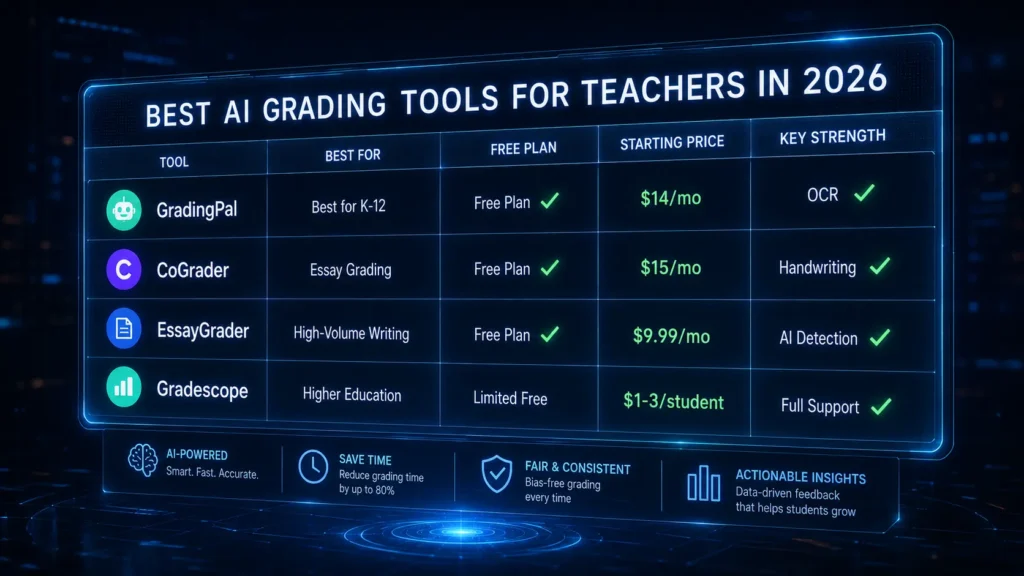
| Tool | Best For | Free Plan | Starting Price | Handwriting | AI Detection |
| GradingPal | K–12 mixed assignment types | ✅ 100/month | $14/mo (annual) | ✅ OCR | ❌ |
| CoGrader | Essay grading, Google Classroom | ✅ 100/month | $15/mo (annual) | ✅ Paid plans | ❌ |
| EssayGrader | High-volume written work | ✅ Available | $9.99/mo | ❌ | ✅ Built in |
| Gradescope | Higher ed, large classes | ✅ Limited | $1–3/student | ✅ Full support | ❌ |
What to Look for Before You Choose — The Four Questions That Matter
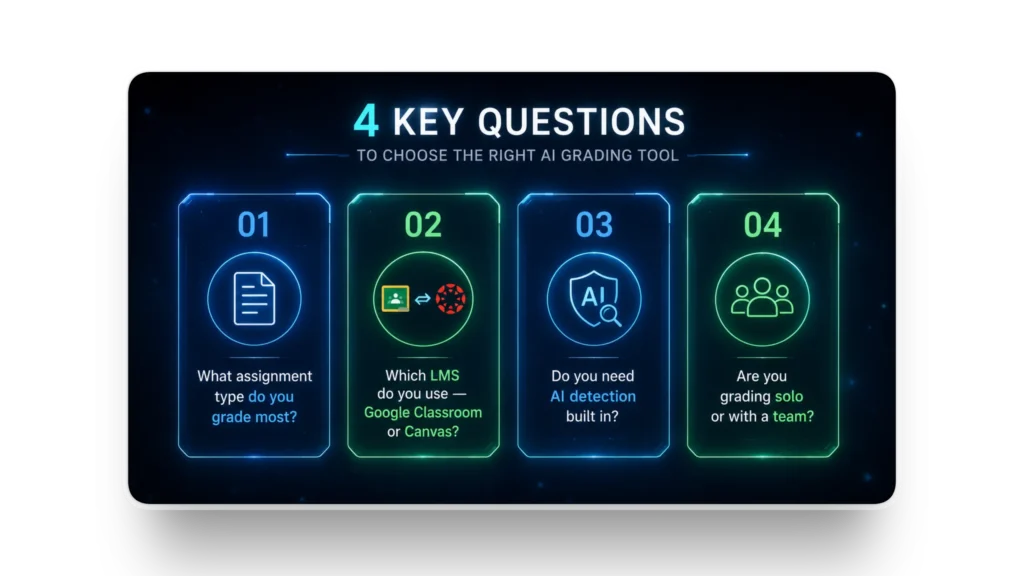
Most teachers who try an AI grading tool and abandon it within a month made the same mistake: they chose based on features rather than fit. Here is the decision framework that actually works.
Question 1: What is your primary assignment type? Essays and long-form writing → EssayGrader or CoGrader. Mixed K–12 formats including handwritten worksheets → GradingPal. Large-scale university assessments → Gradescope. If your answer is “all of the above,” start with GradingPal — its coverage is the broadest across assignment types.
Question 2: Which LMS are you already using? Google Classroom → CoGrader or GradingPal for the deepest native integration. Canvas or Blackboard at the institutional level → Gradescope. Any LMS with basic export/import → EssayGrader works across most platforms.
Question 3: Do you need AI detection built in? If AI-generated student writing is already a concern in your classroom — and in 2026, it is a concern in most classrooms — EssayGrader is the only tool in this guide with both AI detection and plagiarism checking integrated into the grading workflow. The others require a separate subscription for this capability.
Question 4: Are you grading solo or with a team? Solo K–12 teacher → GradingPal or CoGrader. Teacher with TA support or department-level grading → Gradescope’s answer-grouping and team-grading infrastructure is purpose-built for that workflow.
Frequently Asked Questions
Which AI grading tool saves the most time? Across verified user data, AI grading tools consistently reduce grading time by 60 to 80 percent for teachers who fully integrate them into their workflow. GradingPal users report grading full class sets of worksheets in minutes rather than hours. EssayGrader users with large essay loads report the largest absolute time savings — a 30-essay batch that previously took three hours can be completed in under 45 minutes with rubric-based AI feedback.
Are AI grading tools accurate enough to trust? Accuracy varies by assignment type. For objective assessment — multiple choice, fill-in-the-blank, structured short answers — AI grading tools are highly reliable. For subjective written work, accuracy depends heavily on rubric specificity. Vague rubric criteria produce inconsistent AI feedback. Detailed, criterion-specific rubrics with clear level descriptors produce reliable, actionable feedback that experienced teachers describe as comparable to their own evaluation quality.
Do these tools comply with student data privacy requirements? GradingPal is fully FERPA-compliant. EssayGrader and CoGrader follow standard data protection practices for educational software. Gradescope, as a Turnitin product, operates under institutional data agreements. Always verify current compliance documentation directly with any tool before deploying it with student data in a school or district environment.
Can I use AI grading tools for handwritten assignments? Yes — but not equally across tools. GradingPal and Gradescope have the strongest OCR capabilities for handwritten work in this guide. CoGrader supports handwritten assignments on paid plans. EssayGrader is optimized for typed written submissions and is not the right choice for handwritten worksheet grading.
What is the best free AI grading tool for teachers? GradingPal and CoGrader both offer 100 submissions per month on their free plans — enough to grade one or two full class sets. GradingPal’s free tier is stronger for teachers who need worksheet and quiz grading alongside essay support. CoGrader’s free tier is better for teachers focused exclusively on written work graded through Google Classroom. Both are genuinely functional, not trial-limited in the ways that make most free plans frustrating to use.
How do AI grading tools handle academic integrity in 2026? This is the category’s most significant evolving challenge. EssayGrader is currently the strongest in this guide for academic integrity — it integrates both AI writing detection and plagiarism checking directly into the grading workflow. The other tools in this guide do not include built-in AI detection; teachers who need this capability alongside rubric-based grading will need to use a separate tool or choose EssayGrader as their primary platform.
Your Action Plan: From Manual Grading to AI-Assisted in One Week
The transition from manual grading to AI-assisted grading does not have to be complicated. Here is the sequence that produces the smoothest adoption with the least disruption to your existing workflow.
If you teach K–12 with mixed assignment types: Sign up for GradingPal’s free plan. Import your most-used rubric. Run your next class set through it. Compare the AI-generated feedback against how you would have graded manually. The first batch tells you everything you need to know about whether the tool fits your classroom.
If you are a writing or ELA teacher with regular essay assignments: Start with EssayGrader’s free plan. Build one rubric for your most common essay type. Grade a class set you have already graded manually. Compare the feedback quality and the time it took. If the feedback is accurate and the time savings are real, the paid plan pays for itself with the first full grading cycle.
If you already use Google Classroom for everything: CoGrader is your most frictionless entry point. The Google Classroom integration means there is no new file management to learn — assignments come in through the channel you already use, and grades go back the same way. Start the free trial on a low-stakes assignment and scale from there.
If you are in a university or large secondary school environment: Gradescope requires an institutional conversation — but that conversation is worth having if your department is spending significant TA hours on repetitive grading tasks. The answer-grouping feature alone reduces the per-student grading time for problem sets and short-answer exams in ways that individual teacher tools cannot replicate at scale.
The 140 hours per year that teachers spend on grading is not going to zero. But it does not have to stay at 140. The tools exist. The question is which one fits your classroom.
For broader AI workflows, see our 4 best AI productivity tools in 2026
Adrian Cole is a professional AI technology reviewer and creative technologist at aireviewcore.com, covering AI tools for educators, content creators, and digital professionals.
© 2026 aireviewcore.com — All rights reserved.