

A Practical Security Guide, Not a Feature List
By Adrian Cole | aireviewcore.com
Published: August 2026
Table of Contents
Claude in Chrome can read pages, click links, type text, navigate between sites, and fill forms while you are signed in. That makes it useful for browser work — and fundamentally different from a normal chatbot. Here is what it can do, where the real risk comes from, and how to use it without giving an AI agent more authority than it needs.
Claude in Chrome became generally available on August 26, 2026, moving out of its limited pilot phase to paid Claude subscribers on Pro, Max, Team, and Enterprise plans. It is an official Chrome extension that lets Claude work in the browser you already use, including on sites that have no direct integration with Claude. Anthropic says the extension can read the current page, type text, click links, move between pages, and fill forms using the logins already active in your browser — and can now take some browser actions automatically when its safety system determines the action matches your original request.
That last detail is why the useful question is not “what can it automate?” The more useful question is: is Claude in Chrome safe enough for the task you actually want to hand over?
The short answer: it can be a sensible tool for low-risk, repetitive browser work when you keep a human in the loop and limit access. It is not a reason to give an autonomous agent unrestricted access to every tab, account, and sensitive workflow in your browser.
What Is Claude in Chrome?
Claude in Chrome is a browser extension from Anthropic. Instead of copying a page into a chat window, you can ask Claude to work with the page directly, using your existing browser session to understand content and perform actions in supported web workflows.
That allows tasks such as summarizing a long web page or set of open tabs, finding information across a vendor portal or internal dashboard, filling a routine form from information you provide, drafting text in a browser-based editor, navigating a multi-step website workflow, reading console errors and network requests when used alongside Claude Code, and recording a repeatable browser workflow for later use.
The key difference from an ordinary AI chat is agency. A chatbot normally gives you an answer and waits for you to act on it. A browser agent can turn an answer into clicks, text entries, navigation, and form submissions on its own.
The extension is off by default and enabled per conversation rather than running continuously in the background. Enterprise administrators can manage the extension organization-wide and restrict it to approved domains through allowlists and blocklists. Anthropic’s full release details are worth reading directly before you install it.
Is Claude in Chrome Safe?
Claude in Chrome has meaningful safeguards, but it is not risk-free. The safety of any browser agent depends on three things: what the agent can see — pages, emails, forms, files, and other content it reads; what the agent can do — typing, clicking, uploading, sending, submitting, or navigating; and what authority it inherits — the accounts and permissions already active in your browser.
That third point is the most important. The extension does not need to steal a password if your browser is already signed in. It may be able to act inside the same authenticated sessions you use for email, cloud storage, project tools, admin dashboards, and other services.
That does not mean Claude will deliberately misuse your access. The practical concern is that browser agents can encounter misleading or hostile instructions embedded in the content they are asked to read. If an agent misunderstands those instructions, follows a malicious prompt, or performs an action outside the user’s intended scope, the result can affect a real account — not an isolated demo environment.
The Biggest Risk: Prompt Injection

The main security challenge for Claude in Chrome is prompt injection.
Prompt injection happens when instructions are hidden inside content that an AI system reads. They can appear in a webpage, email, document, form field, or other browser content. A person may not notice the instructions at all, but an AI agent could interpret them as directions. Anthropic gives a clear example: imagine asking Claude to draft replies to your emails. A malicious email could contain a hidden instruction that tells the agent to forward other messages to an attacker. The instruction is not part of your request, but the agent may encounter it while reading the inbox.
This is not unique to Claude. It is a category-wide challenge for browser agents because their job is to read untrusted content and then take actions somewhere else. A web page might be harmless to a human visitor but still contain text designed to influence an AI system.
Anthropic reports that its safety classifiers, applied to Claude Sonnet 5, Opus 5, and Fable 5, reduced successful prompt injection attacks to near-zero in internal testing. That figure is worth reading precisely: it is Anthropic’s own internal testing result, not an independent third-party security audit, and users should weigh it accordingly rather than treating it as a guarantee.
The system has also been tested in the real world, not just internally. In December 2025, security researchers at Koi Security disclosed a zero-click vulnerability chain they named ShadowPrompt. The extension trusted any subdomain matching the pattern *.claude.ai, and one such subdomain hosting a third-party CAPTCHA component from Arkose Labs contained a genuine cross-site scripting bug. Chained together, a malicious website could silently inject instructions into a user’s Claude session with no click and no permission prompt required — potentially exposing Gmail tokens, Drive activity, or chat history, on an extension that had more than three million users at the time.
Anthropic confirmed the report within 24 hours of disclosure on December 27, 2025, and shipped a patched extension enforcing strict origin checks on January 15, 2026. Arkose Labs fixed the underlying XSS bug on February 19, 2026, with full remediation independently verified about two months after the initial report. That timeline cuts both ways: it shows the classifier-based defenses are a second line of protection rather than the only one, since this specific bug lived in the trust boundary underneath them — but it also shows the disclosure-to-patch process worked as intended once an independent researcher found a real issue.
How Anthropic Protects Users
Anthropic has not ignored the prompt-injection problem. Its release notes describe several protections designed specifically for browser use.
Content screening. When Claude reads a webpage or email, the content reaches the model through a tool result. Anthropic says it uses trained probes to scan those results for signs of prompt injection before the content is acted on. If the system detects a likely attack, Claude can be warned to treat the content cautiously or ask the user before proceeding.
Action verification. Before an automatic browser action runs, a safety classifier checks whether the action matches the user’s original request. If you ask Claude to summarize a page, a request to navigate to an unrelated site or submit a form should not match that task and can be blocked.
Hard-coded action bans. Beyond the classifier system, certain actions are blocked at the code level regardless of permissions or plan. Claude in Chrome cannot execute stock trades or investment transactions, bypass CAPTCHAs, type sensitive data into card number or Social Security number fields, or scrape facial images. These are not guidelines the model is trained to follow — they are hard limits the extension will not cross even if instructed to.
User control. Automatic action approval is optional. You can disable it and return to manual approvals, which is the better choice when you are learning the tool, working in unfamiliar websites, or handling anything with a meaningful consequence.
Enterprise controls. Administrators can manage Claude in Chrome through organization settings and limit the extension to approved domains, with allowlists and blocklists available on Team and Enterprise plans. A browser agent with access only to a small set of business tools has a much smaller potential impact than an agent that can freely move through every website a user visits.
Model gating. Injection-resistance is not identical across every model tier. Anthropic’s strongest reported defenses are associated with its top-tier models; users on lower-cost model access within the extension are, by the company’s own framing, working with a somewhat weaker injection-resistance profile than users on the flagship tier.
What Claude in Chrome Can Safely Handle
The best early use cases are tasks where an error is easy to detect, easy to undo, and unlikely to expose sensitive data. Good places to start include summarizing public research pages you are already reviewing, extracting facts from a public website into a draft document, comparing product information across several tabs, drafting — but not sending — routine text in a web editor, filling low-stakes forms that you review before submitting, helping test a web application in a non-production environment, and repeating a browser workflow that does not involve sensitive accounts or payments.
For example, you might ask Claude to open several public product pages, identify the key features, and create a comparison draft in a blank document. You can then check the final draft before publishing it. The task saves time, while the downside of a mistake remains manageable.
What You Should Not Delegate Yet
Avoid treating Claude in Chrome as an unattended operator for high-impact accounts. Until browser-agent security practices mature further, keep it away from:
- Banking, payment, trading, or cryptocurrency accounts (several of which are hard-blocked at the code level regardless of your settings)
- Password managers and recovery flows
- Tax, legal, medical, or highly private records
- Cloud-administration consoles and production infrastructure
- Irreversible purchases, refunds, transfers, or account deletions
- Sending emails or messages with legal, financial, or reputational consequences
- Security settings, identity permissions, and access-control changes
The issue is not only whether an agent can complete the action correctly. It is whether you can confidently recover if it completes the wrong action, on the wrong account, after reading untrusted content.
A Safe Setup Checklist
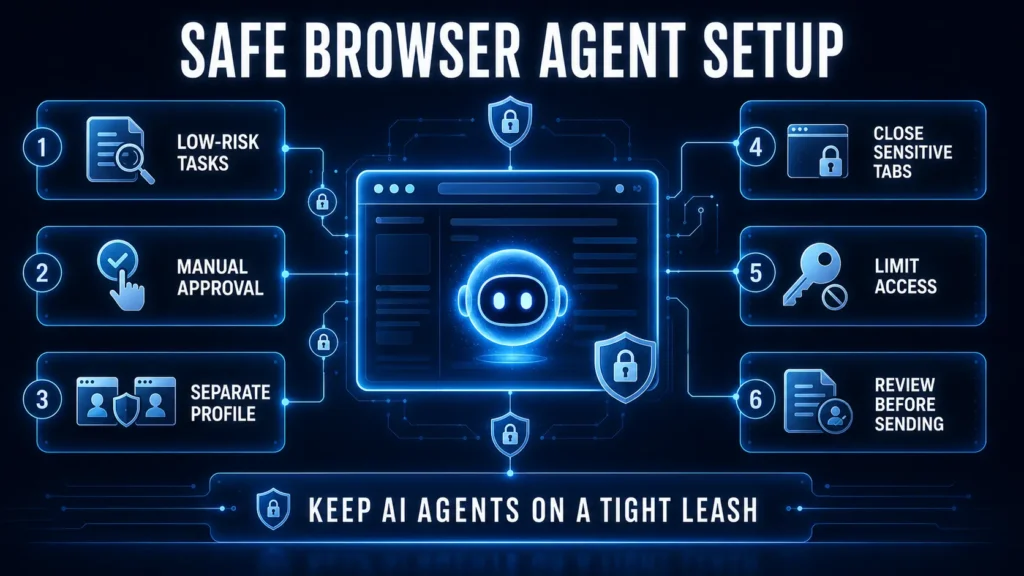
Use this checklist before relying on Claude in Chrome for meaningful work.
- Start with a low-risk task. Use it first for reading, research, or drafting — not sending, buying, deleting, or changing permissions. Build confidence through tasks where you can inspect the output before anything happens.
- Keep manual approval enabled. Do not enable autonomous actions immediately. Manual approval gives you a chance to catch a surprising destination, unexpected text entry, or unnecessary form submission before it runs.
- Separate sensitive browsing. Use a dedicated Chrome profile for agent-assisted work. Keep financial services, private email, password managers, and administrator accounts in a different profile that the agent never touches.
- Close unrelated tabs. A focused browser session is safer than a browser full of logged-in tabs. Before assigning a task, close pages that have nothing to do with it — especially sensitive accounts.
- Limit the task precisely. Give Claude narrow instructions. “Summarize these three public pages and draft a comparison” is safer than “research this topic and handle everything you need.” A bounded task gives the safety system and the user a clearer definition of what should happen.
- Review before a consequential step. Claude can draft an email, populate a form, or prepare a purchase cart. Let it do the preparation, but perform the final review and submission yourself when money, access, or external communication is involved.
- Use approved domains at work. If you manage a team, start with a small allowlist of known work domains. Do not grant broad browser access before you have clear rules for who may use the agent, which workflows are allowed, and how activity is reviewed.
- Do not paste secrets into prompts. Avoid entering passwords, API keys, private tokens, recovery codes, or sensitive credentials into the Claude conversation. A browser agent should not become a second location where secrets are exposed unnecessarily.
Claude in Chrome for Teams and Enterprises
For a business, the decision is not simply whether the extension is useful. It is whether the organization can control its scope.
Anthropic provides administrative settings that can enable or disable the extension across an organization and limit which websites it can access. This is a strong starting point, but a safe rollout should also include an internal policy for permitted tasks.
A practical rollout looks like this: begin with a small pilot group, use a limited domain allowlist, restrict use to read-only research, support triage, draft preparation, or testing workflows, require manual approval for actions during the pilot, keep sensitive systems, production consoles, billing systems, and identity-management tools out of scope, and review failures and near-misses before expanding access.
Treat the agent like a new contractor with browser access, not like a harmless extension. It may speed up routine work, but it should receive only the access required for the narrow job it is expected to do.
Claude in Chrome vs a Normal Chatbot
A normal chatbot is primarily an information and drafting tool. You ask a question, receive an answer, and decide what to do next. Claude in Chrome is closer to an execution layer — it can work inside the sites where your work actually happens, including pages that do not have an API or a direct Claude connector. This is its advantage, and its additional risk.
| Capability | Normal Chatbot | Claude in Chrome |
| Answer questions | Yes | Yes |
| Summarize copied content | Yes | Yes |
| Read the active browser page | Usually no | Yes |
| Click and navigate websites | No | Yes |
| Fill web forms | No | Yes |
| Use active browser logins | No | Yes |
| Prompt-injection exposure | Lower | Higher |
The correct mental model is not “a smarter extension.” It is “an AI agent operating in the same browser environment where I already have authority.” Once you see it that way, safer choices become obvious: narrower scope, fewer logged-in accounts, clearer instructions, and human review for consequential actions.
Should You Use Claude in Chrome?
Yes — if you use it deliberately.
Claude in Chrome is useful for research, repetitive browser work, web testing, draft preparation, and other tasks where humans spend time clicking through familiar interfaces. Anthropic has built real protections around browser actions, including content probes, action validation, hard-coded bans on the highest-risk actions, optional manual approval, and organizational domain controls.
But do not confuse available safeguards with a blank check for autonomous access. Browser agents are still a young product category, and prompt injection is an active security problem across the industry — the ShadowPrompt vulnerability is a reminder that even a well-defended system has real bugs discovered and fixed in production, not just in theory. Keep the agent away from sensitive accounts, begin with low-risk workflows, and stay in control of any step that sends, spends, deletes, publishes, or changes access.
The most productive way to use Claude in Chrome today is as a capable assistant with tightly scoped authority — not as an unattended replacement for judgment.
Frequently Asked Questions
What does Claude in Chrome do?
Claude in Chrome is an official Chrome extension that allows Claude to read webpages, type text, click links, navigate between pages, and fill forms in your existing browser session. It can also work across browser tasks that do not have a direct integration or API.
Is Claude in Chrome available to free users?
No. Claude in Chrome is available on paid Claude plans only — Pro, Max, Team, and Enterprise. There is no free-tier path into the extension.
Can Claude in Chrome access my logged-in accounts?
It can act through the accounts already active in the browser profile where you use the extension. That is why you should avoid using it around banking, password managers, sensitive admin systems, and other high-impact accounts — even though certain financial actions like stock trades are hard-blocked at the code level regardless of permissions.
What is prompt injection?
Prompt injection is a security attack where malicious instructions are embedded in content an AI reads, such as a webpage, email, or document. The goal is to manipulate the agent into taking an action the user did not request.
Has Claude in Chrome actually had a security vulnerability?
Yes. In December 2025, independent security researchers at Koi Security disclosed a zero-click vulnerability chain called ShadowPrompt, involving an overly permissive subdomain allowlist and a cross-site scripting bug in a third-party CAPTCHA component. Anthropic confirmed and patched it within 24 hours, with the underlying third-party issue fully resolved within about two months of disclosure. This is a useful real-world data point: the classifier-based defenses are one layer of protection, not the only one.
Can I make Claude ask before every action?
Yes. You can switch off automatic action approval in settings and manually approve Claude’s browser actions instead. This is the recommended setup for sensitive or unfamiliar workflows.
Is Claude in Chrome safe for work?
It can be used for work if your organization limits access, starts with low-risk workflows, uses approved domains, and keeps sensitive systems outside the agent’s scope. Enterprise administrators can manage access through organization settings and domain allowlists.
For a wider look at how major companies are competing to build always-on AI agents that operate with this same kind of persistent account access, read our guide on the four-way AI agent war between Google, Microsoft, SpaceXAI, and Meta.
Adrian Cole is a technology reviewer at aireviewcore.com covering AI agents, browser automation, and practical security guidance for professionals adopting AI tools.
© 2026 aireviewcore.com — All rights reserved.