
A Plain-English Guide for Beginners and Power Users | By Adrian Cole | aireviewcore.com
You are still using Chrome. So is almost everyone else. Here is why that might be about to change.
Chrome holds roughly 65% of the global browser market in 2026. It is fast, familiar, and works with every extension you have accumulated over the years. There is no obvious reason to switch.
But here is what Chrome cannot do: read the page you are on and answer questions about it without you copying and pasting anything. It cannot summarize a 40-minute video in 30 seconds. It cannot open 12 tabs for a research task, read all of them, and hand you a structured report. It cannot log into a website and fill out a form while you make coffee.
The best AI browsers in 2026 can do all of this — and most of them are free.
This guide explains what an AI browser actually is, tests four of the strongest options available right now, and gives you a clear answer on whether switching is worth the effort for your specific situation.
What Is an AI Browser — And How Is It Different From Adding ChatGPT?
Most people have tried adding a ChatGPT extension to Chrome. You highlight text, right-click, and get a response in a sidebar. That is useful. It is not the same as an AI browser.
The difference comes down to context. A Chrome extension responds to what you select. An AI browser understands everything you are doing — the full page you are reading, all your open tabs, your browsing history within the session — and uses that context to answer questions, summarize content, and take action on your behalf.
Think of it this way. A Chrome extension is like a calculator you keep on your desk. An AI browser is like a colleague sitting next to you who can see your screen and help without you having to explain everything from scratch every time.
There are two types of AI browsers worth knowing about before reading this guide.
AI-native browsers were built from scratch with AI at the core. Every design decision was made around what the AI needs to be useful. Dia and Perplexity Comet are the clearest examples right now.
Traditional browsers with AI added took an existing browser — one you already know how to use — and built an AI assistant into it. Brave and Opera fall into this category. The advantage is that you do not have to relearn anything. Your bookmarks, extensions, and habits all work exactly as they did before.
Neither type is universally better. The right choice depends on how much you want to change and what you actually use a browser for.
The One Trade-Off Nobody Talks About Enough
Before reviewing any browser, this needs to be said clearly.
An AI browser that can read every page you visit, answer questions about your browsing session, and act on websites on your behalf can only do those things because it has access to everything you are doing online.
That is a significant amount of trust to extend to a piece of software. For most general browsing — reading articles, doing research, watching videos — this trade-off is acceptable. For sensitive professional work, medical information, legal documents, or financial accounts, it is worth thinking carefully about which features you are turning on and what data leaves your device.
Every browser in this guide handles this differently. The privacy section for each tool is not a minor footnote — it is information that should factor into your choice.
The 4 Best AI Browsers in 2026
Perplexity is the company that turned AI search into a mainstream product. Comet is what happens when that same approach is applied to the browser itself.
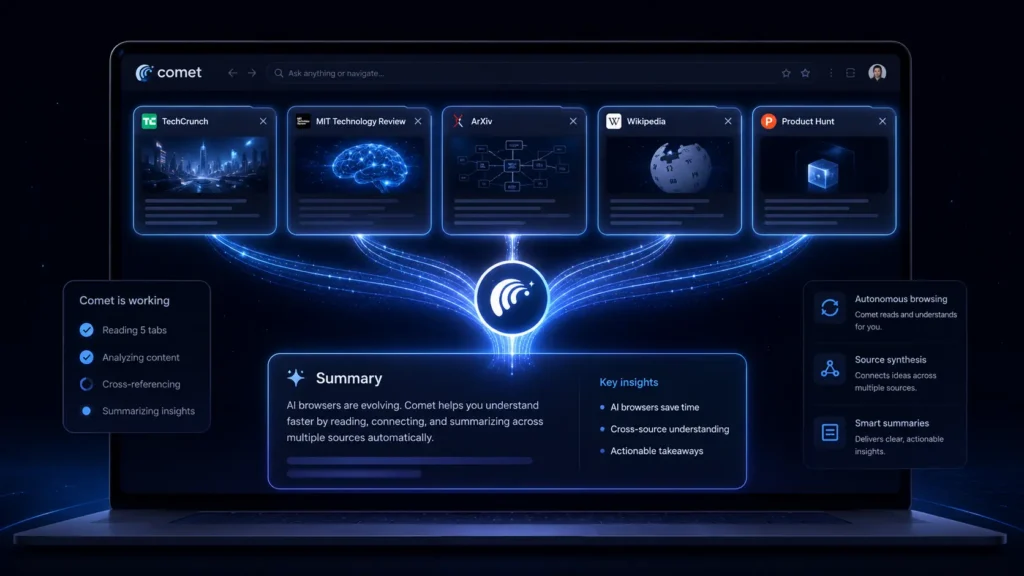
Comet is currently the most AI-native browser available to the general public. When you give it a task — “research flights from London to Tokyo and summarize the best options” — it opens tabs, reads multiple sites, compares the information across them, and hands you a structured summary. You do not click anything. You do not read anything. You describe what you want and the browser does the work.
This is called agentic browsing, and Comet is further along this path than any other browser in this guide.
For everyday browsing, Comet behaves like a fast, clean browser with Perplexity’s AI search built in. You can ask questions about the page you are reading, get summaries of long articles, and conduct research without opening extra tabs. The AI layer is present without being intrusive.
What beginners will notice first: The browser is clean and loads fast. The AI assistant appears in the sidebar when you need it. You do not have to configure anything to start using the basic features.
What power users will find valuable: The agentic task mode handles multi-step research workflows that would take 20 minutes manually. Give it a complex research question and come back in five minutes to a structured report with sources.
The honest limitation: Comet’s agentic features are powerful and, occasionally, unpredictable. The browser takes actions on your behalf — clicking buttons, opening tabs, filling in search fields — which is useful until it does something you did not intend. Keeping an eye on what it is doing during complex tasks is still necessary in 2026. Amazon also filed a legal challenge against Comet’s automated shopping capabilities in early 2026. The case is ongoing. For shopping-related automated tasks specifically, the legal picture is unclear.
Privacy note: Comet sends browsing context to Perplexity’s servers for AI processing. If you are doing sensitive research — medical, legal, financial — disable the AI features for those sessions or use a different browser.
Expert Workflow:
Start with a simple research task before trusting Comet with complex ones. Ask it to “summarize this article in three bullet points” on a page you already understand. Read the summary, verify it is accurate, and build confidence in the tool before giving it tasks you cannot easily check. For complex agentic tasks, keep the browser visible while it works for the first few sessions so you understand how it interprets your instructions before running tasks in the background.
| Best for | Research, autonomous multi-step tasks, AI-first browsing |
| Free plan | Yes — core features free, Perplexity subscription enhances agentic mode |
| Platform | Mac, Windows, iOS (Android in development) |
| AI type | Agentic — takes actions on your behalf |
| Privacy | Cloud processing — context sent to Perplexity servers |
Expert Verdict: Comet is the most capable AI browser available to the general public in July 2026. If your primary browser use case involves research, information gathering, and repetitive web tasks, it delivers more value than any other option in this guide. Start with the free tier and evaluate whether the agentic features fit how you actually work before committing.
Dia is the browser that The Browser Company built after deciding that Arc — their previous browser, which became a cult favorite among developers and designers — had reached its limit. Arc stopped receiving new features in late 2025. Dia is what replaced it.
The difference between Arc and Dia is the same difference that defines this entire category: Arc was a beautifully organized browser. Dia is a browser where the AI is the primary interface.
In Dia, you do not search the web in the traditional sense. You ask questions in natural language and Dia answers them using a combination of your open tabs, your browsing session, and web search. If you have a research paper, a YouTube video, and three articles open about the same topic, Dia synthesizes them together and answers your question using all of them as sources. You do not copy and paste anything between tabs.
For people who do a lot of research — students, journalists, analysts, anyone who opens many tabs to answer a single question — this workflow is genuinely faster than any traditional browser approach.
The conversational interface is cleaner than most AI browsers. Dia does not have a cluttered sidebar. The AI feels like it is part of the browser rather than an addition to it, which makes it easier for beginners to adapt to than tools with more feature-dense interfaces.
What beginners will notice first: Dia feels different immediately. The address bar works differently from Chrome. The tab organization is different. There is a short adjustment period of a few days before the new patterns feel natural. Most users who commit to this adjustment period report that it becomes their preferred browser within two weeks.
What power users will find valuable: Cross-tab context awareness is the standout feature. Asking “what are the main disagreements between the sources I have open?” and receiving an accurate synthesis across five open tabs is a genuinely new capability that no traditional browser can replicate.
The honest limitation: Dia is still in active development and some features available in Arc — particularly extension support — are more limited in Dia. Check your most-used extensions before switching. As of July 2026, Dia has broader availability than at launch but is still rolling out features.
Privacy note: Dia processes browsing context through cloud servers. Review the privacy settings to understand which features send data externally and configure accordingly for sensitive sessions.
Expert Workflow:
Migrate one type of task to Dia before switching entirely. Pick the task category where multi-tab research is most common in your workflow — academic research, competitive analysis, news monitoring — and run that category through Dia for two weeks while keeping Chrome for everything else. This approach lets you evaluate the real productivity impact without disrupting your full workflow during the evaluation period.
| Best for | Research-heavy daily browsing, cross-tab synthesis, AI-first interface |
| Free plan | Yes |
| Platform | Mac, Windows (iOS and Android in development) |
| AI type | Conversational with cross-tab context |
| Privacy | Cloud processing — configure per-session for sensitive work |
Expert Verdict: Dia is the right choice for users who want a fully AI-native browser without the complexity of Comet’s agentic features. Its cross-tab context awareness is the most useful single AI feature in any browser tested in this guide for everyday research and information synthesis.
Brave built its reputation by blocking ads and trackers by default. Leo, Brave’s AI assistant, follows the same philosophy: it is built to give you AI features without giving up your privacy in the process.
Most AI browsers send your browsing context to external servers for processing. Leo works differently. For many functions, Leo processes information locally on your device. When it does need to send data externally — for more complex tasks that require larger AI models — it uses anonymized, unlinkable requests that cannot be traced back to you or your browsing history. Brave explicitly states that it does not store your Leo conversations or use your browsing behavior to train its models.
For professionals in law, healthcare, finance, or any field where what you research is sensitive, this architecture is not a minor feature. It is the primary reason to choose Brave over every other browser in this guide.
Beyond privacy, Leo is a capable AI assistant. It summarizes pages, answers questions about what you are reading, helps with writing tasks, and handles the standard AI browser features that most users will actually use day-to-day. The free version uses the Qwen 14B, Mixtral, and Gemma AI models. Leo Premium at $14.99 per month adds access to Claude Sonnet and higher rate limits for heavy users.
Brave itself is a full-featured browser that works exactly like Chrome for everyday tasks. Your existing Chrome extensions work in Brave. Your bookmarks import in one minute. The interface is familiar from the first day. For users who want AI features without relearning a new browser, this is the lowest-friction path.
What beginners will notice first: Brave looks and works like Chrome. The AI sidebar appears when you need it. The switch from Chrome to Brave is the smoothest of any browser in this guide.
What power users will find valuable: The combination of Leo’s privacy architecture with Brave’s existing tracker-blocking and fingerprinting protection creates a browsing environment significantly more private than any other AI-enabled browser tested. For users who conduct sensitive research, this matters at a practical level, not just a philosophical one.
The honest limitation: Leo’s AI capabilities are solid but not as ambitious as Comet’s agentic features or Dia’s cross-tab synthesis. Brave is the right choice when privacy is the primary requirement. It is not the right choice if you want the most powerful AI browsing capabilities available.
Expert Workflow:
Enable Leo for everyday tasks immediately but keep the default privacy settings unchanged. Brave’s defaults are already strong — changing them in the pursuit of more AI features undermines the reason to use Brave in the first place. Use Leo Premium if you regularly hit rate limits on the free tier or need access to Claude Sonnet specifically for writing and analysis tasks.
| Best for | Privacy-conscious users, sensitive professional research |
| Free plan | Yes — Leo AI included free |
| Paid plan | Leo Premium $14.99/month for Claude Sonnet access |
| Platform | Windows, Mac, Linux, iOS, Android |
| AI type | Assistant with local-first processing |
| Privacy | Industry-leading — local processing, no conversation storage |
Expert Verdict: Brave with Leo is the right browser when privacy is a non-negotiable requirement. Its on-device processing architecture, zero conversation storage policy, and familiar Chrome-like interface make it the most trustworthy AI browser available in 2026 for users who handle sensitive information professionally or personally.
Opera is the sleeper pick in this category. It offers one of the most complete free AI feature sets of any browser available in 2026, across a browser that has been in continuous development since 1995 and runs reliably on every platform.
The free Opera AI includes Aria, Opera’s built-in AI assistant, which understands the context of the page you are on and answers questions about it without copy-pasting. It also includes up to 100 AI-generated images per day, video and document analysis, web search, and ChatGPT integration — all without a subscription. For users who want to experiment with AI browsing without financial commitment, Opera’s free tier delivers more raw capability than any other browser in this guide.
Opera Neon, the paid tier at $19.90 per month, adds full agentic AI. It handles complex multi-step projects, manages parallel tasks, navigates websites autonomously, fills forms, and automates research workflows. This positions Neon as a direct competitor to Comet’s agentic capabilities at a similar price range.
The context-aware browsing is the free feature that most users will find immediately useful. Opera knows what page you are on and can answer questions about it the moment you ask. You do not have to highlight text, open a sidebar, or configure anything. The AI is simply present and aware, which is a genuinely different experience from using a Chrome extension.
What beginners will notice first: Opera is familiar enough that switching from Chrome is not disorienting. The AI features work without setup. The free tier is generous enough to explore what AI browsing actually means in practice before deciding whether to pay for more.
What power users will find valuable: The two-track pricing model — completely free with strong AI features, or paid agentic mode at a clear price — gives power users a straightforward upgrade path without the ambiguity of feature-limited trials.
The honest limitation: Opera’s context-aware AI feature broke during independent testing in early 2026 before being rebuilt in Opera One R3. It is now stable but this history warrants checking current reviews before relying on it for critical work. The Neon agentic tier, while powerful, is a newer product than Comet and has less community testing at scale.
Expert Workflow:
Start with the free Opera AI for two weeks before evaluating whether Neon is worth the monthly cost. The free tier is functional enough to determine whether agentic browsing actually fits your workflow. If you find yourself wishing Opera could just handle an entire multi-step task autonomously rather than answering questions about individual pages, that is the signal to upgrade to Neon.
| Best for | Best free AI features, all platforms, beginners exploring AI browsing |
| Free plan | Yes — Aria AI, 100 images/day, video analysis, ChatGPT integration |
| Paid plan | Opera Neon $19.90/month for full agentic AI |
| Platform | Windows, Mac, Linux, iOS, Android |
| AI type | Assistant (free) / Agentic (Neon) |
| Privacy | Cloud processing — standard data handling |
Expert Verdict: Opera is the right starting point for anyone who wants to experience AI browsing without financial commitment or a steep learning curve. Its free AI feature set is the most complete in this guide, the browser is mature and stable, and the Neon upgrade path is clear if you decide you want agentic capabilities.
Side-by-Side Comparison
| Browser | Best For | Free AI | Agentic | Privacy | Platforms |
|---|---|---|---|---|---|
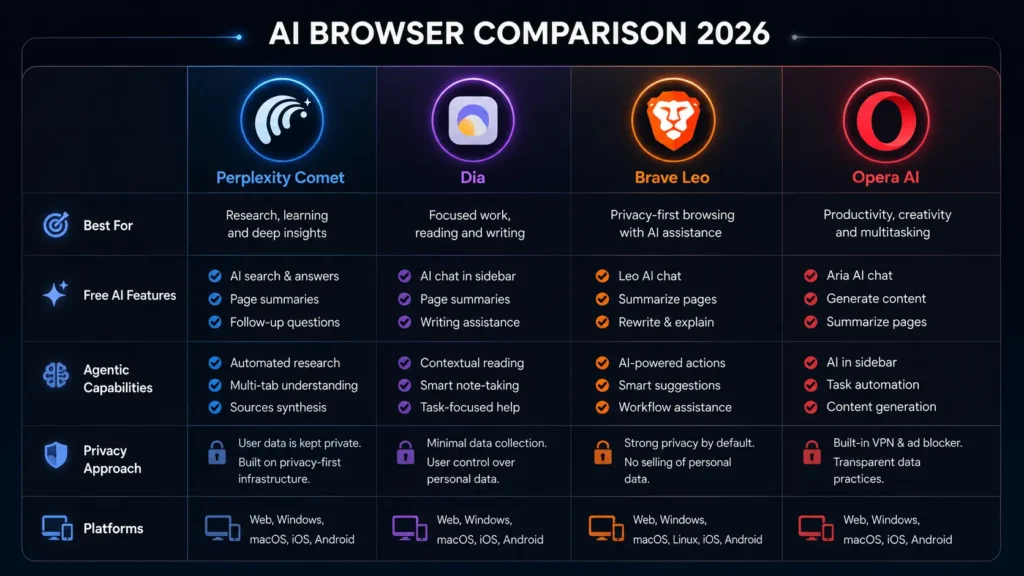
| Perplexity Comet | Research, autonomous tasks | Yes | Yes | Cloud | Mac, Windows, iOS |
| Dia | AI-native daily browsing | Yes | Partial | Cloud | Mac, Windows |
| Brave Leo | Privacy-first AI browsing | Yes | No | Local-first | All platforms |
| Opera AI | Free all-around features | Yes | Neon ($19.90/mo) | Cloud | All platforms |
Should You Switch From Chrome?
The honest answer depends on what you actually do in a browser.
If you primarily use Chrome for email, watching videos, shopping, and casual browsing, the AI features in these browsers will improve your experience but probably not enough to justify the switching cost.
If you spend significant time doing research, reading long articles, gathering information across multiple sources, or doing repetitive web-based tasks, the AI browsers in this guide offer a meaningfully different — and faster — workflow than Chrome.
The lowest-risk way to find out is to install one as a secondary browser and run a single type of work through it for two weeks. Do not switch your default on day one. Import your bookmarks, try the AI features on the tasks where you spend the most time, and make the decision based on whether your actual work improved.
Most people who try this report that they either find the AI features genuinely useful within the first week, or they conclude that Chrome is still the right tool for how they actually browse. Both outcomes are valid. The point is to test on real work rather than a demo.
Frequently Asked Questions
What is the best AI browser in 2026?
It depends on your priority. For autonomous research tasks, Perplexity Comet. For AI-native daily browsing with cross-tab synthesis, Dia. For privacy-first AI, Brave with Leo. For the best free AI feature set without switching cost, Opera AI. There is no single best browser across all use cases.
Are AI browsers free?
Most of the core features are free. Perplexity Comet, Dia, Brave Leo, and Opera AI all offer genuinely useful free tiers. Paid upgrades exist — Opera Neon at $19.90 per month and Brave Leo Premium at $14.99 per month — but are not required to start experiencing what AI browsing offers.
Is it safe to use an AI browser?
Safe for most purposes, with one important consideration: AI browsers that understand your browsing context send that context to external servers for processing. Brave is the exception — it processes locally for many features. For sensitive professional browsing, either use Brave or disable AI features during those sessions regardless of which browser you choose.
What happened to Arc Browser?
The Browser Company stopped new Arc development in late 2025 and shifted focus to Dia, their new AI-first browser. Arc still works and receives security updates, but new features are no longer being added. Dia is the successor.
Do AI browsers work with Chrome extensions?
Brave and Opera support Chrome extensions natively — your existing extensions work without modification. Dia and Comet have more limited extension support as of July 2026. Check your most critical extensions before switching.
How long does it take to adjust to a new browser?
Most users report that a genuinely different browser like Dia feels natural after three to five days of regular use. Brave and Opera feel familiar from day one because they are built on the same engine as Chrome. The switching cost is real but not large for any browser in this guide.
Your Action Plan
The best AI browser for you is not the one with the most features. It is the one that fits how you actually use a browser.
If you handle sensitive professional information and want AI features without the privacy trade-off, install Brave. It takes ten minutes and works exactly like Chrome from day one.
If you want the best free AI browsing experience and are comfortable with a familiar interface, try Opera AI. Install it alongside Chrome, test the free features for a week, and decide whether it earns a place in your workflow.
If your work involves heavy research and you want a browser that synthesizes information across tabs, try Dia. Give it a week with the type of work where you currently have the most tabs open simultaneously.
If you want the most ambitious AI browsing available right now and are comfortable with agentic features that act on your behalf, try Perplexity Comet.
None of these require uninstalling Chrome. Install as a secondary browser, test on real work, and decide based on whether your actual workflow improved.
For more AI tools that work alongside your browser to improve your workflow, see our guide on the best AI productivity tools in 2026.
Adrian Cole is a technology reviewer at aireviewcore.com covering AI tools, browser technology, and practical guides for users choosing between AI products.
© 2026 aireviewcore.com — All rights reserved.