
Stop Hiring for Tasks That AI Can Own Completely | By Adrian Cole | aireviewcore.com
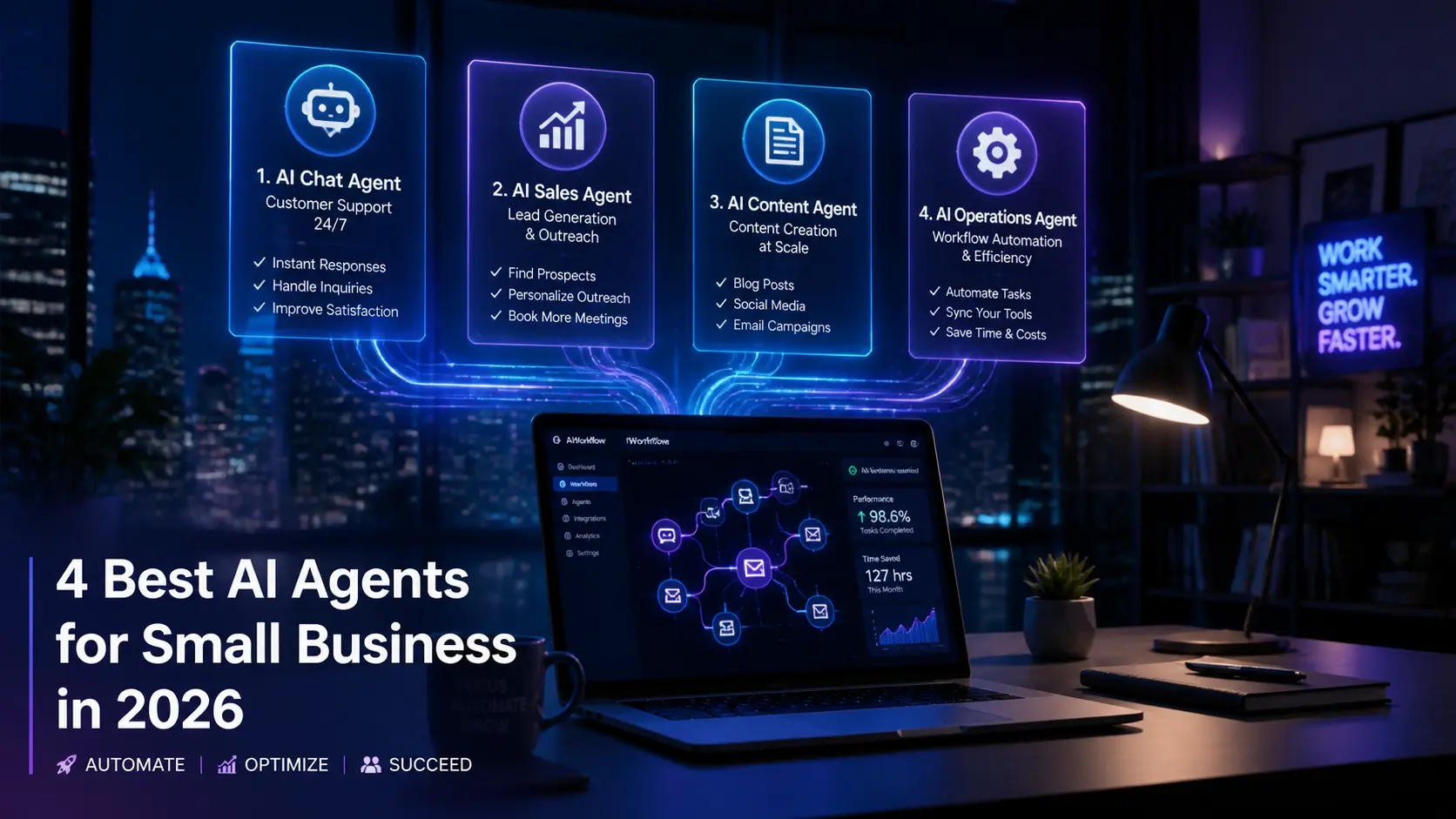
The 4 best AI agents for small business in 2026 solve a problem that most small business owners do not realize they have until it is costing them serious money.
Here is that problem: you are paying human beings to do work that follows a predictable pattern every single time. Answer this type of customer question. Follow up with this category of lead. Update these records after every call. Schedule these recurring tasks. The work is real, it matters, and it requires someone to do it. But it does not require a human to do it.
According to Salesforce’s 2024 SMB Trends Report, 75% of small and medium businesses are now experimenting with AI, and 91% plan to increase their AI investment in the next year. The gap between businesses that have figured this out and those that have not is compounding every quarter.
This guide covers four AI agents that small business owners are actually using in 2026, each evaluated on what it genuinely handles well, what it costs at realistic usage levels, and who will get the most value from it. The tools here are chosen because they solve different operational problems. No single agent wins every use case, and this guide does not pretend otherwise.
What an AI Agent Actually Is — And Why It Is Different From a Chatbot
Most small business owners have experimented with AI chatbots. They answer a question, suggest a response, or generate some text when you ask them to. They are reactive. They wait for you to start.
An AI agent operates differently. You give it a goal and it pursues that goal through a sequence of actions, decisions, and tool usage without requiring input at each step. It can read an email, extract the key information, check your CRM, update the relevant record, draft a follow-up reply, and send it — all without a human triggering each action individually.
The practical difference for a small business is significant. A chatbot reduces how long each individual task takes. An agent removes the task from your workload entirely.
In 2026, the best AI agents for small business have crossed a reliability threshold that earlier versions of this technology did not meet. They handle ambiguous inputs more gracefully. They fail more predictably. And the no-code interfaces have matured to where a non-technical business owner can configure and deploy a working agent in an afternoon.
The 4 Best AI Agents for Small Business in 2026
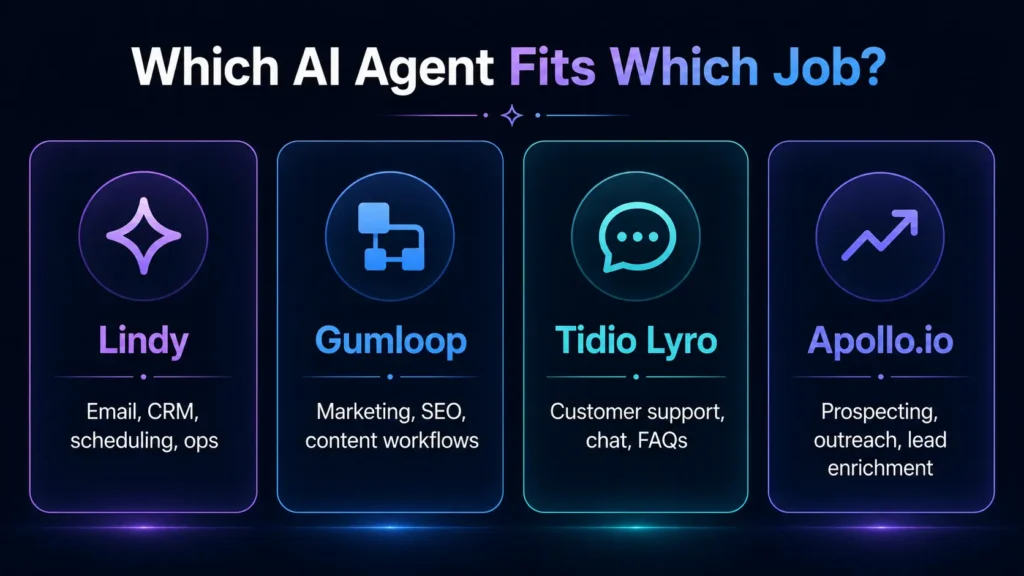
Lindy is the AI agent platform that appears most consistently when small business owners describe what they actually needed before they knew AI agents existed. It handles email triage, CRM updates, meeting scheduling, customer support routing, lead qualification, and internal operations through agents that you build in plain language without writing code.
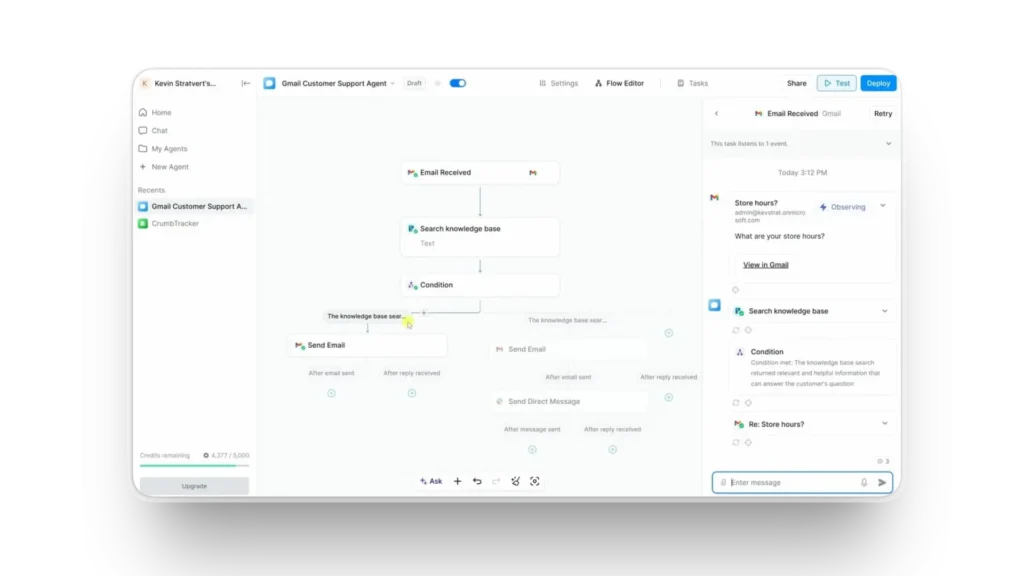
The setup process is where Lindy earns its reputation. Most no-code platforms claim simplicity and then present you with a diagram builder that requires three hours of YouTube tutorials before you produce anything useful. Lindy’s agents are configured through natural language instructions. You tell the agent what you want it to do, in the same way you would explain a job to a new hire, and the platform translates that into a working automated workflow.
The context-sharing capability between agents is the feature that separates Lindy from simpler automation tools. When a customer sends an inquiry, a Lindy agent can qualify the lead, pull their existing information from HubSpot, check against your calendar for available slots, draft a personalized response, and schedule the meeting — each step informed by the context gathered in the previous one. That end-to-end handling of a complete workflow, without manual handoffs between steps, is the core value proposition.
Lindy integrates natively with Gmail, Slack, HubSpot, Notion, Salesforce, and over 3,000 other tools. For small businesses that have already built their operations around a specific tool stack, this integration breadth means Lindy slots into existing workflows rather than requiring you to rebuild around a new platform.
Real small business owners on Reddit describe using Lindy for lead intake from web forms, automatic CRM updates after every customer call, and meeting scheduling that previously required a dedicated coordinator. The consistent finding is that the first agent takes a few hours to configure correctly and subsequent agents take significantly less time as you understand the platform’s logic.
Expert Workflow: Start with the single highest-volume, most repetitive task in your current operations.
Not the most complex one. Not the most impactful one. The most repetitive one. For most small businesses, this is either email triage or CRM data entry. Build one agent for that task, run it in supervised mode for two weeks, then expand. The biggest mistake with AI agent adoption is trying to automate five things at once and then troubleshooting five things at once.
When your first agent is stable, use the Lindy team feature to create a multi-agent system where specialized agents hand off tasks to each other. A lead qualification agent can pass a qualified lead to a scheduling agent which triggers a CRM update agent. This orchestration capability is what makes Lindy scale with business growth rather than becoming a bottleneck at volume.
| Best for | No-code workflow automation across sales, support, and operations |
| Free plan | Yes — limited tasks |
| Paid plan | $49/month (Pro) — unlimited tasks, priority support |
| Integrations | Gmail, Slack, HubSpot, Notion, Salesforce, 3,000+ |
| Setup time | A few hours for first agent |
| Technical skill required | None |
Expert Verdict: Lindy is the strongest general-purpose AI agent for small businesses that want to automate across multiple operational areas without hiring a developer. Its natural language configuration and deep integration library make it the most practical starting point for small teams building their first AI agent workflow.
Gumloop approaches AI agent building from a visual canvas interface that makes complex multi-step workflows easy to design, review, and modify. It was built specifically for marketing operations, and that focus shows in the depth of its capabilities for SEO research, ad copy generation, web scraping, lead generation, and content production workflows.
The platform’s Y Combinator backing and $50 million Series B in March 2026 are worth noting not as marketing credentials but as operational signals. That level of investment means active development, a growing integration library, and a platform that is building toward long-term stability rather than struggling to survive. For small businesses that have been burned by platforms that shut down or stopped updating, the funding trajectory matters when choosing infrastructure.
The Subflows feature is Gumloop’s most technically distinctive capability. It lets you nest workflows inside workflows, so a content production operation that involves keyword research, outline generation, draft writing, SEO optimization, and image sourcing can run as a single triggered workflow rather than a series of manually connected steps. For small businesses producing regular content at scale, this kind of orchestration compresses a multi-day production cycle into hours.
Where Gumloop earns its place over general-purpose automation tools is in the intelligence of its agents. The platform handles ambiguous inputs more gracefully than simpler trigger-based automations, which means you spend less time manually handling the edge cases that fall outside your defined workflow logic. An agent that breaks on ten percent of inputs is not an agent — it is a productivity liability. Gumloop’s handling of input variation is one of the more honest differentiators tested in this guide.
The integration library is smaller than Zapier’s, which matters if your business runs on tools that Gumloop does not yet natively support. Check the integration list before committing. The platform’s API access on higher-tier plans partially addresses this for technical users.
Expert Workflow: Build your first Gumloop workflow around a repeatable content production task with a clear input and a clear output. A workflow that takes a keyword and produces a structured content brief is an ideal starting point. The workflow is simple enough to configure quickly, the output is immediately useful, and the format teaches you how Gumloop’s canvas logic works before you attempt more complex orchestration.
Once your first content workflow is stable, use the Subflows feature to connect multiple content operations into a single pipeline. A keyword research flow can trigger a brief generation flow which triggers a draft creation flow. This three-step automation compresses what was a two-day content production process into something that runs while you focus on other work.
| Best for | Marketing workflows, content operations, SEO automation |
| Free plan | Yes — limited runs |
| Paid plan | $37/month — unlimited runs, full feature access |
| Integrations | Growing library, API access on higher plans |
| Setup time | Half a day for first workflow |
| Technical skill required | None — visual canvas interface |
Expert Verdict: Gumloop is the right choice for small businesses whose primary operational bottleneck is marketing and content production. Its visual workflow builder, Subflows orchestration, and active development roadmap make it the strongest marketing-focused AI agent platform available at the SMB price point in 2026.
Tidio with its Lyro AI agent solves the specific problem that kills small business customer satisfaction most reliably: the gap between when a customer asks a question and when they get a useful answer. For businesses receiving repetitive customer inquiries, that gap is a solvable problem. Lyro solves it.
The Lyro AI agent learns from your existing documentation, FAQ content, and past support conversations. Once trained, it handles customer inquiries across live chat, email, and messaging channels with responses that reflect your actual product knowledge rather than generic AI answers. The handoff logic is what makes it work in practice: when an inquiry falls outside what Lyro can confidently answer, it escalates to a human agent rather than attempting a response that might be wrong. That escalation threshold is configurable, which means you control how conservative or aggressive the automation is.
For small businesses that have invested in documentation, this tool pays its subscription back in the first week. A business with detailed product FAQs can configure Lyro in an afternoon and have it handling a significant portion of incoming support volume by the next business day. The setup is not the challenge. The ongoing maintenance of keeping Lyro’s knowledge base current as your products and policies evolve is where consistent attention is required.
The platform includes a live chat interface, email integration, and a basic CRM for tracking customer interactions, which means smaller businesses can use Tidio as their primary customer communication infrastructure rather than adding it on top of an existing stack. For businesses that are still building their customer operations, this bundled approach simplifies the setup considerably.
At 500 conversations per month, the Lyro plan costs approximately $69/month. For a business receiving that volume of customer inquiries, the alternative is a part-time support hire at $1,500 to $2,500 per month minimum. The economics hold at significantly lower conversation volumes than that ceiling suggests.
Expert Workflow: Export your last 60 days of customer support conversations before configuring Lyro. The most common questions in that data set are your first training priorities. Configure Lyro to handle those questions specifically before expanding to broader product knowledge. This targeted approach produces better early results than feeding Lyro your entire documentation library at once and hoping the answers are coherent.
Set Lyro’s escalation threshold conservatively for the first month. Better to have a human handle an inquiry that Lyro could have managed than to have Lyro provide a wrong answer to a question it should have escalated. As you review Lyro’s conversation logs and see where it performs well and where it struggles, you can adjust the threshold based on observed performance rather than assumption.
| Best for | Customer support automation across chat and email |
| Free plan | Yes — 50 Lyro conversations/month |
| Paid plan | $29/month (Starter) — 50 Lyro conversations included, additional packages available |
| Lyro conversations | $69/month for 500 conversations/month |
| Integrations | Shopify, WordPress, Wix, Squarespace, major CRMs |
| Setup time | Afternoon for basic configuration |
Expert Verdict: Tidio with Lyro is the most immediately impactful AI agent for small businesses losing time to repetitive customer inquiries. Its conversation-based pricing model is transparent, the setup is genuinely fast, and the economics compared to human support alternatives are clear within the first month of use.
Apollo.io is the AI agent platform that sales-focused small businesses consistently recommend once they have moved beyond basic CRM management and into systematic outbound prospecting. Its AI agent capabilities handle lead discovery, contact enrichment, email sequence personalization, and follow-up scheduling at a scale that a small sales team cannot match manually.
The platform’s contact database — over 275 million verified contacts with detailed firmographic and technographic data — is what makes its AI agent features genuinely powerful rather than just convenient. An agent that searches for and finds accurate contact information is more useful than one that automates outreach to bad data. Apollo’s data quality is its structural advantage over general-purpose prospecting tools.
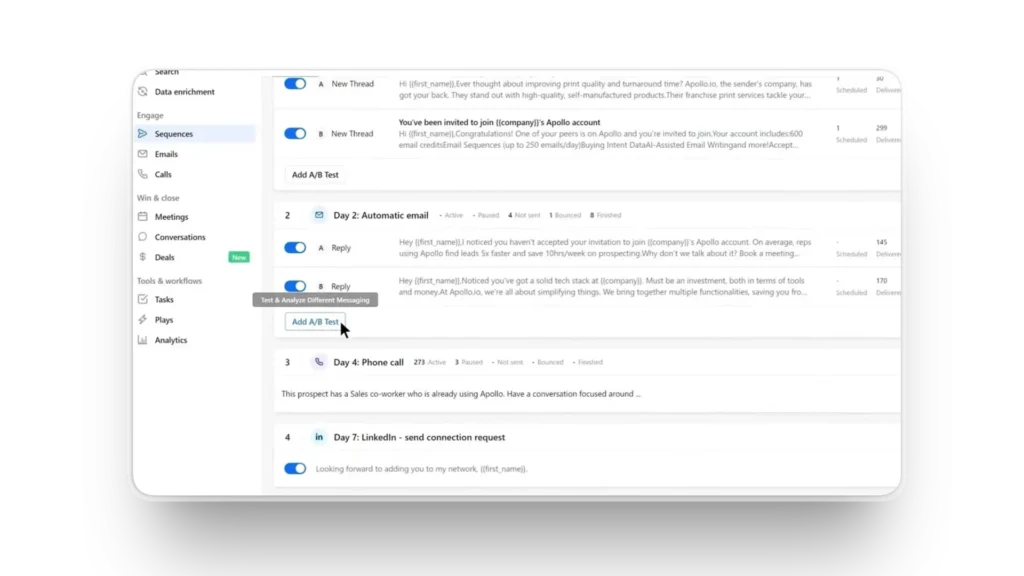
The AI personalization layer is where the platform separates itself from simpler email automation tools. Rather than inserting a first name and company name into a template, Apollo’s agent analyzes available signals about each prospect, recent news, LinkedIn activity, company hiring patterns, and funding events, and incorporates relevant details into outreach that reads as researched rather than automated. This personalization at scale is what drives the open and reply rates that justify the platform’s price point.
The Professional plan at $79/month is where Apollo’s AI features become fully functional for a small business. The Basic plan restricts access to the more powerful automation and AI capabilities. Build that honest cost into your evaluation rather than starting from the lower-tier price.
Expert Workflow: Build your ideal customer profile in Apollo before configuring any automation. The precision of your ICP definition determines the quality of every prospect list the agent builds and every sequence it sends. Spend two hours defining the specific company size, industry, geographic market, technology stack, and role seniority that characterize your best current customers. The agent performs significantly better with tight targeting than with broad parameters.
Run your first AI-personalized sequence on a small test group of 50 prospects before scaling. Review the personalization quality, reply rate, and any responses that indicate the outreach landed poorly. This test cycle takes one to two weeks and gives you data to optimize both the targeting and the sequence before committing to larger volumes.
| Best for | Sales prospecting, outbound automation, lead enrichment |
| Free plan | Yes — limited features |
| Paid plan | Basic $49/month · Professional $79/month (full AI features) |
| Contact database | 275M+ verified contacts |
| Integrations | Salesforce, HubSpot, Pipedrive, Gmail, Outlook |
| Setup time | One to two days for full configuration |
Expert Verdict: Apollo.io is the strongest AI agent for small businesses with a defined sales motion that need to systematize outbound prospecting. Its contact data quality, AI personalization capabilities, and integration with major CRMs make it the most complete sales automation platform at the SMB price point in 2026.
The Honest Cost of Running All Four Agents
One of the most cited concerns about AI agent adoption from small business owners is the cumulative cost of multiple subscriptions. Here is a realistic monthly cost for a three-person team using all four tools in this guide at typical SMB usage levels.
| Tool | Plan | Monthly Cost |
|---|---|---|
| Lindy | Pro | $49 |
| Gumloop | Paid | $37 |
| Tidio Lyro | 500 conversations | $69 |
| Apollo.io | Professional | $79 |
| Total | $234/month |
For context, that $234 monthly investment automates workflows that would otherwise consume a significant portion of a full-time employee’s time. If the four agents combined save 20 hours per week across your team at a $25/hour equivalent value, the monthly value generated is $2,000. The economics are clear. The harder question is whether the agents will actually work reliably enough to deliver that value, which is why this guide emphasizes starting with one agent and expanding rather than deploying all four simultaneously.
Which Agent Should You Start With?
The right starting point depends entirely on where your team loses the most time each week.
If the answer is customer inquiries, start with Tidio Lyro. The setup is the fastest in this guide, and the time savings become visible within days rather than weeks.
If the answer is email management and administrative tasks spread across sales, support, and operations, start with Lindy. Its flexibility across workflow types makes it the most broadly applicable starting point.
If the answer is content and marketing production, start with Gumloop. Its visual canvas makes it easy to understand what is being automated and why.
If the answer is sales prospecting and outbound, start with Apollo.io. Its contact data and sequence automation are purpose-built for the problem rather than adapted from a general-purpose platform.
Frequently Asked Questions
What is the difference between an AI agent and a chatbot? A chatbot responds to individual inputs. An AI agent pursues goals through sequences of actions across multiple tools without requiring human input at each step. The practical difference for a small business is that a chatbot reduces how long individual tasks take while an agent removes those tasks from your workload entirely.
How long does it take to set up an AI agent for a small business? Setup time varies by platform and workflow complexity. Tidio Lyro can be configured in an afternoon. Lindy’s first agent typically takes a few hours. Gumloop’s first workflow takes half a day. Apollo.io requires one to two days for complete configuration. All four platforms offer no-code setup that does not require technical expertise.
Are AI agents reliable enough for customer-facing work in 2026? The reliability threshold has crossed a point where customer-facing deployment is practical for many use cases. The key is configuring conservative escalation logic so that the agent hands off to a human when it is not confident rather than attempting an answer it might get wrong. Tidio Lyro’s supervised escalation model is the most mature implementation of this approach in the tools covered here.
What is a realistic return on investment for AI agents at a small business? According to Salesforce’s 2024 SMB Trends Report, small businesses using AI agents report average efficiency gains of 30 to 50 percent on the specific tasks they automate. The financial return depends entirely on the volume of the automated task and the alternative cost of handling it manually. At realistic SMB volumes, most agent subscriptions pay for themselves within the first month.
Do I need technical skills to set up these tools? No. All four tools in this guide offer no-code configuration designed for non-technical users. Lindy uses natural language instructions. Gumloop uses a visual canvas. Tidio uses a training interface that learns from your existing documentation. Apollo.io uses structured forms for targeting and sequence configuration. Technical skills accelerate setup but are not required to get started.
What happens when an AI agent makes a mistake? All four platforms include human review and override capabilities. The most important configuration decision when deploying any agent is defining what it can and cannot do autonomously and ensuring clear escalation paths for situations outside those boundaries. Start every agent in supervised mode where a human reviews outputs before they are acted on, then expand autonomy as you validate performance.
Your Action Plan
The 4 best AI agents for small business in 2026 have made one thing clear: the question is no longer whether AI agents work. It is whether your business is set up to use them effectively.
Here is the sequence that produces the best results consistently.
Pick the one workflow in your business that costs the most time per week and follows the most predictable pattern. That is your first agent.
Configure it. Test it in supervised mode for two weeks. Measure the actual time saved against the time invested in setup and monitoring.
If the economics work — and for most small businesses at realistic task volumes, they will — expand to a second workflow. Then a third.
The businesses gaining the most from AI agents in 2026 are not the ones that deployed the most agents on day one. If you are still building your AI stack, start with our guide on the best AI productivity tools in 2026
Adrian Cole is a professional AI technology reviewer and creative technologist at aireviewcore.com, covering AI tools for small businesses, content creators, and digital professionals.
© 2026 aireviewcore.com — All rights reserved.