
By Adrian Cole | aireviewcore.com
TL;DR — Top Picks at a Glance
- Fireflies — Best overall for teams needing CRM integration and conversation analytics
- Fathom — Best free AI note taker with genuinely unlimited recording for individuals
- Otter — Best for real-time transcription and collaborative live note-taking
- Bluedot — Best bot-free option for sensitive calls and multilingual teams
- HappyScribe — Best for multilingual teams requiring strict EU privacy compliance
Table of Contents
Stop Taking Notes in Meetings. Seriously.
You are nodding along, trying to look engaged, while simultaneously typing as fast as you can so you do not lose what was just said. Sound familiar? That is not active participation. That is split-attention tax — and it costs you more than you realize.
The best AI tools for meeting notes in 2026 have crossed a real threshold. Transcription accuracy is largely a solved problem — most leading tools land between 90 and 95 percent on clean audio. The differences now come down to the things that actually affect your daily workflow: whether a bot visibly joins your call, how well the tool talks to your CRM, what the free tier honestly allows, and whether the AI summary is actually useful or just a word dump you still have to edit.
We tested four tools across real meetings — sales calls, internal standups, client check-ins, and research interviews. Here is what we found.
It is not just the time. It is the quality of your attention.
When you are focused on capturing what someone just said, you are not fully processing it. You miss the subtext. You miss the follow-up question you should have asked. And whoever took the notes that day spent the meeting documenting it instead of contributing to it.
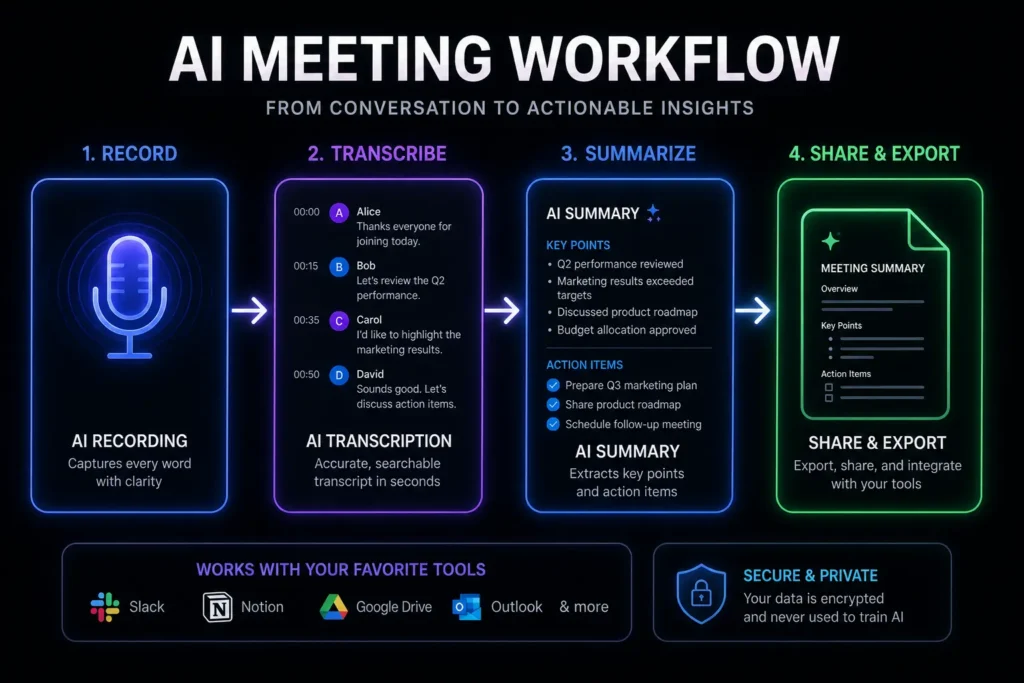
The tools in this guide fix that at the source — not by making you a faster typist, but by removing the need entirely.
Bot visibility. Most AI note-takers join your call as a visible participant — “Fireflies Notetaker” or “Fathom Notetaker” appears in the attendee list. For internal team meetings, nobody cares. For early-stage sales calls or sensitive client conversations, a visible bot can shift the dynamic in ways you do not want. If that matters to you, look at Bluedot.
Free tier reality. Every tool here has a free plan. What varies wildly is what that free plan actually lets you do. Fathom gives you unlimited recording for free. Otter gives you 300 minutes per month. That is a significant difference — know it before you build a workflow around something that runs out mid-week.
Integration depth. Great notes that live in a silo are only half the job. The real payoff is when meeting insights flow automatically into your CRM, your project tool, your Slack workspace. Check the integration list before committing, or explore our full stack of 4 Best AI Productivity Tools in 2026 to see how these insights flow into a broader automated workflow.
Summary quality, not just transcript volume. Raw transcription is a commodity in 2026. What separates the good tools from the genuinely useful ones is whether the AI summary captures what actually mattered decisions made, action items assigned, things that need follow-up — without requiring you to read the whole thing to find out.
Best AI Tools for Meeting Notes — Quick Comparison
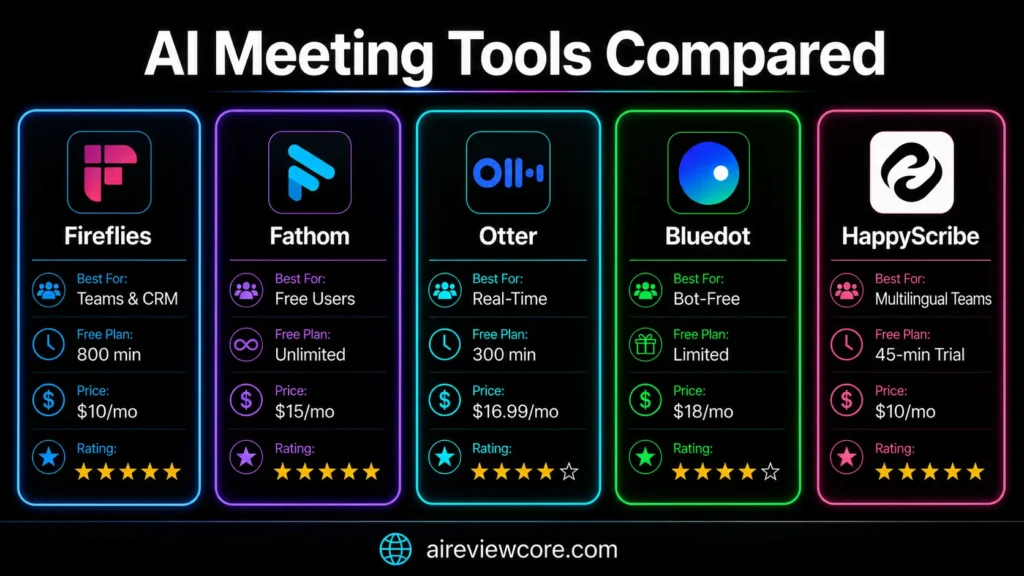
| Tool | Best For | Free Plan | Starting Price | Works With |
| Fireflies.ai | Teams, CRM integration, analytics | ✅ 800 min/seat | $10/user/mo (annual) | Zoom, Meet, Teams, Webex |
| Fathom | Free unlimited individual use | ✅ Truly unlimited | $15/user/mo (annual) | Zoom, Meet, Teams |
| Otter.ai | Real-time transcription, collaboration | ✅ 300 min/mo | $8.33/user/mo (annual) | Zoom, Meet, Teams |
| Bluedot | Bot-free, multilingual, privacy-first | ✅ Limited | $18/user/mo (annual) | Chrome-based, all platforms |
| HappyScribe | Multilingual teams, EU privacy, GDPR compliance | ✅ Unlimited 45 min recordings | $8.50/user/mo (annual) | Zoom, Meet, Teams, Webex, 20+ more |
1. Fireflies.ai — Best Overall for Teams
Fireflies is the tool most teams end up on eventually — and for good reason. It is used by over 500,000 companies, joins your meetings as a bot, transcribes in real time, and produces AI summaries with speaker tags, action items, and sentiment analysis. Its integration list is the longest in this category: Salesforce, HubSpot, Notion, Slack, Asana, and hundreds more via Zapier.
What actually makes it stand out is the layer above the transcription. Fireflies tracks topics across multiple calls over time, flags recurring themes in customer conversations, and measures talk-time ratios per speaker. That is not note-taking — that is conversation intelligence.
Picture a sales manager reviewing fifteen discovery calls from the past month. Instead of listening to recordings or reading transcripts, she asks AskFred — Fireflies’ AI assistant — “What objections came up most in calls this month?” She gets a structured answer with timestamps in under ten seconds. That kind of query across a large call library is where Fireflies earns its price.
The visible bot is the most consistent complaint, and it is legitimate. “Fireflies Notetaker” joining a call with a new prospect does create a noticeable moment. Most buyers accept it in 2026 — but some do not, and you cannot un-ring that bell.
Honestly, the free plan is more of a trial than a sustainable option for active users. The 800-minute storage cap fills faster than you expect if you are in meetings daily.
- Automatic bot joins Zoom, Meet, Teams, and Webex
- Speaker identification and sentiment analysis
- AskFred AI assistant for querying meeting history
- Native CRM integrations with Salesforce, HubSpot, Pipedrive
- 100+ language support
- Custom topic tracking across calls
Pros:
- Deepest integration ecosystem in the category
- Conversation intelligence analytics across multiple meetings
- Strong transcription accuracy at 90-95% on clean audio
- Scales well from small teams to large organizations
Cons:
- Visible bot creates friction on sensitive external calls
- Free tier storage cap (800 min) runs out fast for active users
- Dashboard can feel overwhelming if you just want basic notes
- AI credit limits on free plan restrict summary generation
| Plan | Price | Key Features |
| Free | $0/month | 800 min storage/seat, 20 AI credits/mo, unlimited transcription |
| Pro | $10/user/mo (annual) / $18/mo (monthly) | 8,000 min storage, unlimited AI summaries, CRM integrations |
| Business | $19/user/mo (annual) / $29/mo (monthly) | Unlimited storage, video recording, conversation intelligence |
| Enterprise | $39+/user/mo (annual) | SSO, HIPAA compliance, custom features |
Expert Verdict: Fireflies.ai is built for teams that need meeting notes flowing automatically into their CRM and want to spot patterns across dozens of calls over time. If that describes your workflow, it is the obvious choice.
2. Fathom — Best Free AI Note Taker
Honestly, Fathom surprised us the most during testing.
Most “free” AI tools use their free tier as a countdown clock — designed to run out just when you start relying on the product. Fathom does not do that. Unlimited recording. Unlimited transcription. No minute caps. No storage limits that reset monthly.
Marketing teams we spoke to reported using Fathom’s free plan for months without hitting a meaningful wall. That is genuinely unusual in this category.
The summary quality is clean. Fathom prioritizes structured post-meeting output — decisions made, action items assigned, key points — without burying them in a word dump you have to edit. The “send recap” feature emails a structured summary to all participants right after the call. One click. Done. No copy-paste, no reformatting.
For Zoom users specifically, the experience is smooth. Fathom appears as an overlay inside your Zoom window — less intrusive than most bots, more integrated than a separate app.
A consultant wraps up a one-hour strategy call with a client. Before she even closes the Zoom window, Fathom has generated a structured recap — decisions, next steps, owner names — and sent it to everyone on the call. Her client replies within minutes: “Great summary, thanks for sending that so fast.” She did not type a word of it.
The five AI-summary-per-month cap on the free plan is the real ceiling. If you are in meetings daily, you will hit it by Wednesday. The $15/month upgrade removes this entirely, which is fair — but know it going in.
No mobile app means in-person meetings are out. If you record anything away from your desk, Fathom is not your tool.
- Unlimited free recording and transcription for individuals
- Structured AI meeting summaries with action item extraction
- Instant shareable highlight clips
- Automated recap email to all participants
- Native Zoom integration with in-call overlay
- CRM sync on paid plans (Salesforce, HubSpot)
Pros:
- Best free plan in the category — genuinely unlimited recording
- Clean, minimal interface without feature overload
- Summary quality consistently rated above average
- Fast setup — under five minutes from signup to first recording
Cons:
- Free plan caps AI summaries at 5 per month
- No mobile app — in-person meetings cannot be recorded
- Less analytics depth than Fireflies for high-volume teams
- Visible bot in calls — same limitation as Fireflies and Otter
| Plan | Price | Key Features |
| Free | $0/month | Unlimited recording and transcription for individual use 5 AI summaries/mo |
| Premium | $15/user/mo (annual) | Unlimited AI summaries, advanced features |
| Team Edition | $19/user/mo (annual) | Team workspace, shared summaries, collaboration tools |
| Business | $25/user/mo (annual) | CRM field sync, advanced integrations, admin controls |
Expert Verdict: Start here if you want to try AI meeting notes without spending money. The free plan is real. If you hit the summary cap and the product has earned a place in your workflow, the $15/month upgrade is easy to justify.
3. Otter.ai — Best for Real-Time Transcription
Every tool in this guide delivers value after the meeting. Otter delivers it during.
While Fireflies and Fathom produce their best work once the call ends, Otter generates a live, scrolling transcript that every participant can see, highlight, and comment on in real time. Someone says something important — you highlight it. The whole room sees the flag. No “wait, can you repeat that?” No post-meeting debate about what was actually decided.
The AI chatbot is the feature that changes how complex meetings run. During a long strategy session, a participant types into Otter: “What did we decide about the Q3 budget?” The answer comes back in seconds — pulled from the live transcript, cited with a timestamp. No interruption. No confusion. Just clarity, mid-meeting.
Transcription accuracy is Otter’s technical edge: 93-95% on clean audio, the highest of any tool we tested. For meetings where precision is non-negotiable — legal reviews, compliance discussions, medical contexts that accuracy margin matters.
A product team runs a two-hour roadmap planning session with eight participants across three time zones. The live Otter transcript means everyone — including the two people who joined twenty minutes late — can scroll back and see what was discussed without asking anyone to repeat it. The AI summary lands in everyone’s inbox before the next meeting of the day begins.
Three hundred minutes per month on the free plan is genuinely not enough for anyone attending meetings daily. It covers roughly five hours of recorded time — you will exhaust that in the first week if you are in back-to-back calls.
Language support is the other significant gap. Otter handles English, French, and Spanish. That is it. For international teams, this is a dealbreaker — Fireflies and Bluedot both support 100+ languages.
- Live, collaborative real-time transcript visible to all participants
- AI chatbot for querying the transcript during meetings
- Automatic slide capture from screen shares
- Speaker identification with voice profile learning
- Meeting series organization and search across recordings
- Workspace channels for team collaboration
Pros:
- Best real-time transcription experience of any tool tested
- Live collaborative transcript enables true in-meeting interaction
- Highest transcription accuracy (93-95%) on clean audio
- Strong search across recording library for long-term reference
Cons:
- Free plan limited to 300 minutes per month — not enough for daily use
- Language support limited to English, French, and Spanish only
- Visible bot joins calls — same limitation as Fireflies and Fathom
- AI summary quality rated below Fathom by most active users
| Plan | Price | Key Features |
| Free | $0/month | 300 min/month, 3 imports/month, basic features |
| Pro | $8.33/user/mo (annual) | 1,200 min/month, advanced AI features, integrations |
| Business | $30/user/mo (annual) | 6,000 min/month, admin controls, team analytics |
| Enterprise | Custom | Unlimited, SSO, HIPAA compliance, dedicated support |
Expert Verdict: Otter.ai is for teams where the live experience changes the quality of the meeting itself — not just the documentation after it. If your meetings are complex, multi-party, and benefit from a shared real-time record, Otter earns its price.
4. Bluedot — Best Bot-Free AI Note Taker
Every other tool in this guide has the same fundamental problem: a bot with your note-taker’s name joins your call and sits in the attendee list for everyone to see.
Bluedot removes that problem entirely.
It records from your device through a Chrome extension — locally, quietly, without appearing as a participant. Your meeting looks exactly like it always did. The notes appear in your dashboard afterward, same as any other tool. Nobody knew it was running.
A March 2026 Google Meet update started flagging third-party note-taker bots as “potential risk” and defaulting to blocking their entry. If your team runs on Google Meet, that update made bot-based tools meaningfully more complicated overnight. Bluedot — because it records locally, not as a bot — is completely unaffected.
A founder is about to hop on a call with a Series A investor she has been trying to reach for three months. She wants notes but does not want a “Notetaker Bot” sitting in the attendee list making the call feel like an interview. She opens Bluedot, clicks record, and joins the meeting. The investor never sees a bot. The transcript and summary are waiting in her dashboard when the call ends.
That scenario is where Bluedot wins every time.
The free plan is the most restrictive of the four tools here. If you want to properly evaluate Bluedot before paying, you will hit the ceiling quickly. Budget for the trial period or commit to the Starter plan from day one.
The Chrome extension dependency also means Bluedot works best in a desktop browser context. It is not designed for in-person recording or mobile-first workflows.
- Bot-free local recording — no visible participant joins your call
- Chrome extension-based recording across all major conferencing platforms
- 100+ language support with multilingual transcription
- AI-generated summaries with action items and decisions
- CRM integration with Salesforce, HubSpot, and others
- Works on Google Meet, Zoom, Teams, and any browser-based conference tool
Pros:
- Only tool in this guide with true bot-free recording
- Unaffected by the 2026 Google Meet bot restrictions
- 100+ language support for international and multilingual teams
- Right tool for sensitive calls where discretion matters
Cons:
- Most restrictive free plan of the four tools tested
- Chrome extension dependency — not suitable outside the browser
- Less conversation intelligence depth than Fireflies
- Smaller integration ecosystem than Fireflies or Otter
| Plan | Price | Key Features |
| Free | $0/month | Limited recordings per month, basic transcription |
| Starter | $18/user/mo (annual) | Unlimited recordings, AI summaries, basic integrations |
| Pro | $25/user/mo (annual) | Advanced AI, CRM integrations, priority support |
| Enterprise | Custom | SOC 2, SSO, data residency, dedicated support |
Expert Verdict: Bluedot is the right call when discretion matters. Sensitive client conversations, investor meetings, research interviews — any situation where a visible bot changes the dynamic. It also becomes the default Google Meet option in 2026 now that the platform is pushing back on bots.
5. HappyScribe — Best for Multilingual Teams and EU Privacy
Most AI note-takers cover a handful of major languages and call it international support. HappyScribe auto-joins Zoom, Google Meet, Microsoft Teams, and 20+ more conferencing platforms via calendar sync, transcribes meetings in 120+ languages and dialects with over 95% accuracy, and delivers structured summaries and action items minutes after each call ends. That language coverage is not an afterthought it is the product’s origin story, going back to 2017 when HappyScribe started as a multilingual transcription platform in Barcelona before evolving into a full meeting workflow.
The other differentiator is the privacy posture. HappyScribe is GDPR-compliant and SOC 2 Type II certified, with all data stored in EU-based Tier IV data centers running PCI DSS and ISO 27001 infrastructure. Files are encrypted in transit (TLS) and at rest (AES-256 block-level). For European teams, public sector buyers, and anyone in legal, finance, or healthcare, that is not a nice-to-have — it is a procurement checklist item that most US-headquartered tools cannot tick without extra paperwork.
A market researcher runs a series of qualitative interviews across France, Germany, Spain, and Japan over a single fortnight. Instead of switching tools per language or paying for human transcription on every clip, she lets HappyScribe auto-join each call. Every transcript lands in her dashboard tagged with speaker labels, ready to translate into 80+ languages for the cross-market report. The data stays inside the EU the entire time — no separate data-processing agreement required, no awkward conversation with legal.
The honest tradeoff is real-time. HappyScribe does not generate a live scrolling transcript during the call — notes are produced minutes after the meeting ends. If your value comes from in-meeting clarification the way Otter operates, this is not the tool. Bluedot users will also notice that HappyScribe joins calls as a visible participant by default, though it does offer a browser-based recorder as a second capture mode when discretion matters more than calendar automation.
- Auto-joins Zoom, Google Meet, Microsoft Teams, Webex, and 20+ conferencing platforms via calendar sync
- 120+ languages and dialects with over 95% AI transcription accuracy
- Both bot and bot-free capture modes — calendar-joined bot or browser-based recorder
- AI summary, action items, and full transcript delivered minutes after each call
- Translates notes into 80+ languages and transcripts into 120+
- Optional human transcription add-on at 99% accuracy with under 24-hour turnaround
pros:
- Widest language coverage of any tool tested — 120+ languages and dialects
- GDPR-compliant and SOC 2 Type II certified with EU data residency by default
- Generous free plan with unlimited 45-minute meeting recordings
- Both bot and bot-free capture modes — the only tool in this guide offering both
Cons:
- No real-time transcript — notes are generated after the meeting, not during it
- Free plan caps each meeting recording at 45 minutes
- Pro plan starts at 3 seats, which is more than solo professionals need
- Smaller native CRM integration set than Fireflies (Zapier covers the gap)
| Plan | Price | Key Features |
|---|---|---|
| Free | $0/month | Unlimited 45-min meeting recordings, 10 min AI transcription trial, 3 Ask AI uses |
| Basic | $8.50/user/mo (annual) | 120 AI minutes/month, 20 Ask AI uses, $0.20/min top-up |
| Pro | $19/user/mo (annual) | 600 AI minutes/month, 3 seats, unlimited Ask AI |
| Business | $59/user/mo (annual) | 6,000 AI minutes/month, 5 seats, 5% off human proofreading |
Expert Verdict: HappyScribe is the right call for teams whose meetings genuinely cross languages, and for any organization where GDPR and EU data residency are non-negotiable. If multilingual capture and privacy compliance are baseline requirements, no other tool in this guide is in the same conversation.
Best Free AI Meeting Note Takers in 2026
If budget is the constraint, here is the honest comparison:
Fathom is the winner. Unlimited recording and transcription, five AI summaries per month. For most individual users, that is enough.
Fireflies is the strongest free option for teams — 800 minutes of storage per seat, CRM integration included, which most competitors lock behind paid tiers.
Otter at 300 minutes is best treated as a trial. Use it to test the real-time experience. Do not build a daily workflow around it on the free plan.
Bluedot free tier is for evaluation only. If the bot-free model is what you need, plan to upgrade.
HappyScribe is the strongest free option for multilingual teams — unlimited 45-minute meeting recordings, 120+ language support, and EU privacy compliance built in. The 10-minute AI transcription trial is the real ceiling, but the meeting recording allowance is genuinely generous compared to anything else in this category.
Note-Taking AI for Students — Free Options
Students have different needs than corporate teams — and most meeting note tools are not built with them in mind.
In-person lectures. Long dense content. Mobile recording. No CRM needed.
Otter.ai is the strongest student pick here. The mobile app handles in-person lecture recording, the live transcript is visible on your phone as the lecture progresses, and the AI summary turns a two-hour lecture into a structured set of key points — genuinely useful for revision, not just archival.
The 300-minute free monthly limit covers roughly two weeks of typical university course time. Not unlimited, but workable.
Fathom is less suitable for students due to its video conferencing focus and no mobile app — though it works well for online classes run over Zoom.
For note-taking AI for students free, Otter.ai is the most practical starting point from everything we tested.
Frequently Asked Questions
What is the best free AI note taker? Fathom. It is the only tool in this category offering unlimited free recording and transcription without minute caps. The free plan limits AI summaries to five per month — sufficient for users attending up to five meetings per week. For teams wanting free access with CRM integration, Fireflies.ai is the stronger organizational choice.
Does Fireflies work with Zoom? Yes. Fireflies integrates natively with Zoom, Google Meet, Microsoft Teams, and Webex. The bot joins as a meeting participant, records and transcribes the call, and delivers the AI summary to your dashboard within minutes of the meeting ending. The Zoom integration is the most stable and widely used configuration.
Is Fathom really free? Yes — with one real limitation. Unlimited recording and transcription, no storage cap, no expiry. The constraint is AI summaries, capped at five per month on the free tier. If you attend more than five meetings per week and rely on AI summaries rather than raw transcripts, the $15/month Premium plan is the natural next step.
What is Bluedot AI note taker? Bluedot is an AI meeting note-taker that records your calls through a Chrome extension — locally, without sending a visible bot into your meeting. It works across Google Meet, Zoom, Teams, and any browser-based conferencing tool, supports 100+ languages, and produces AI summaries with action items and decisions. It is the go-to alternative when a visible bot in the attendee list is not acceptable.
What is the best AI tool for meeting minutes? For formal meeting minutes — structured documents capturing decisions, attendees, and action items — Fireflies.ai produces the most reliable output. Its action item extraction, topic tracking, and CRM integration make the minutes immediately actionable. For less formal summary needs, Fathom’s post-meeting recap email delivers comparable value with far less setup.
Does HappyScribe work with Zoom and Google Meet? Yes. HappyScribe auto-joins Zoom, Google Meet, Microsoft Teams, and 20+ other conferencing platforms once you connect your Google or Outlook calendar. It records both audio and video, transcribes in 120+ languages with over 95% accuracy, and delivers a structured summary plus action items minutes after the call ends. It is GDPR-compliant and SOC 2 Type II certified, with all data stored in EU-based Tier IV data centers — which is why European teams in regulated industries tend to default to it.
Which Tool Actually Belongs in Your Workflow?
The best AI tools for meeting notes in 2026 have made manual note-taking optional. The question is just which tool fits your situation.
Pick Fireflies if your team needs meeting notes flowing into a CRM and you want to analyze patterns across dozens of calls over time.
Pick Fathom if you want the most functional free plan available and prioritize clean, simple summaries over analytics depth.
Pick Otter if your meetings benefit from a live collaborative transcript — workshops, training sessions, complex multi-party discussions.
Pick Bluedot if you conduct client calls where a visible bot is not acceptable, if Google Meet is your primary platform, or if your team spans multiple languages.
Pick HappyScribe if your meetings cross languages or if EU data residency and GDPR compliance are baseline requirements your procurement team will check.
Start with the free tier that matches your use case. Two weeks of real meetings will tell you more than any comparison chart.
Adrian Cole is a professional AI technology reviewer and creative technologist at aireviewcore.com, covering AI productivity tools, language models, and workflow technology with a focus on practical professional applications.
© 2026 aireviewcore.com — All rights reserved.